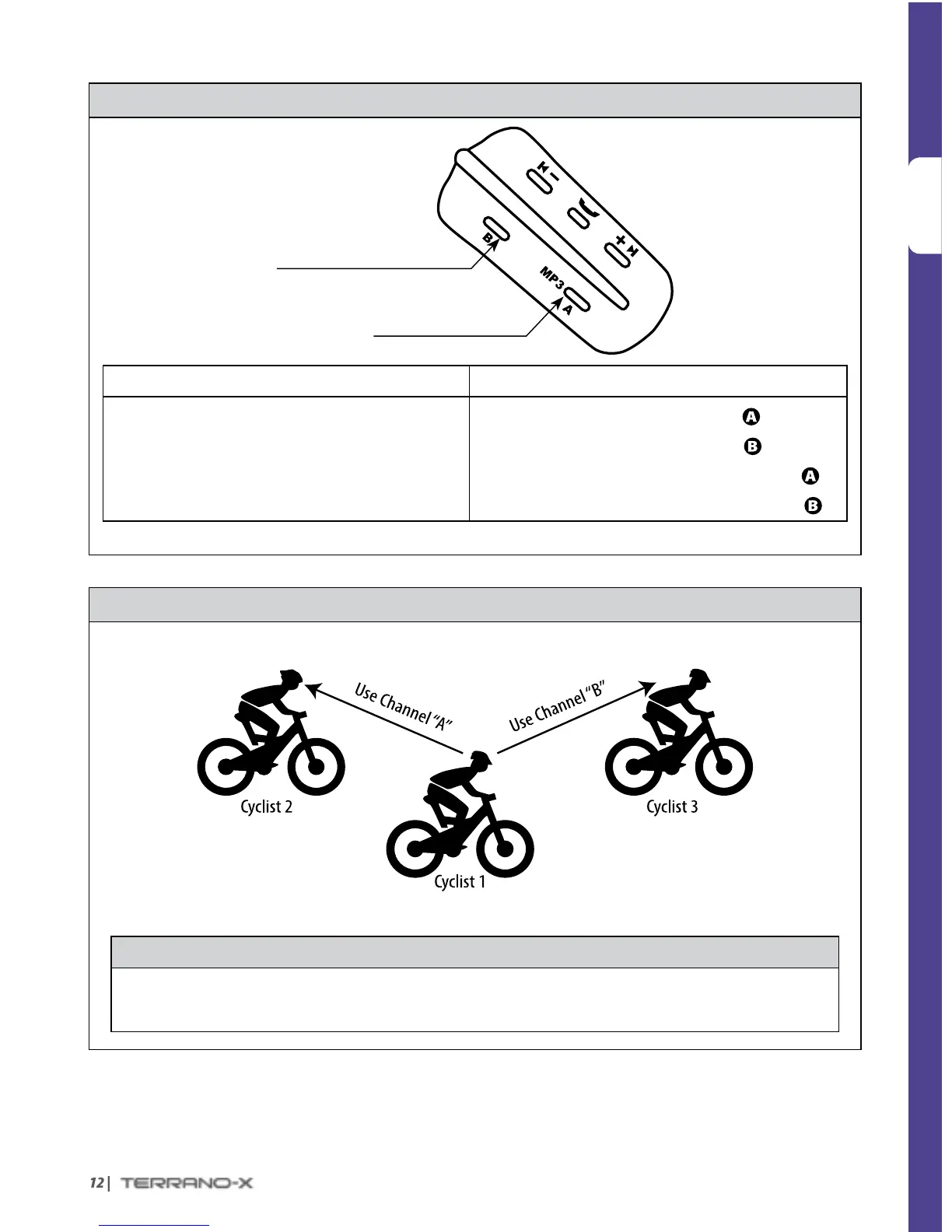
USING THE INTERCOM
Channel B Button
• Connects to Channel B / D
Channel A Button
• Connects to Channel A / C
VOICE CONNECT MANUAL CONNECT
Start Conference Call with Channel “A” and “B”
Say any word loudly into the microphone
(Call ends automatically after 30 seconds of silence)
Start / End Call with Channel “A”: Tap
Start / End Call with Channel “B”: Tap
Start / End Call with Channel “C”:
Double-tap
Start / End Call with Channel “D”:
Double-tap
THREE-WAY CONFERENCE INTERCOM
For 3-Way Conference Mode Intercom, use Channels A and B as follows:
Cyclist “1” is paired to Cyclist “2” and Cyclist “3”
IMPORTANT: Three-Way Conference Mode Considerations
When in Intercom Conference mode with 2 other participants, you will not be able to receive mobile phone
calls, GPS navigation instructions or make a toggling call as long as the conference call is in progress.


 To Next Page