The Terumo Penpol CS300 Compo Scale is a medical device designed for measuring the weight and volume of blood and blood components. It offers a convenient way to convert weight measurements to volume with a single key press. The scale supports weighing and volume conversion for four blood components: Red Blood Cells (RBC), White Blood Cells (WBC), Platelets, and Plasma, as well as for whole blood.
Technical Specifications:
- Product Code: CS300
- Power Source: AC-DC Adaptor
- Input for Adaptor: 100-240VAC, 0.7A, 50-60Hz
- CS300 Input: 12VDC, 1A
- Power: 5W (max)
- Electrical Safety: Protection against electrical shock - Class II
- Pollution Degree: 2
- Installation Category: II
- Ingress of Water Protection: IPX1 (Protected against dripping water)
- Weighing Range: Up to 2.5Kg
- Resolution: 1gm / 1ml
- Tolerance: 0-500g: ±2gm/ml; 501-2500g: ±5gm/ml
- Working Environment Temperature: 5 to 40°C
- Working Environment Relative Humidity: 10% to 80%
- Working Environment Atmospheric Pressure: 700hPa to 1060hPa
- Storing and Transportation Temperature: -20°C to 40°C
- Storing and Transportation Relative Humidity: 20% to 90%
- Storing and Transportation Atmospheric Pressure: 600hPa to 1060hPa
- Interfacing with TOMEs: LAN Connection
- Dimensions (WxDxH): 185x240x50 mm
- Weight: Net Weight: 2kg, Gross Weight: 3.5kg
Usage Features:
The CS300 Compo Scale features a clear display and an intuitive set of keys for various functions.
- Display: Shows weight and volume measurements, as well as operational indications.
- Keys:
- Zero Set: Used to tare the weight or volume, setting the displayed value to zero.
- Enter/Esc: A dual-function key. Its primary function is to exit the compare mode. Its secondary function is to confirm selections, particularly when choosing a blood component after using the Comp key.
- Vol Set: Another dual-function key. When the CS300 is interfaced with an Intelligent Expressor E300, it sets the volume. It also toggles between components in the component selection mode.
- Comp: A dual-function key for selecting blood components (Plasma, Platelet, RBC, WBC, Whole Blood). Pressing this key enters the component selection mode, and subsequent presses cycle through the available components in the forward direction. Its second function is to increase the set volume when connected to an Intelligent Expressor E300.
- Compare Mode Key: Pressing this key activates the compare mode, allowing the user to compare the weight of two bags. The displayed weight freezes, and the weight of the next bag is shown on the other end of the display. The user can toggle between "Bag1" and "Bag2." The Enter/Esc key is used to exit this mode and return to normal operation.
- gm/ml: Selects the unit of measurement, switching between grams (gm) and milliliters (ml).
Indications:
- Zero Set LED: Illuminates when the zero set function is active.
- gm/ml LED: Illuminates to indicate the selected unit of measurement.
- "OVER RANGE" on LCD: Appears when the weight/volume exceeds the scale's capacity.
- "*" indication on LCD: Appears when the set weight/volume is achieved.
Installation Details:
- Unpacking: Inspect the carton for shipping damages. Report any missing or damaged items immediately to Terumo Penpol Private Limited/Branch Office. Verify the received items against the purchase order and packing slip.
- Package Contents: The package includes the Compo Scale CS300, AC-DC Adaptor, Tray, User Manual, Test Report, Do's & Don'ts, and Warranty Card.
- Site Planning Guidelines:
- Place the CS300 on a flat, stable surface with adequate surrounding space for easy operation.
- Avoid placing the CS300 directly under a fan, as this can cause reading variations.
- Protect the device from direct sunlight, excessive heat, moisture, and dust.
- Do not install near RF-generating equipment, which can cause fluctuations in readings.
- Installation Procedure:
- Carefully remove packing materials.
- Ensure the serial number on the warranty card matches the serial number on the equipment.
- Properly fix the tray onto the central pin without applying excessive pressure.
- Connect the power supply jack to the power inlet at the back of the equipment.
- Refer to the operating instructions for proper use.
Interfacing with TOMEs:
For interfacing the CS300 with TOMEs (implemented in version 6.2), a Lantronix® xDirect serial-to-Ethernet converter is required.
- Connect the Lantronix x-direct RS232 to LAN converter to the Compo Scale.
- Connect to the TOMEs server via a LAN cable.
- Log in to http:'systemname'/tomes using the username and password provided by service personnel.
- Navigate to "Stations" -> "Programs" -> "CS300" -> "Browse to station."
- A window for weight events in CS300 will pop up.
- Place the blood bag on the tray, and the weight displayed on the equipment will be updated in the TOMEs page.
- Note: All other keys except gm/ml and zero set will be disabled during TOMEs connectivity.
Maintenance Features:
- Cleaning Instructions:
- Before cleaning, switch off the equipment and disconnect the AC-DC adapter.
- Do not use aggressive or corrosive products, abrasive powder, steel wool, abrasive sponges, or chemical solvents.
- Remove and clean the tray separately.
- Use delicate detergents for cleaning the Compo Scale; do not immerse the equipment in any liquid.
- Avoid pressing the tray or the tray holding bush during cleaning.
- Do not rub stickers with hospital spirit.
- Ensure the equipment, especially the power adapter, is dry before use.
- General Precautions:
- The Compo Scale is designed for a maximum weight of 2500gm. Do not overload the equipment.
- Switch off the equipment when not in use.
- When transporting, transport the tray separately. Reinstall the tray carefully onto the central pin without force.
- If weight/volume readings are unstable, ensure the equipment is not directly under a fan or near RF-generating equipment.
- User maintenance is limited to cleaning; all other service must be performed by approved Service Personnel.
Troubleshooting:
- Power switch ON but no LCD indication:
- Verify the outlet is functional or try a different outlet.
- Check the adapter connection; replace if defective.
- Abnormal load variation:
- Check if the equipment is under a fan; relocate if necessary.
- Check if the equipment is close to RF-generating equipment; relocate if necessary.
- LCD backlit working but characters not displayed properly:
- Switch OFF the unit and switch it ON again.
- Weight not changing or showing 0000 or 0001:
- Switch OFF the unit and switch it ON again.
- Serial connection not working:
- Re-establish the connection.
- For any unresolved issues, contact authorized Service Personnel.

 Need help?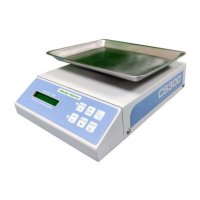

 To Next Page
 General