3
Pressing this key takes the CS300 in to compare mode.
In this mode the CS300 can be used to compare the weight of two bags. When this key is pressed the weight being shown freezes and it shows the
weight of the next bag on the other end of display.
The user can keep on toggling between Bag1 and Bag2. The Enter / Esc key is used to escape from this mode and take the CS300 to normal mode.
This key is used to select the unit of measurement either in gm or ml.
gm
ml
CS300
Instructions for Use
Inspect the carton for shipping damages. If you find any, notify Terumo Penpol Private Limited / Branch Office.
The items received may be cross verified against the P.O and packing slip. Any missing or damaged item must be reported immediately to the carrier and
Terumo Penpol Private Limited / Branch Office.
4. Installation Details
4.1 Unpacking:
4.2 Package Details:
4.3 Site Planning Guidelines:
The package contains the following items.
When selecting a place to set up the CS300 please keep the following in mind.
Compo Scale CS300, AC-DC Adaptor, Tray, User manual, Test report, Do’s & Don’ts & Warranty card
4.4 Installation Procedure:
1.Place the CS300 on a flat stable surface with adequate space around, for easy operation. 2. Placing the CS300 directly under a fan could cause variation
in reading. 3. Avoid locations that are subject to direct sunlight, excessive heat, moisture and dust. 4. Avoid installing too near to RF generating equipments.
This could cause fluctuation in the reading when RF is ON.
1. Remove the packing materials carefully, 2. Ensure that the serial No. in the warranty card and serial No. on the equipment are same , 3. Carefully fix the
tray properly on the pin provided at the center. Do not apply pressure on the tray. , 4. Connect the jack of the power supply to power inlet at the back of the
equipment., 5. Use the operating instructions to work with the equipment.
Ÿ Ensure that the tray is cleaned and fixed on the equipment.
Ÿ Power adaptor connected to main power supply.
Ÿ Switch ON the CS300.
Ÿ Follow the instructions given below to work on the various functions:
Ÿ This key is used to make the displayed weight equal to zero (tare the weight / volume).
Ÿ This is a dual function key. The first function is to escape from the compare mode.
The second function is to confirm the selection. The second function is used in one of the following cases:
Ÿ For selection of a component press Comp key, then use up and down arrow key for selecting the required component. After getting the appropriate
component press this key to confirm.
Zero
Set
Enter/
Esc
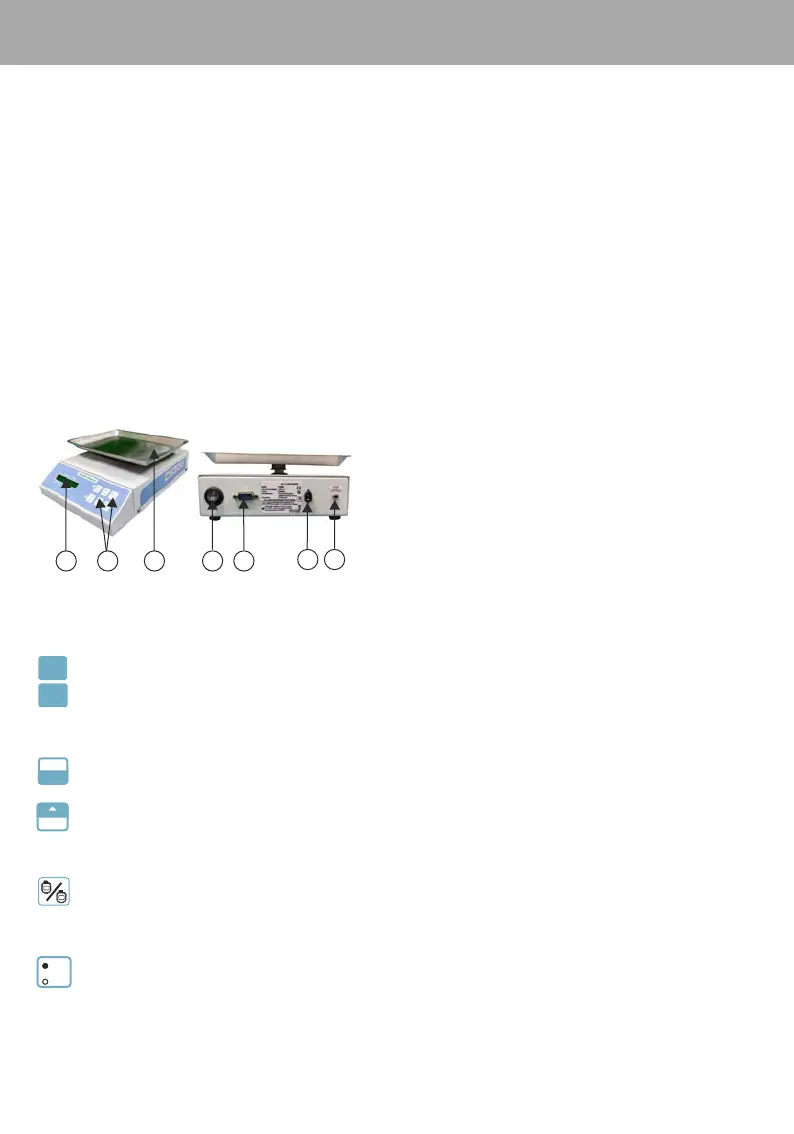
1. Display
2. Keys
3. Tray
4. Power switch of CS300
5. RS232 Connector
6. DC Jack
7. Intelligent Expressor E300-CS300 Interface cable
4
5
76
1
3
2
5. Technical Description & Operating Procedure
This is a dual function key
u
Vol Set
Function 1: To set the volume when CS300 is interfaced with Intelligent Expressor E300* .
To toggle between the components in the component selection mode.Function 2:
Comp
This is a dual function key
1
2
Select Blood components.The available components are Plasma, Platelet, RBC, WBC, Whole Blood PressingFunction 1:
this key takes the CS300 to component select mode. After that the same key can use for selection of different components
in the forward direction
Second function is to increase set volume when connected to Intelligent Expressor E300Function 2:
* For interfacing E300, please refer old version of CS300 user manual/contact Medical Systems Group
Indications........ For Zero Set - LED
For gm/ml - LED
‘***OVER RANGE***’ on LCD
‘*’ indication on LCD when set
weight / volume is achieved


 To Next Page
 Loading...