CS300
4
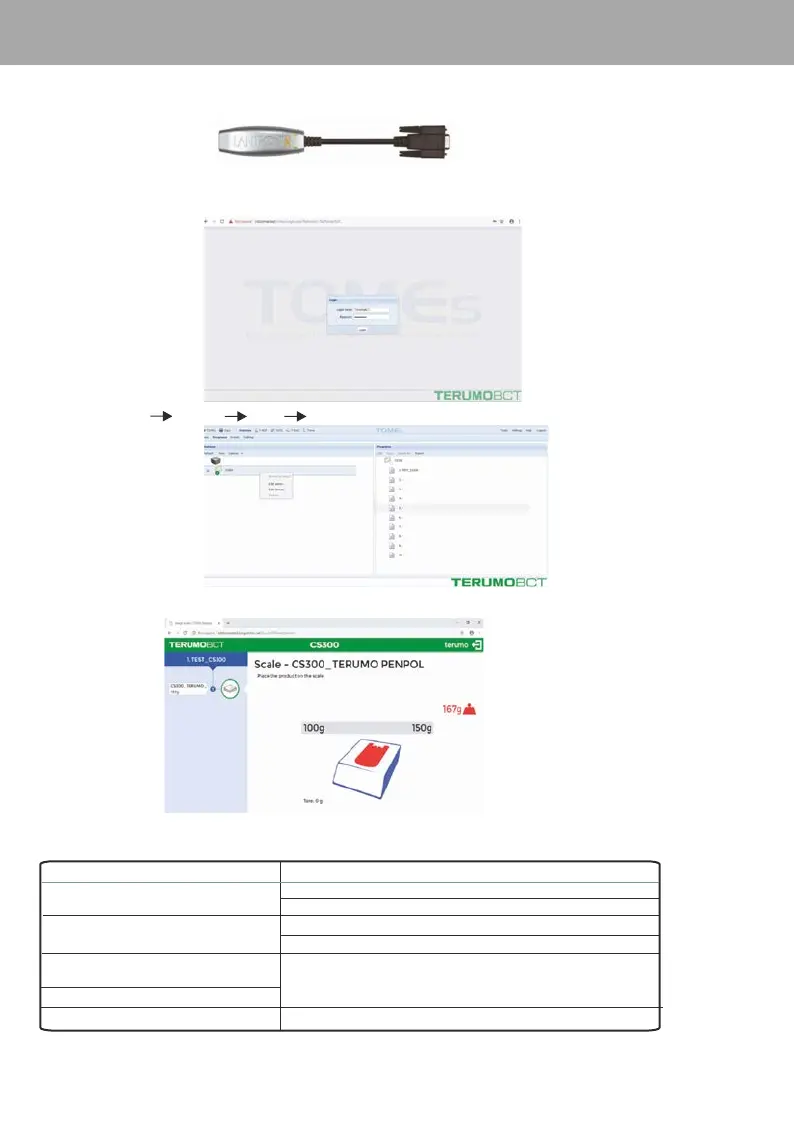
1. Connect the Lantronix x-direct RS232 to LAN converter to the Compo Scale and connect to TOMEs server through LAN cable
2. Login to . With User name and password set by service personnel.http:'systemname'/tomes
6. Interfacing with TOMEs
3. Go to Stations Programs CS300 Browse to station
To interface CS300 with TOMEs ( implemented in version 6.2) a Lantronix® xDirect serial-to-Ethernet converter(Fig.1)to be used.
Instructions for Use
Fig.1
1. A window for weight event in CS300 will popup as shown below
2. Put the blood bag over the tray and the weight displayed in the equipment display will be updated in the page*.
* All other keys except gm/ml and zero set will be disabled during TOMEs connectivity
F Please contact authorised Service Personnel if not resolved / for any other problem.
7. Troubleshooting
Problem
Solution
Power switch is ON but no LCD indication.
Abnormal load variation.
LCD backlit is working but characters are not being
displayed properly.
Weight is not changing or showing 0000 or 0001.
Verify outlet is good or plug into a different outlet.
Check the adaptor,connect it properly, Replace if defective.
Check whether the equipment is under a fan.Relocate if necessary.
Check whether the equipment is close to RF generating equipments. Relocate if necessary.
Switch OFF the unit and switch it ON again.
Serial connection is not working
Re-establish the connection


 To Next Page