6
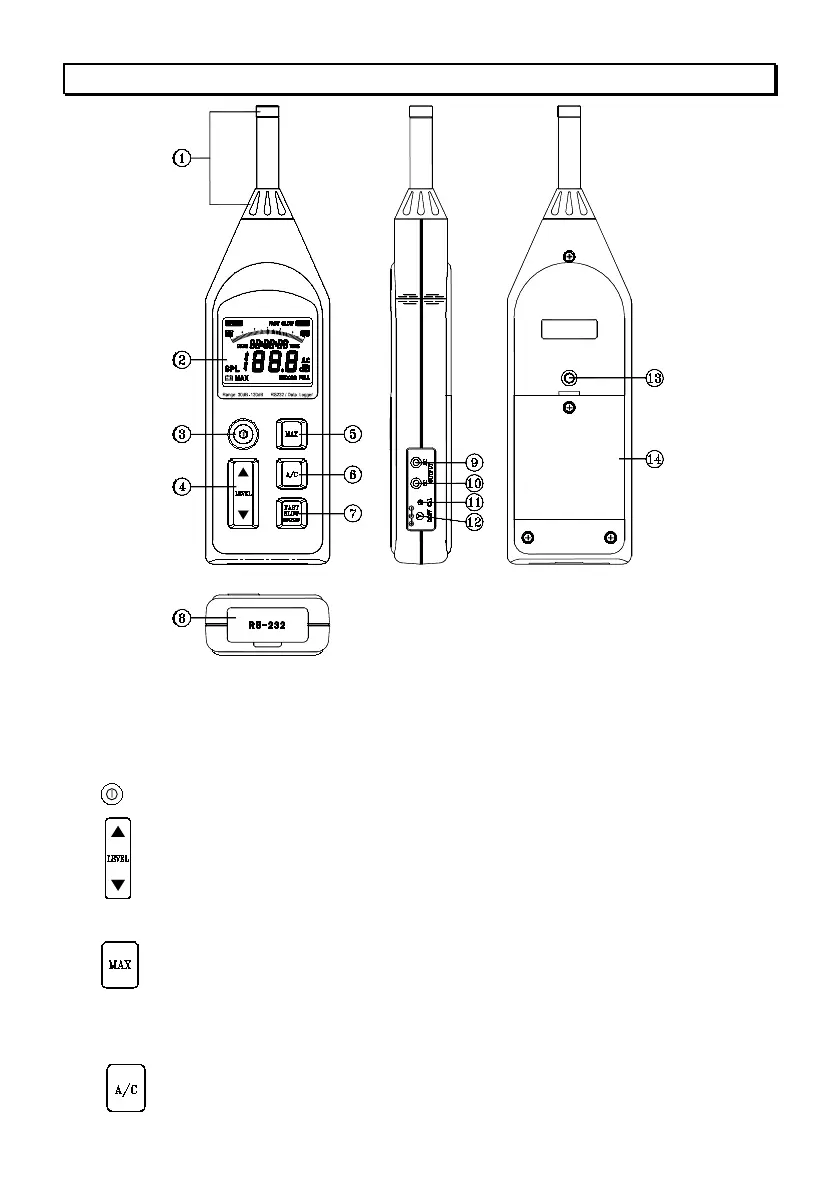
5. CONTROLS AND FUNCTIONS
1. Microphone :
Electret Condenser microphone
2. Display: The LCD shows the sound level as a numeric value and a bar graph. The
display also shows the operation mode of the instrument, the selected measurement
parameters, warning indications and real-time clock/calendar.
3.
Button: Press to turn the instrument on and off.
4. Button: c Level range buttons: select the level range for the measurement.
The following five settings are available: 30 to 90dB, 40 to 100dB,
50 to 110dB, 60 to 120dB, 70 to 130dB.
d Press these buttons to increment or decrement setting values.
5. Button: Used for reading the maximum time-weighted sound level
encountered during a measurement.
Press this button to enter maximum recording mode. The “MAX”
indicator will appear on the display. Press again to exit maximum
recording mode.
6. Button: Sets the frequency weighting to A or C mode.



 To Next Page