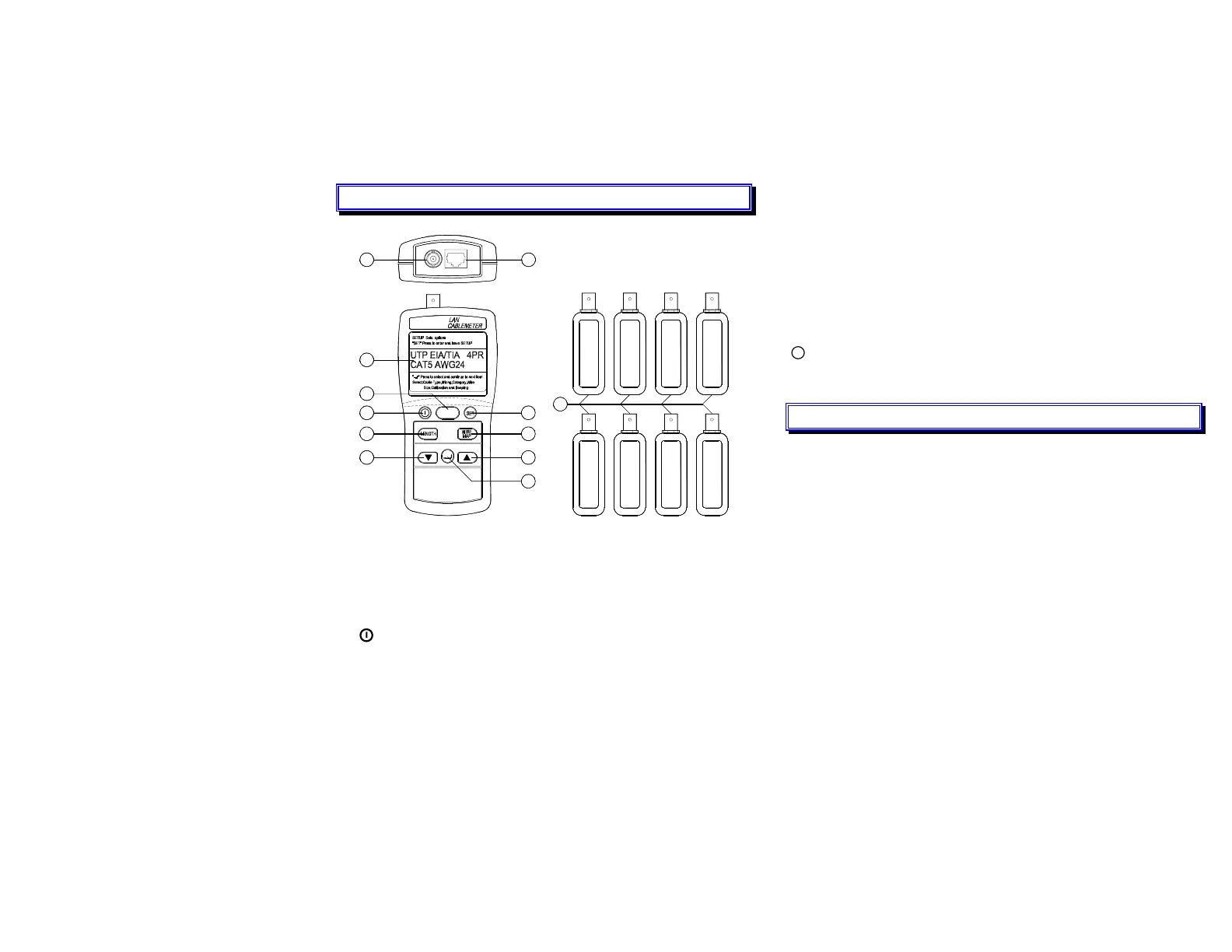
II. PRODUCT PROFILE
1
7
5
3
2
TEST
9
COAX FTP/UTP
7
8
5
11
6
4
1
678
234
10
LCD Display :
A 2-line by 16-character display. For more information, press ▼ ▲
key to display the additional information.
TEST key : Test the attached cable and indicate a pass or failure
information base on the specified parameters for the selected cable.
Power key : On or Off.
SET key : Access to cable selection, cable calibration, and other test
tool settings.
LENGTH measurement key : Measure the length of each pair of
twisted pair cable or coaxial cables in meters or feet and tests for
anomalies.
2
WIREMAP test key : Displays wiring connections, opens, shorts,
and split pairs.
▼ ▲keys : Scroll through a selection of choices or multiple
displays.
¿ ENTER key : Enter a selection into the test tool and moves to the
next setting selection.
BNC connector for connecting coaxial cables.
RJ45 jack : Standard 8-pin modular jack for connecting UTP and
FTP cable.
11
Remote Identifiers #1 ~ #8.
III. SPECIFICATIONS
Cable Length Measurements
Range : 1.0 to 350m (2-999 ft)
Accuracy : 5% + 1m (5% +3ft)
Resolution : Measurement Units in Feet :
Cables < 100 ft : 0.5 ft
Cables > 100 ft :1ft
Measurement Units in Meters.
Cables < 100 meters : 0.5m
Cables > 100 meters :1m
Failures Detected
SHORTS
Range of short detection : 0 to 350m ( 0 to 999ft)
Accuracy of distance to a short (Assumes short is 0Ω)
UTP/FTP : 7% + 3m (7% + 10ft)
Coaxial Cables : 10% + 10m (10% + 30ft)
3



 To Next Page