9
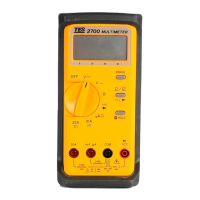
LCD Display :
Measured values, unit symbols and decimal points are displayed.
Data Hold Button :
Push the Button to hold the reading and sign will appear . Push again, to
release the holding.
AC/DC Function Button :
To select function for measuring DC voltage, DC current, AC voltage ,
AC current.
Range Selector Switch :
For range selection.
Temperature Measuring Connector :
To insert K ( CA ) type sensor for temperature measurement.
20A Measuring Connector :
To connect positive lead (red test lead) for current measurement below
20A.
mA and uA Measuring Connector :
To connect positive lead (red test lead) for current measurement below
200mA.
COM Measuring Connector :
To connect negative lead ( black test lead ) for voltage, current ,
resistance, diode, frequency , and continuity measurement.
“ V-
Ω
-Hz ” Measuring Connector :
To connect positive lead ( red test lead ) for voltage, resistance, diode ,
frequency, and continuity measurement.



 To Next Page