CHILD LOCK
The Child safety lock prevents operation by small children.
All oven functions are disabled including the clock when the
child lock is on.
Press and hold the • Stop/Clear
button for about ve seconds after
which time a beep sounds and the
LOCK indicator appears.
To cancel, press and hold the • Stop/
Clear button until the beep sounds
and the clock re- appears.
Operation – 2
AUTO DEFROST
There are two auto-defrosting programmes
DEFROST PROGRAMME 1 (DEF 1) - defrost by weight. You can auto defrost
100g to 2kg of food (in 100g increments)
DEFROST PROGRAMME 2 (DEF 2) - defrost by time.
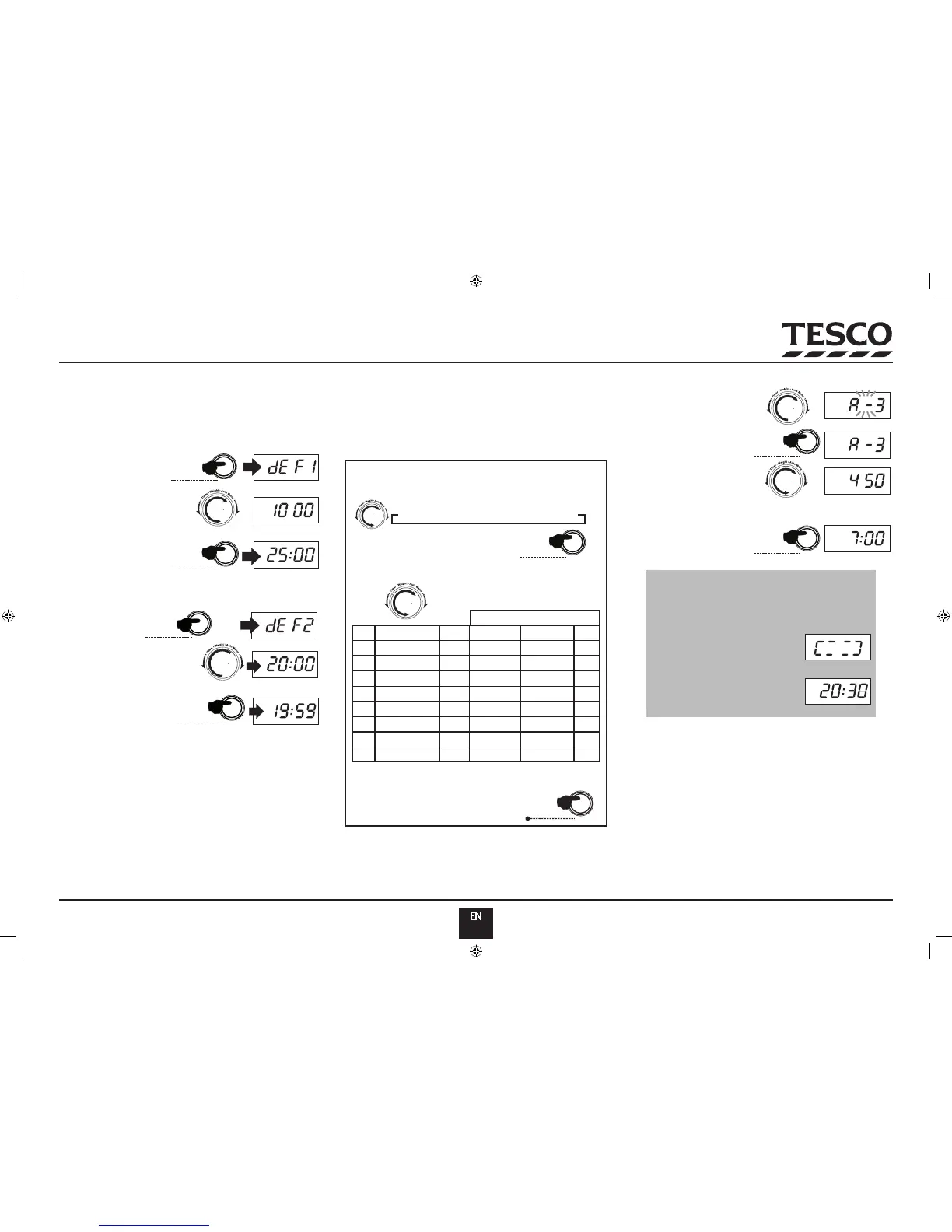
Example 1: Auto Defrost 1 kg of food
Defrost
W.T/Time
Start/
+30SEC./Confirm
X2
Defrost
W.T/Time
Start/
+30SEC./Confirm
Press • W.T/ Time Defrost
Dial in the weight of the •
food
Press • Start/+30SEC./Conrm
to start cooking.
The programme automatically calculates the time required.
Example 2. Auto-Defrost food for 20 minutes
Press • W.T/ Time Defrost
twice
Dial in the time•
Press • Start/+30SEC./Conrm
to start cooking
During Defrosting:
It is good practice to periodically check food during the defrosting
process, turning it if necessary.
After Defrosting:
Open the oven door. Remove the food and check that it has fully •
defrosted. If the food is partially defrosted, replace it in the oven and
re-select Auto Defrost programme 2 (DEF 2) and add sucient time
to fully defrost the food.
AUTO COOKING
Your oven can calculate the cooking time of various foods. Just select the
program from the table below and enter the weight.
The results of auto-cooking depend on many factors, the actual type of
food, the temperature it goes into the oven at, etc. If after the program
has ended the food is underdone, use the Basic Cooking Procedure for a
short time to complete the process.
A-1 A-2 A-3 A-4 A-5 A-6A-7A-8
Start/
+30SEC./Confirm
Rotate the Function knob to the right. Each click brings up •
an Auto cook Menu. There are 8 menus.
Press • Start/+30SEC./Conrm
Dial in the weight (use the table below)•
ROTATE TO THE RIGHT TO INCREASE WEIGHT
ROTATE TO THE LEFT TO DECREASE WEIGHT
Example: Auto Cook 450g of Fish:
MENU SUGGESTED FOOD POWER
NUMBER OF CLICKS
A-1
A-2
A-3
A-4
A-5
A-6
A-7
A-8
Reheat food
Most vegetables
Fish
Pasta*
Baked potato
Pizza
Soup
* NOTE: Add enough boiling water to the food before cooking.
Plus 450ml water Plus 800ml water
50 g 100 g
100%
100%
100%
100%
80%
80%
80%
1 2 3
200 g
200 g
200 g
200 g
200 g
400 g
400 g
400 g
400 g
300 g
350 g
600 g
400 g
450 g
600 g
Press • Start/+30SEC./Conrm
Select Fish: Menu A-3•
X3
X3
Start/
+30SEC./Confirm
Start/
+30SEC./Confirm
Press • Start/+30SEC./Conrm
Select 450 grammes•
Press Start/+30SEC./Conrm to start
cooking
Broccoli
250 g
250 g 350 g 450 g100%


 To Next Page