MULTI-STAGE COOKING
You can combine cooking processes in a two stage programme. There
are two main uses for this process.
A Cook food for a period at one power setting and then nish with
another power setting. You can for example, cook food and then
keep it warm by setting a low power for the second process.
B Defrost and grill or microwave food in a combined process.
After the rst stage, the buzzer will sound once and the next stage will
automatically start.
Operation - 4
If you are defrosting, this must be the rst process.
You can use multi-cooking with combi -cooking so you can
defrost, microwave and grill all in one. The Auto-Cook menu
cannot be used in multi-cooking.
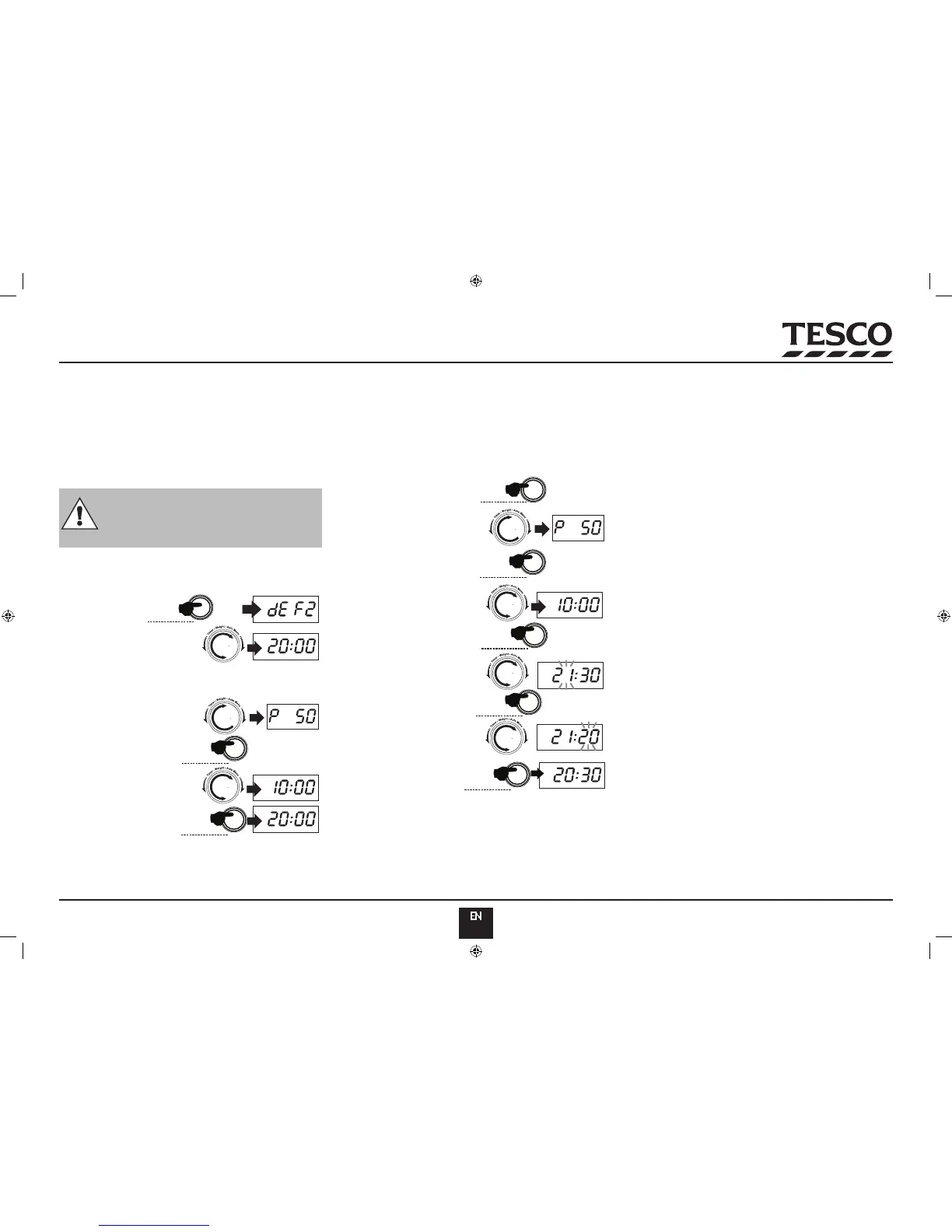
Example: Defrost the food for 20 minutes, then cook at 50%
microwave power for 10 minutes.
Press • W.T/Time/Defrost
Twice
Dial in the time•
Press the • Micro/Grill/Combi
button
Rotate the Function knob to •
select 50% power
Press • Start/+30SEC./Conrm
Rotate the Function knob to set •
10 minutes
Press • Start/+30SEC./Conrm
The defrost cycle will commence. When the defrost cycle has ended the
oven will move on to the cooking process.
TIME DELAYED COOKING
You can preset the time at which the cooking process starts.
A Make sure the clock is set to the correct time
B Input the cooking program. Do NOT press the START button
C Set the clock to the required start time -see Page 4.
D Press
Start/+30SEC./Conrm to set the programme.
Example: Cook food at 50% power for 10 min starting at21:20
Press the • Micro/Grill/Combi
button.
Select 50% power.•
Press • Start/+30SEC./Conrm
Rotate the Function knob to set •
10 minutes
Press the • Clock/Pre-set
button
Rotate the Function knob to •
select 21 hours.
Press the • Clock/Pre-set
button again.
Rotate the Function knob to •
select 20 minutes
Press • Start/+30SEC./Conrm
The display reverts to clock time: When the preset time comes the buzzer
sounds twice and the oven will begin the programme.
When Time Delayed coking is preset:
You cannot operate other oven functions.•
Press • Stop/Clear to clear a Pre-set program and revert to normal
operation.
NOTES ON TIME DELAYED COOKING:
You can use a single program, a multistage program or an Auto-cook
menu. You cannot use Express cooking.
Do not use raw or frozen sh products or foods which may deteriorate
during the waiting period.
Do not use time-delayed cooking with a defrost programme.
The clock must be set!
QUERIES
During cooking: press the POWER button to briey display the •
microwave power in the current programme.
During cooking: press the CLOCK button to briey display the clock •
time.
In Time Delay mode: pressing the CLOCK button will briey display •
the start time of the pre-set process.
ADDING TIME DURING COOKING
During normal cooking and defrosting, you can increase the cooking •
time by repeatedly pressing the Start/+30SEC./Conrm button.
You cannot add time during Grilling, ‘Defrost by Weight’ or ‘Auto-•
Cook’ programs.
DISPLAYS AND OVEN STATES
Every time you press a button, the oven will beep once. If the button •
is not fully depressed, or the action is not part of the process you will
not hear a beep and nothing will happen..
When you rst rotate the Function knob in either direction during a •
cooking process the oven will beep once.
When setting a cooking process, if you do not conrm the process •
by pressing the Start/+30SEC./Conrm button within one minute,
the process will be cancelled and the oven will revert to displaying
the clock time.
The buzzer will sound ve times to remind you when cooking is •
nished.
Before inputting any cooking process, it is good practice to press the •
Stop/Clear button twice to clear the oven memory.


 To Next Page