11
ENG
APP INSTALL/MOVE/UNINSTALL
TV SOURCE SETTING
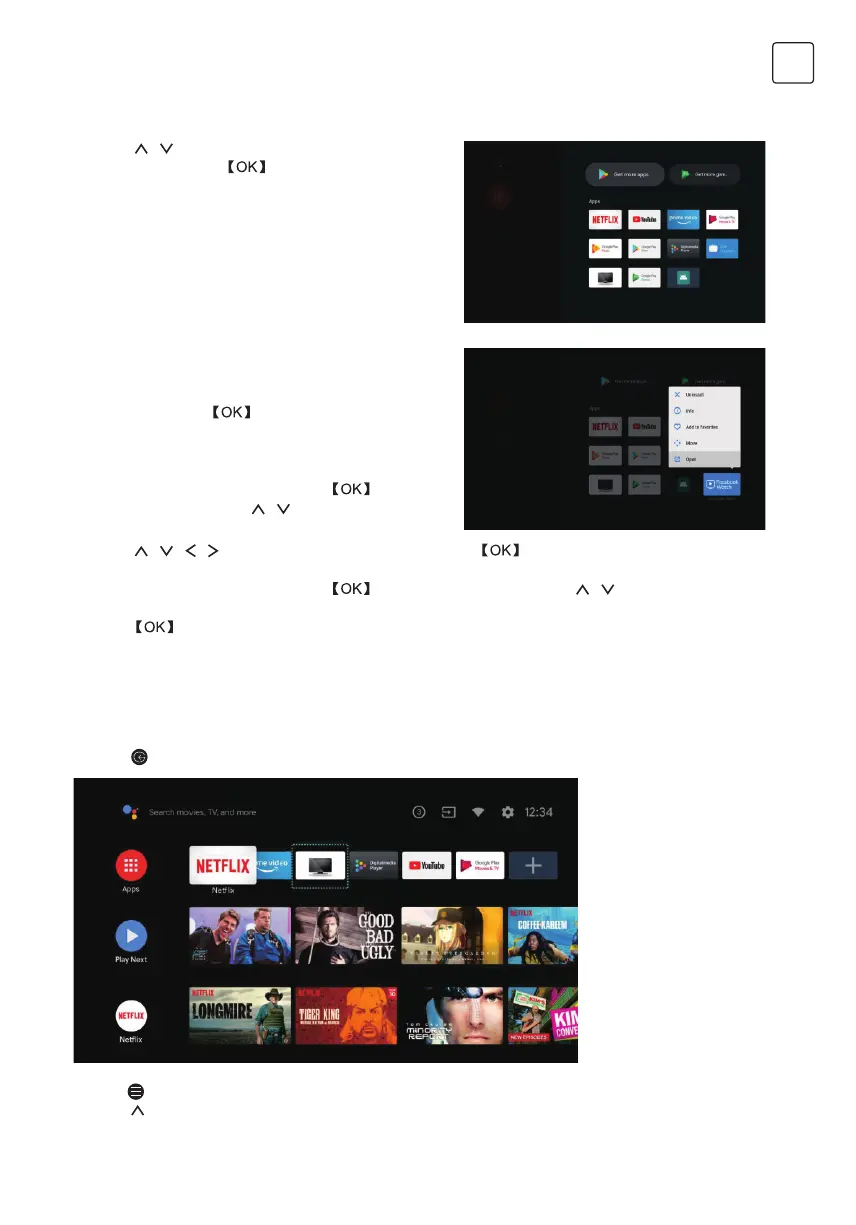
-> Press / on remote control to select “Apps” on
Homepage, then click to enter.
-> Select “Get more apps” and input app name.
->Select “search” which is in the upper right corner of
the page.
The way to enter TV source in Homepage:
-> Press
on remote control or Select “Live TV” on Homepage.
->Press
on remote control.
-> Press on remote control to select “Channels” and select “New Channels Available” to enter.
Example for “Facebook”
4.1 Install
-> Input “Facebook”, find “Facebook” App will show
in the list, then click
to select it.
->Select “Install”, when completed select to open or
Uninstall.
4.2 Move
-> Select “Facebook”, press and hold on
remote control, then click / on remote control to
select “Move”.
-> Press
/ / / on remote control to move, then click to confirm.
4.3 Uninstall
-> Select “Facebook”, press and hold on remote control, then click / on remote control to
select “Uninstall”.
-> press to uninstall.


 To Next Page