3
ENG
PREPARATION
Disassembly and Installation
Accessories
Note: The pictures are only for reference.
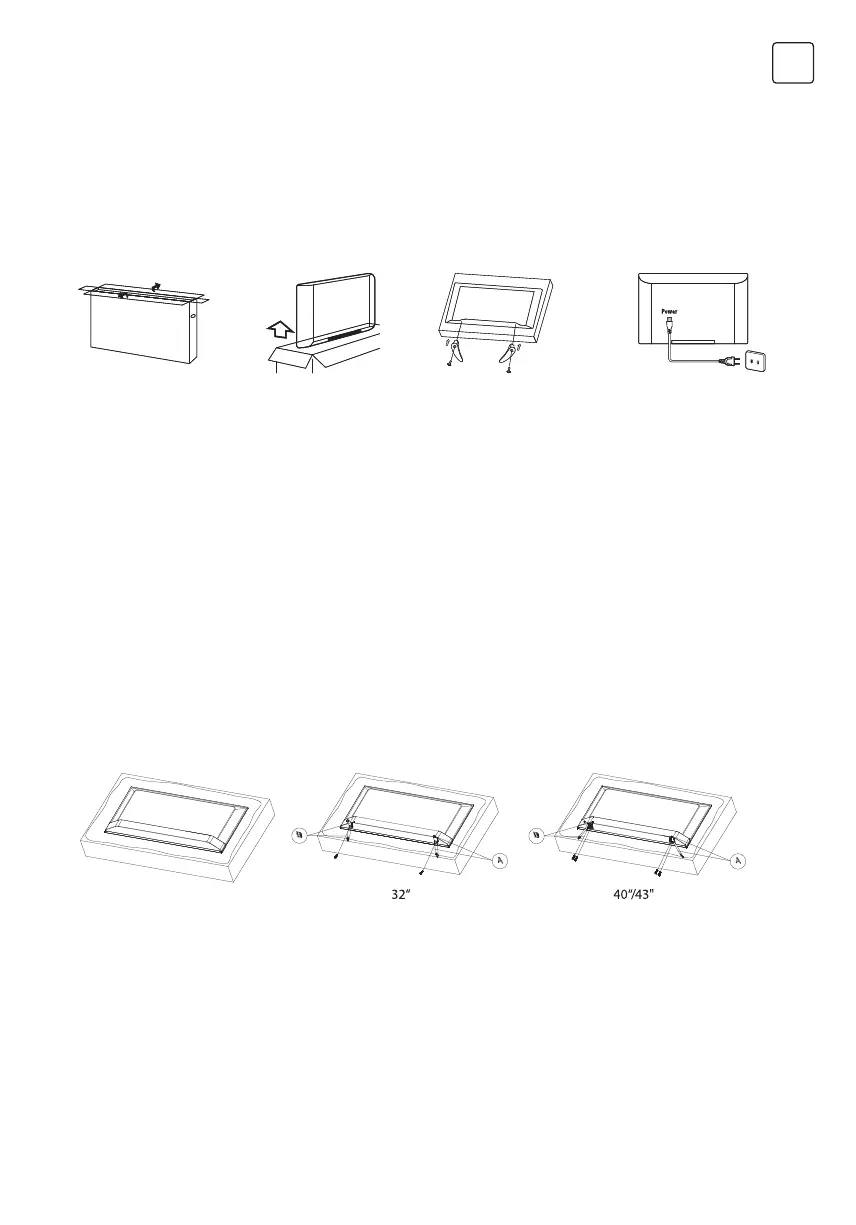
1. Open the package.
• Batteries (2)
• Remote Controller
• Quick Start Guide
• Base Stands (2)
• Screws: 32”:2, 40”/43”:4
• Warranty Card
• Power Cord
• AV Converting Cable
2. Take out the TV. 3. Install the TV stands.
4. Connect the
power cord.
Stand Installation
Step 1: Take out the TV and carefully put it (screen downward) on a stable and flat table with a soft
cloth or cushion on it.
Step 2: Please check to make sure there is the same mark(A/B) on the TV back and the correct stand.
This step is not available for the stands without any mark on it, or not available for the TV with one
stand only.
Step 3: Fix the stands to the TV by using the matching screws provided in the box. The stands may
vary depending on the region or model.


 To Next Page