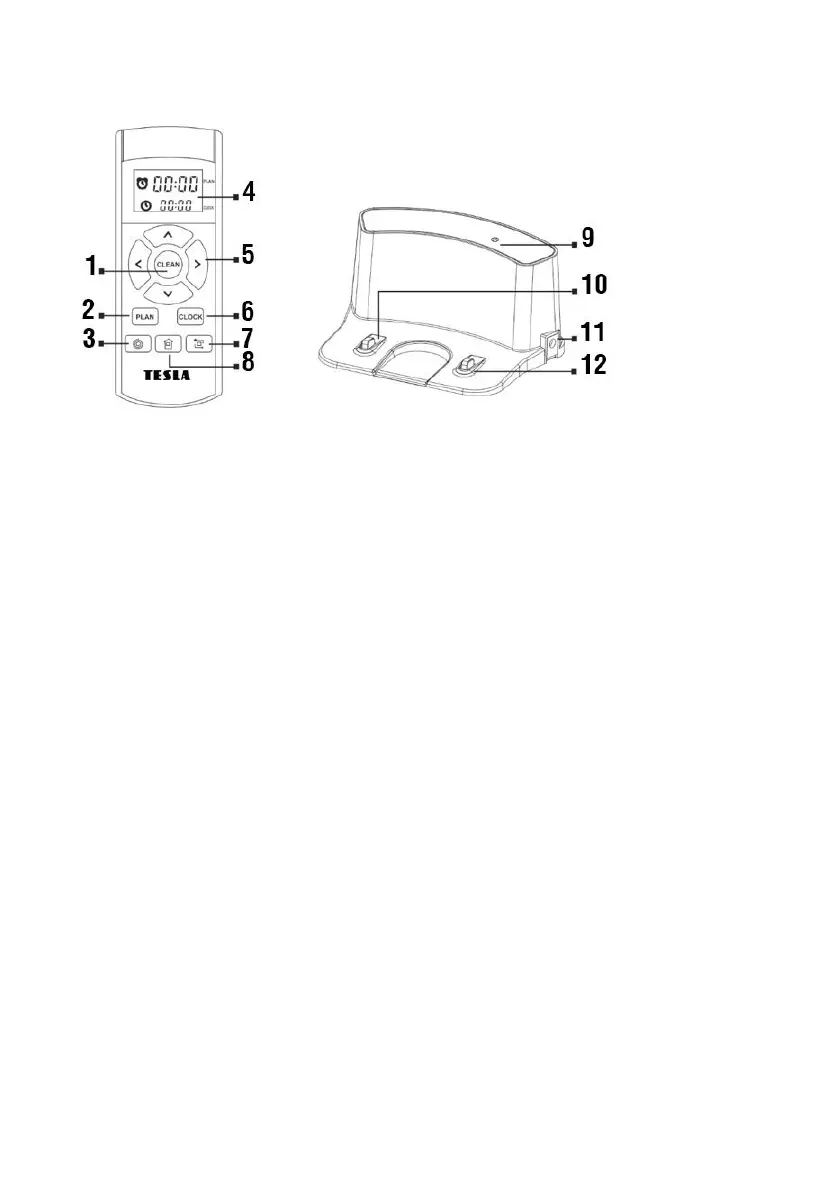
REMOTE CONTROL CHARGING STATION
Schedule cleaning setting
Return to the charging station
REMOTE CONTROL
1. The "CLEAN" (1) button
Start/Stop the operation
Run the selected mode
2. Directional buttons (5)
Button : to increase the time value for the schedule cleaning and time setting
Button : a directional button to move forward
Button : to decrease the time value for the schedule cleaning and time setting
Button : a directional button to move backward
Button : to switch from setting the minutes to setting the hours for a schedule cleaning and
time setting
Button : a directional button to move to the left
Button : to switch from setting the hours to setting the minutes for a schedule cleaning and
time setting
Button : a directional button to move to the right
3. The "PLAN" (2) button
Enter the "Schedule Cleaning" mode, use the directional buttons at the top half of the remote



 To Next Page