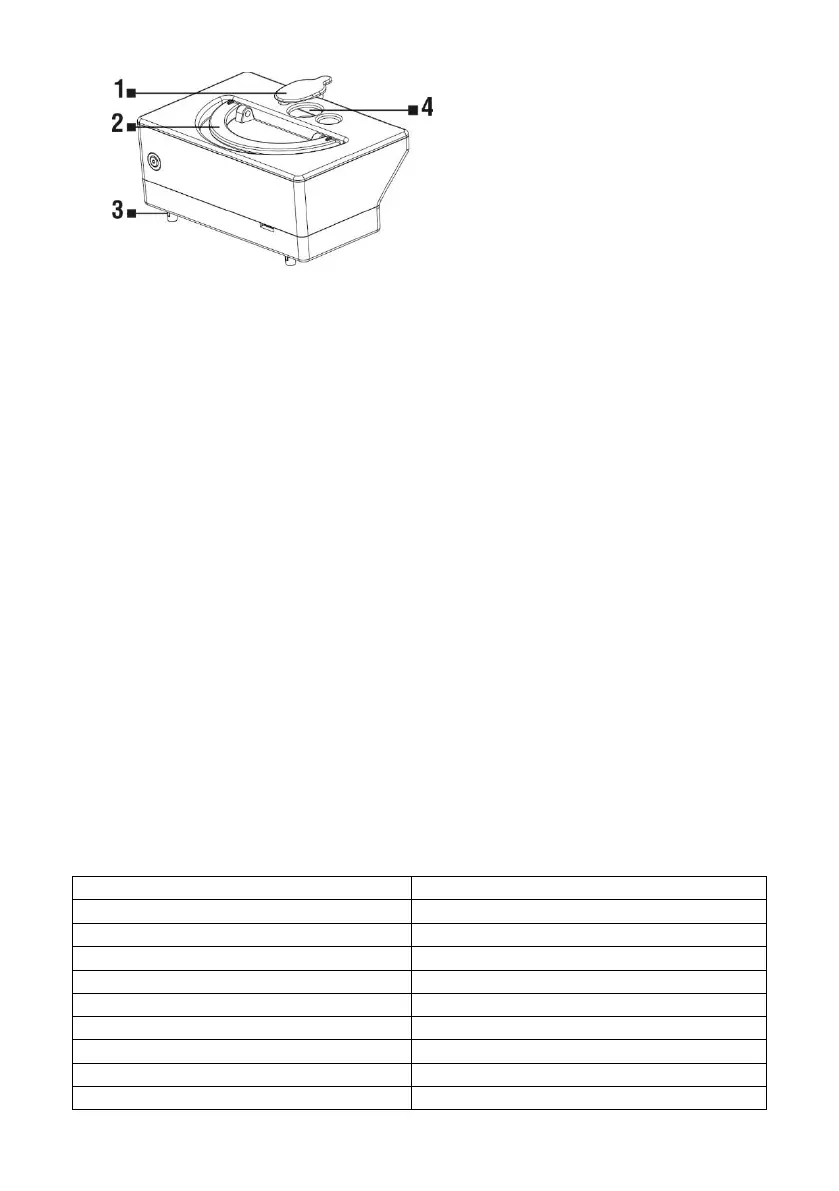
Water container opening cover
Opening for moistening the mop
Handle for removing the container
from the vacuum cleaner
Water should slowly drip from the left and right plastic parts.
Press the top cover of the vacuum cleaner gently to open it, remove the dust container and
insert the water container instead.
The container should be properly inserted into its place in the vacuum cleaner.
Close the top of the vacuum cleaner.
Press the "CLEAN" button to start the wet mopping operation.
In this mode, the device does not vacuum, only the side brushes operate.
Water drips automatically, so do not let the vacuum cleaner stand motionlessly in one place
with remaining water in the container to prevent water spillage on the floor.
Do not use the microfiber cloth for mopping uneven surfaces or carpets.
Remove the water container when the mopping is done.
Do not charge the battery with the water tank for safety reasons.
DRY MOPPING
To remove fine dust and polish the floor.
Attach the mopping pad with the mop on the vacuum cleaner, use the two installation holes
"M" on the bottom of the vacuum cleaner.
Do not use the microfiber cloth for mopping uneven surfaces or carpets.
DESCRIPTION OF THE STATUS LED DIODES
All lights flash gradually
The middle lights flash slowly
The middle lights turns solid
The middle lights turns solid, lower light flash
The middle lights turns solid, upper light flash



 To Next Page