Press the „4“ (PLAN) button on the remote control to enter the "Schedule Cleaning" mode.
Use the directional buttons at the top half of the remote control display (HH: MM) to set the
start for the schedule cleaning.
Setting the scheduled cleaning time is possible within a 15-minute interval.
Press the „4“ (PLAN) button again to confirm the set time of the "Schedule Cleaning".
To erase the scheduled cleaning, set the time in the bottom line on the remote control display
to "00:00" and save it.
Successful schedule cleaning setting will be confirmed by a beep sound on the vacuum cleaner.
WET MOPPING
After dust cleaning, the dirt container can be replaced by the water tank. For best results, we
recommend using this feature in one room and then moving with wet mopping to the next room.
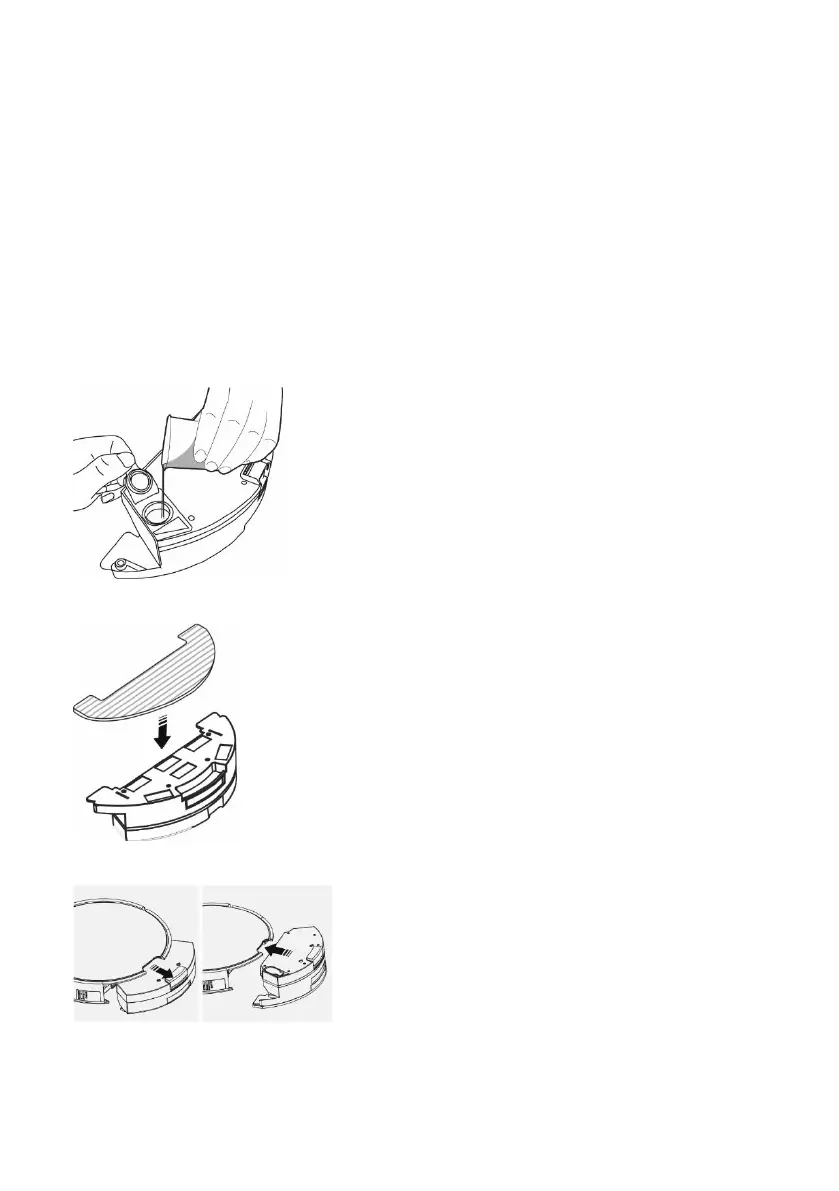
Open the plastic cap and take the water into
the plastic water tank. We recommend that
the floor be wiped with clean water, the
detergent may cause foam to soften water
dripping on the mop, or cause smudges on
the floor after drying.
Install the blue mopping fabric on the bottom
with the water tank. Lightly dampen the
mopping fabric for a faster and smoother
wiping. When removing the mop from the
holder, make sure you do not damage the
velcro fastener on the bracket quickly.
If the mop is dirty after cleaning, you can
clean it with lukewarm water.
Remove the dirt trap from the unit and insert
the water tank.
Press the "AUTO" button on the vacuum cleaner or "7" on the remote control to start wiping with
water. In this mode, vacuuming is switched off, only side cleaning brushes work.



 To Next Page