55.. MMoouunnttiinngg
12
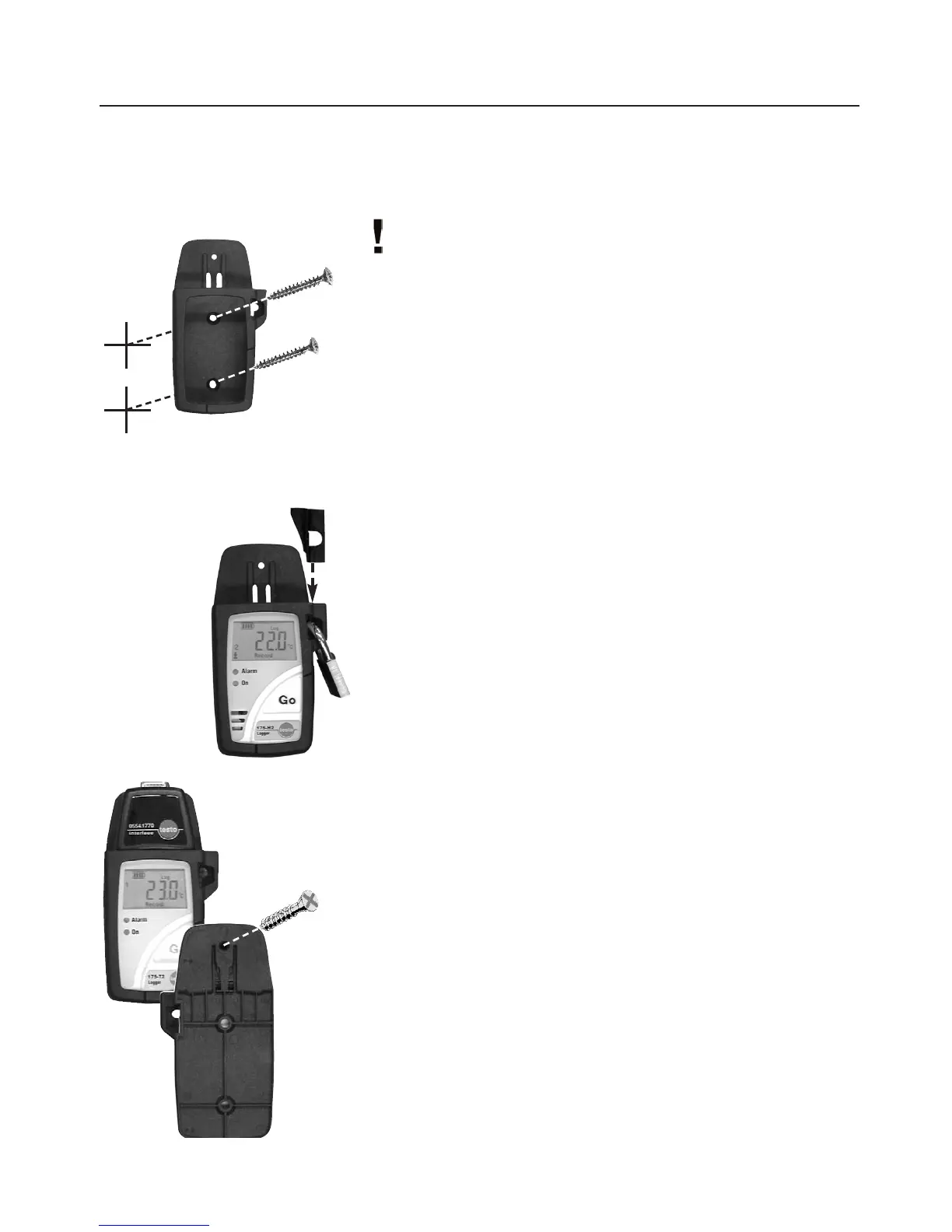
5.1 MMounting tthe wwall hholder
Mounting materials (e.g. screws, dowels) are not included.
1
Position the wall holder at the required location.
2
Using a pencil or similar, mark where the fixing screw is to go.
3
Prepare the area for mounting (e.g. drill a hole, put in dowel).
4
Mount the wall holder using a screw which fits.
5.2 SSecuring tthe ddata llogger wwith aa llock
1
Insert the data logger into the wall holder.
2
Place the retainer key in the wall holder.
3
Attach the lock to the wall holder (Accessory: Part no.
0554 1755).
5.3 TTransportable uunit
A unit can be made out of the wall holder, logger and the interface
to make transport or dispatch easier.
1
Push the data logger into the wall holder.
2
Push the interface onto the wall holder.
3
Secure the unit by connecting the wall holder and the interface
using the screw supplied.



 To Next Page