Product description14
Product description
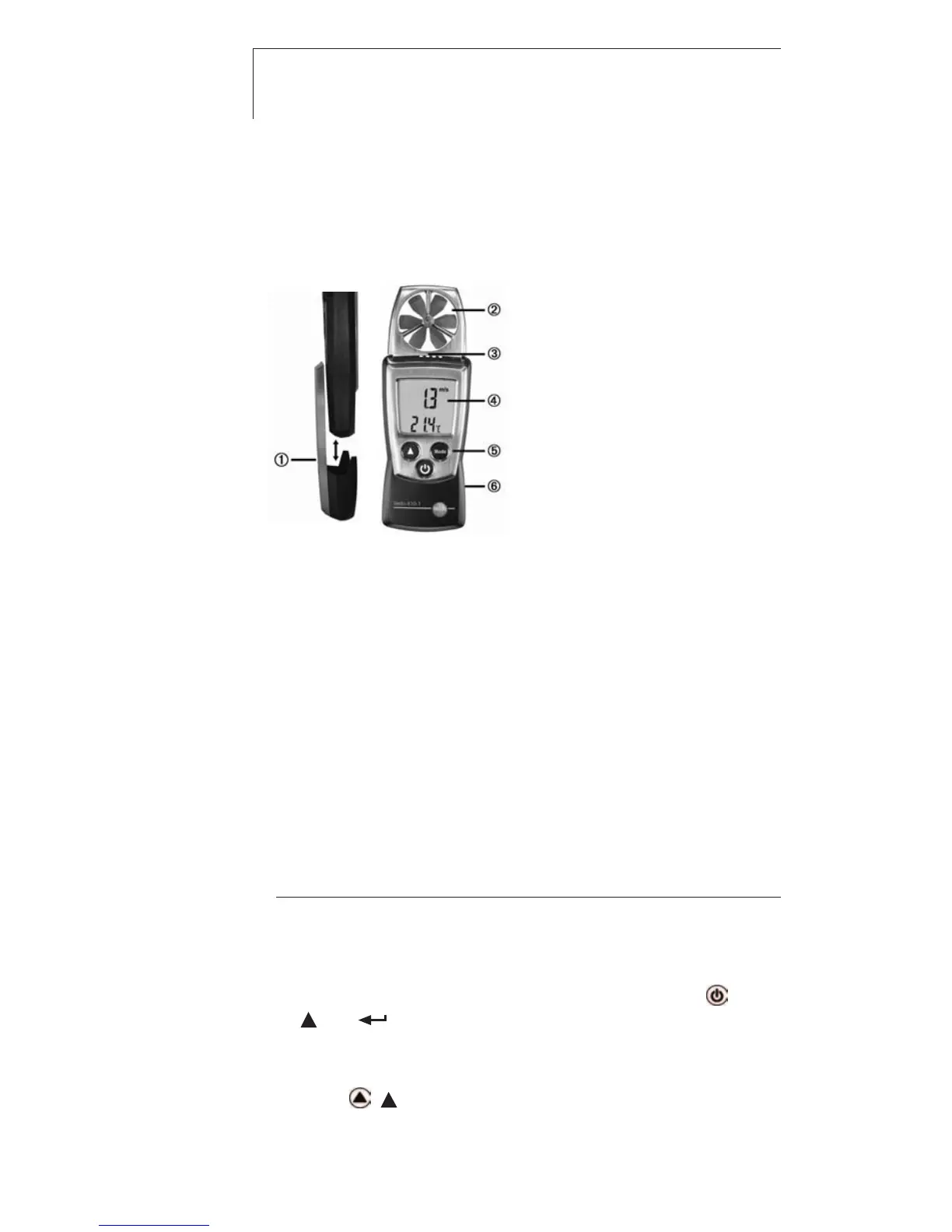
At a glance
Protection cap: Park position
Impeller
Temperature sensor
Display
Control keys
Battery compartment (on rear)
First steps
²
Inserting bbatteries:
1 To open the battery compartment, push the battery cover
down.
2 Insert batteries (2x 1.5 V type AAA). Observe the polarity!
3 To close the battery compartment, push the battery cover
back on.
²
Basic ssettings ((configuration mmode):
Adjustable functions
· Unit of temperature: °C, °F
· Unit of velocity: m/s, km/h, fpm, mph, kts, Beau
· Auto off function: OFF, ON (instrument switches off automatically if no key is
pressed for 10 minutes)
1 When switching the instrument on, press and hold until
and appear on the display (configuration mode).
- The adjustable function is displayed. The current setting
flashes.
2 Press ( ) several times until the desired setting flashes.



 To Next Page