20
5. Memory settings
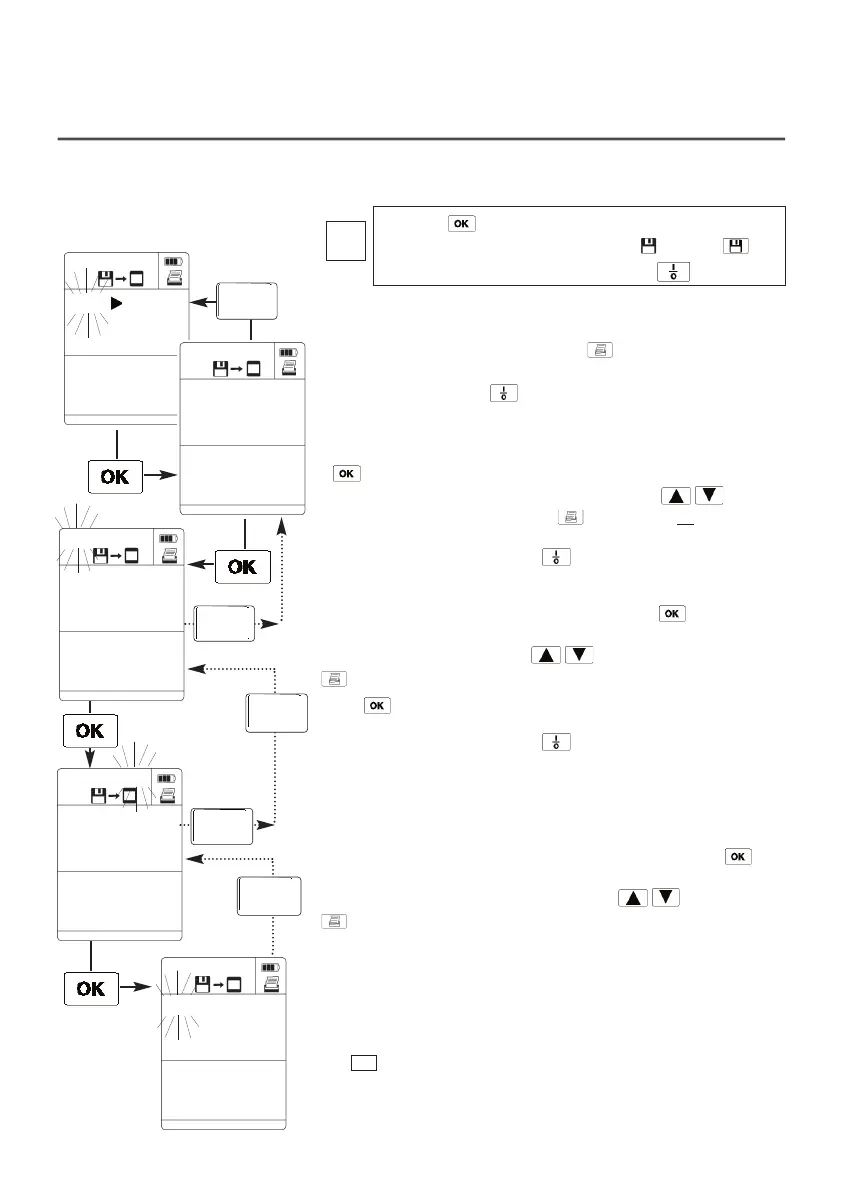
Reading or printing memory contents
OUT
1. Reading out or printing memory contents:
If the “OUT” display is flashing and the button is pressed,
printing of the complete memory contents is started. Cancel
printout by pressing the button.
2. Selecting the location:
If is activated selection options appear in the display to select
the required location. Select location by pressing .
If printing is activated by pressing at this point, all
of the logs
(measurement series and cycles) for this location are printed.
Cancel printout by pressing the button.
3. Selecting the log:
Confirm the location selected above by pressing .
The M.0x counter flashes in the display.
Select the log no. by pressing .
activates a printout of the selected measurement log.
Press to display the values measured.
Cancel printout by pressing the button
4. Selecting the measurement cycle: (only possible if a
measurement log consists of a measurement series):
Confirm the measurement log selected above by pressing .
The N.0x counter flashes in the display.
Select the measurement cycle by pressing .
activates a printout of the selected measurement cycle.
The
button enables you to go back one step.
EESSCC
LLooccaattiioonn
01:13
1998
M.0
55
N.0017
Pizza
01.01
79.7
°C
M.0
55
N.00
1177
1:
79.7
°C
M.0
55
N.0017
11::
OOUUTT
CLEAR
MEMORY
01
Location
Duct 1
Press the button to access the memory settings
mode. Confirm flashing save symbol via the
button. Cancel printing by pressing the button.
i
ESC
Location
ESC
Location
ESC
Location
ESC
Location
ESC
Location



 To Next Page