5 • Teufel Streamer
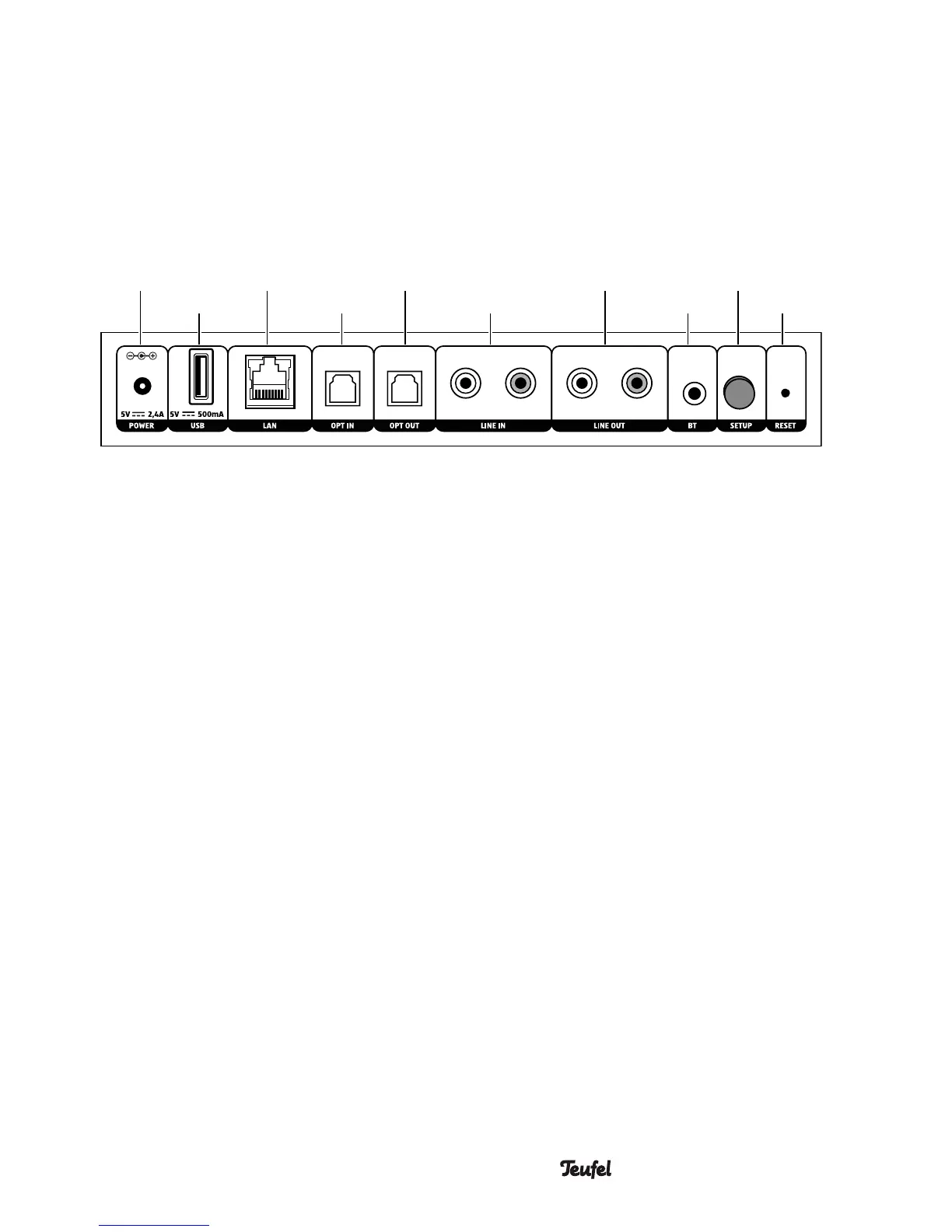
(10) (16)(14) (18)(12)
(15)(13) (17) (19)(11)
(10) Connector jack for mains
adapter
(11) USB 2.0 jack
For restoring the firmware and
for sharing music.
Music saved on a USB stick will
be made available under “My
music” if the stick is connected
to the USB port of the host
device. In the network settings,
you can see which device acts
as a host in your system.
(12) Network connection (LAN)
(13) Optical input (digital) for external
players via TOSLINK cable
(14) Optical output (digital) e.g. to the
amplifier via TOSLINK cable
Back side
(15) (Analogue) audio input for
external players via RCA cable.
(16) (Analogue) audio output e.g. to
the amplifier via RCA cable.
(17) Bluetooth pairing button
Tap to set the Teufel Streamer to
pairing mode.
(18) Setup button
Push during the setup process
once asked to do so.
(19) Reset button
Hold for 8seconds while
the device is on to reset the
Teufel Streamer to the factory
default settings.


 To Next Page