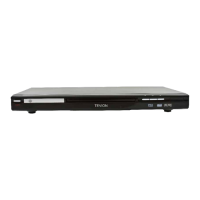
The Tevion Slimline DVD Player, model 40699, is a versatile entertainment device designed for playing various disc formats and offering USB connectivity for multimedia playback. It features a sleek, slimline design suitable for modern home entertainment setups.
Function Description:
This DVD player is primarily designed for playing DVDs, VCDs, CDs, and MP3s. It supports a wide range of disc formats including DIVX/MPEG4, DVD, SVCD, VCD, CD, and MP3. Additionally, it boasts USB functionality, allowing users to play MP3 audio files and view JPEG images directly from a USB storage device. The player also includes a DVD freeze-frame function, random track playback, and various audio and video output connections for integration with different display and sound systems.
Important Technical Specifications:
- Power Supply: AC 90-240V-50/60HZ
- Power Consumption: 11W
- Weight: Approximately 1.5 kg
- Video System: NTSC/PAL/AUTO
- Optical Read-out System: Semiconductor ALGaAs Weam, wave
- Audio Frequency Response:
- DVD audio: Fs 48KHz PCM4 Hz ~ 22KHz
- Fs 48KHz PCM4 Hz ~ 22KHz
- S/N Ratio: ≥90dB
- Dynamic Range: ≥90dB
- Rotating Ratio: Within measurable range
- Operation Condition: Temperature 0°C ~ 40°C
- Video Output: 1.0V(p-p), 75Ω
- S-Video Output: (Υ)1.0v(p-p), 75Ω (C)0.286V(p-p), 75Ω
- Audio Output (Analog Audio): 2.0V(rms)
- USB Capacity: Maximum 4GB
Usage Features:
Remote Control Operation:
The device comes with a remote control that requires 2 x AAA alkaline batteries. The remote allows for comprehensive control over the DVD player's functions, including:
- OPEN/CLOSE: To open and close the disc tray.
- POWER: To turn the unit on/off.
- OSD: On-Screen Display.
- NO. KEY: Numeric buttons for direct selection.
- TIME, ANGLE, LANGUAGE: For adjusting playback settings.
- SUBTITLE, TITLE: To select subtitles or return to the DVD title menu.
- MENU, ENTER: For navigating menus and confirming selections.
- DIRECTION BUTTONS (LEFT, RIGHT, UP, DOWN): For menu navigation.
- FWD, REV: For fast forward and rewind (x2, x4, x8, x16, x32 speeds).
- PLAY/PAUSE: To start, pause, and resume playback.
- VOL+/VOL-: To adjust volume.
- DVD/USB: To switch between DVD and USB input modes.
- STOP: To stop playback (press once to pause, twice to stop completely).
- RAN: Random track playback.
- ZOOM: To zoom in on the video (x2, x3, x4).
- MUTE: To mute audio.
- PBC/RETURN: Programmed Button Control (for VCDs) or return function.
- CLEAR: To clear selections.
- N/P: To select NTSC or PAL video format.
- L/R: Left/Right audio channel selection.
- VIDEO: To select video output mode (S-Video, YUV, RGB).
- PROG: Program function.
- SLOW: Slow motion playback (1/2, 1/4, 1/8, 1/16 speeds).
- REPEAT: Repeat playback options (single song, folder, etc.).
- STEP: Frame-by-frame advance.
- A-B: A-B repeat function.
Connecting Your DVD Player:
The player offers multiple connection options for video and audio:
- Video Connections:
- SCART Output: Connects to a TV's SCART socket using the provided SCART cable.
- AV Output: Connects to a TV's AV Input using the provided AV cable (red, yellow, white).
- Y Pb/Cb Pr/Cr Component Output: Connects to an RGB socket on a TV (red, green, blue).
- S-Video Output: For S-Video compatible displays.
- Audio Connections:
- 2 CH Left/Right Output: Connects to a HIFI system's Audio In using an RCA cable (red for right, white for left).
- Digital Signal Coaxial Out: For digital audio connection to compatible amplifiers/receivers.
- Digital Signal Optical Output: For optical digital audio connection.
DVD Operation:
- Disc Loading: Press 'open/close' to eject the disc tray. Load a disc (label facing up) and press 'open/close' again. The player will automatically identify the disc format. Avoid playing cracked, broken, or deformed discs.
- Playback Control: Use the remote's buttons for play, pause, stop, fast forward, rewind, next/previous chapter, slow motion, and frame-by-frame advance.
- Subtitle/Angle: Select desired subtitles or change viewing angles if supported by the DVD.
- Menu Navigation: Use 'title' to return to the DVD root menu and direction buttons to navigate. Numeric buttons can select chapters/tracks.
- VCD Playback: Use 'PBC' to return to the root menu.
- Video Format: Use 'N/P' to switch between NTSC and PAL.
- Zoom: Use 'zoom' to magnify the video image.
USB Operation:
- Accessing USB: Ensure no disc is in the tray, insert the USB device, and press the 'DVD/USB' button. Navigate to the USB option and press 'enter' twice to confirm.
- MP3 Playback: Files will display on screen. Use direction keys to select and 'enter' to play. 'Repeat' button cycles through single song play, single song repeat, folder repeat, or folder play.
- JPEG Picture Viewing: Pictures display on screen. Use direction keys to navigate and 'enter' to view. Pictures will automatically advance within a folder. Direction keys can rotate the picture. 'Title' button returns to the root menu.
Accessed via the 'setup' button on the remote, allowing customization of various settings:
- General Setup:
- TV Display: Pan & Scan 16:9, Letterbox 4:3, Normal.
- Angle Mark: On/Off.
- OSD Lang: English, German, Spanish.
- Captions: On/Off.
- Screensaver: On/Off.
- HDCD: Off, 1X, 2X.
- Audio Setup:
- Downmix: L/T R/T, Stereo.
- Spdif Output: Off, Raw, PCM.
- Dolby Setup:
- Dual Mono: Stereo, L-Mono, R-Mono, Mix Mono.
- Dynamic: Off, Full.
- Video Setup:
- Component: S-Video, YUV, RGB.
- TV Mode: (No specific options listed, likely auto-detected or user-selected based on connection).
- Sharpness: High, Medium, Low.
- Brightness: Setting.
- Contrast: Setting.
- Preference Setup:
- TV Type: PAL, Auto, NTSC.
- Audio Language: (8 Available).
- Subtitle Language: (8 Available).
- Disc Menu Language: (8 Available).
- Parental: Settings (for parental control).
- Password: Settings (for password protection).
- Default: Reset (to factory settings).
Maintenance Features:
Safety Instructions:
- Ventilation: Ensure slots and openings are not blocked to prevent overheating.
- Water and Moisture: Do not use near water or in wet environments.
- Cleaning: Unplug before cleaning. Use a damp cloth; avoid liquid or aerosol cleaners.
- Lightning: Unplug from wall outlet and disconnect antenna/cable during storms or prolonged disuse.
- Servicing: Refer all servicing to qualified personnel. Do not attempt to open the unit.
- Battery Handling: Use 2 x AAA alkaline batteries for the remote. Do not throw batteries into fire or expose to heat. Seek medical attention if swallowed. Dispose of batteries and the product according to local recycling schemes.
- Laser Safety: The player is a CLASS 1 LASER PRODUCT; do not look directly at the laser.
Troubleshooting:
The manual provides a troubleshooting guide for common issues:
- No Power: Ensure AC adaptor is securely plugged in.
- No Picture: Check equipment connections, ensure correct mode on player and TV, verify TV video socket functionality.
- No Sound: Check audio settings, input settings for TV/stereo system, and equipment connections.
- Disc Not Loading: Ensure disc is inserted correctly (label facing up), disc is clean and unscratched, and disc format is compatible.
- Remote Not Responding: Check battery polarity, ensure remote is pointed at the player's sensor, and avoid heat sources near the sensor.
- USB Not Loading: Ensure USB mode is selected, USB is connected securely, and files are compatible with the player.
Warranty and Support:
The Tevion Slimline DVD Player comes with a 3-year parts and labour warranty. Customers are advised to fill in and return the Warranty Card. Dedicated help lines are available for UK/Northern Ireland (0161 975 0458) and Republic of Ireland (1800 882912). Web support is available at www.fascin8.co.uk. A Fault Report Card is included for documenting issues when sending the product for repair, requiring proof of purchase and contact details.

 Need help?
 General

 To Next Page