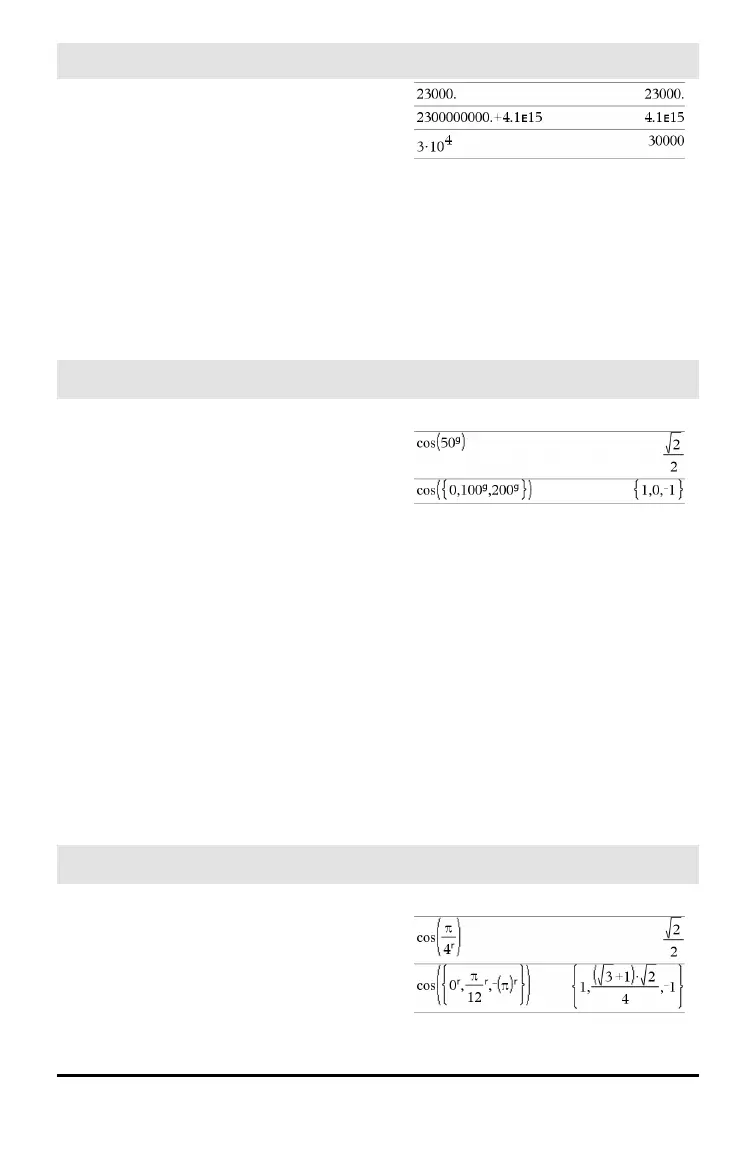
E (scientific notation)
i key
mantissaEexponent
Enters a number in scientific notation. The
number is interpreted as
mantissa ×10
exponent
.
Hint: If you want to enter a power of 10
without causing a decimal value result, use
10^integer.
Note: You can insert this operator from the
computer keyboard by typing @E. for
example, type 2.3@E4 to enter 2.3E4.
g
(gradian)
¹ key
Expr1
g
⇒ expression
List1
g
⇒ list
Matrix1
g
⇒ matrix
This function gives you a way to specify a
gradian angle while in the Degree or Radian
mode.
In Radian angle mode, multiplies Expr1 by
π/200.
In Degree angle mode, multiplies Expr1 by
g/100.
In Gradian mode, returns Expr1 unchanged.
Note: You can insert this symbol from the
computer keyboard by typing @g.
In Degree, Gradian or Radian mode:
r
(radian)
¹ key
Expr1
r
⇒ expression
List1
r
⇒ list
Matrix1
r
⇒ matrix
In Degree, Gradian or Radian angle mode:
Symbols 223



 To Next Page
 Loading...