EasyManua.ls Logo

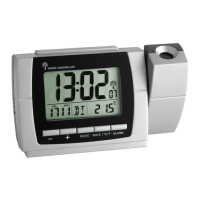
TFA 60.5015 - User Manual

TFA 60.5015
46 pages
Go to English
Print Icon
To Next Page IconTo Next Page
Loading...
Bedienungsanleitung
Instruction manual
Mode d’emploi
Instrucciones de uso
Gebruiksaanwijzing
Istruzioni per l'uso
Kat. Nr. 60.5015 V2
Instruction manuals
www.tfa-dostmann.de/en/service/downloads/instruction-manuals
TFA_No. 60.5015_Anl_03_22 21.03.2022 11:10 Uhr Seite 1
Question and Answer IconNeed help?

Do you have a question about the TFA 60.5015 and is the answer not in the manual?

Summary

Product Information and Safety

Getting Started Guide

Read the instruction manual carefully to learn about device functions, first use, and operation.

Package Contents

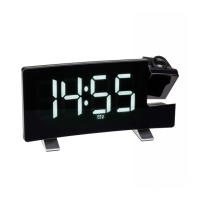
List of items included: Projection alarm clock radio, USB cable, power adapter, battery, manual.

Product Application

Highlights features like LED display, projection, wake-up options, and USB charging.

Important Safety Information

Covers intended use, unauthorized repairs, and general precautions for safe operation.

Device Components Overview

LCD Display Elements

Identifies display elements like Time, PM indicator, memory, and alarm symbols.

Button Identification

Labels buttons for volume, radio, snooze, set, alarm, and dimming functions.

Housing Features

Details physical parts including battery compartment, USB port, and projection arm.

Initial Setup and Power

Getting Started Procedures

Instructions on connecting power, inserting backup battery, and initial device readiness.

Settings and Alarms

Time and Snooze Interval Configuration

Guide to setting the clock time, date, and adjustable snooze interval.

Alarm Time Setting

Details on setting two independent alarm times and wake-up sources (radio or alarm).

Radio Operations

Radio Functionality

Instructions for turning on the radio, scanning stations, and adjusting volume.

Sleep Timer Function

Enables setting the radio to automatically switch off after a specified duration.

Projection and Illumination Features

Time Projection Setup

Instructions on positioning the projection arm and adjusting projection brightness.

Illumination Control Modes

Details manual and automatic dimming modes for display brightness.

Automatic Dimming Settings

Configuration for light sensor-based and timed automatic dimming functions.

Timed Dimming Interval

Sets the start and end times for the timed automatic dimming mode.

Charging and Maintenance

USB Charging Function

Guidelines for using the USB port to charge mobile devices.

Care and Maintenance

Recommendations for cleaning, battery removal, and storage.

Troubleshooting and Disposal

Common Troubleshooting Issues

Solutions for problems like no display, incorrect indication, or no backlight.

Electrical Device Disposal

Instructions for environmentally-friendly disposal of the electronic device according to WEEE.

Battery Disposal Guidelines

Advises on proper disposal of batteries, highlighting potential environmental and health risks.

Product Specifications and Compliance

Technical Specifications

Lists power consumption, radio frequency range, housing dimensions, and weight.

EU Declaration of Conformity

States compliance with EU directives for radio equipment, providing a web link.
Summary

Product Information and Safety

Getting Started Guide

Read the instruction manual carefully to learn about device functions, first use, and operation.

Package Contents

List of items included: Projection alarm clock radio, USB cable, power adapter, battery, manual.

Product Application

Highlights features like LED display, projection, wake-up options, and USB charging.

Important Safety Information

Covers intended use, unauthorized repairs, and general precautions for safe operation.

Device Components Overview

LCD Display Elements

Identifies display elements like Time, PM indicator, memory, and alarm symbols.

Button Identification

Labels buttons for volume, radio, snooze, set, alarm, and dimming functions.

Housing Features

Details physical parts including battery compartment, USB port, and projection arm.

Initial Setup and Power

Getting Started Procedures

Instructions on connecting power, inserting backup battery, and initial device readiness.

Settings and Alarms

Time and Snooze Interval Configuration

Guide to setting the clock time, date, and adjustable snooze interval.

Alarm Time Setting

Details on setting two independent alarm times and wake-up sources (radio or alarm).

Radio Operations

Radio Functionality

Instructions for turning on the radio, scanning stations, and adjusting volume.

Sleep Timer Function

Enables setting the radio to automatically switch off after a specified duration.

Projection and Illumination Features

Time Projection Setup

Instructions on positioning the projection arm and adjusting projection brightness.

Illumination Control Modes

Details manual and automatic dimming modes for display brightness.

Automatic Dimming Settings

Configuration for light sensor-based and timed automatic dimming functions.

Timed Dimming Interval

Sets the start and end times for the timed automatic dimming mode.

Charging and Maintenance

USB Charging Function

Guidelines for using the USB port to charge mobile devices.

Care and Maintenance

Recommendations for cleaning, battery removal, and storage.

Troubleshooting and Disposal

Common Troubleshooting Issues

Solutions for problems like no display, incorrect indication, or no backlight.

Electrical Device Disposal

Instructions for environmentally-friendly disposal of the electronic device according to WEEE.

Battery Disposal Guidelines

Advises on proper disposal of batteries, highlighting potential environmental and health risks.

Product Specifications and Compliance

Technical Specifications

Lists power consumption, radio frequency range, housing dimensions, and weight.

EU Declaration of Conformity

States compliance with EU directives for radio equipment, providing a web link.

TFA 60.5015 Specifications

General IconGeneral
BrandTFA
Model60.5015
CategoryClock
LanguageEnglish

Related product manuals