INSTALLING YOUR CLEARSOLUTION
™
FILTER:
For Best Results
• Run the ClearSolution™ G2 Filter 24 hours a day.
• DO NOT operate during freezing conditions. Drain the ClearSolution™ G2 Filter
and store in a protected area.
Classic Pattern
Model 700: 23”W x 20”H
Model 1250: 32”W x 30”H
Model 700: 24”W x 20”H
Model 1250: 52”W x 40”H
Model 700: 10”W
Model 1250: 20”W
Fan Pattern Bell Pattern
Watch a video of the ClearSolution™ G2 Filter installation
online @ www.thepondguy.com/clearsolutionG2
Step 2
Connect Fountain Assembly to
the Filter
Screw the assembly onto the ClearSolution™ G2 Filter.
Step 1
Assemble Fountain
Components
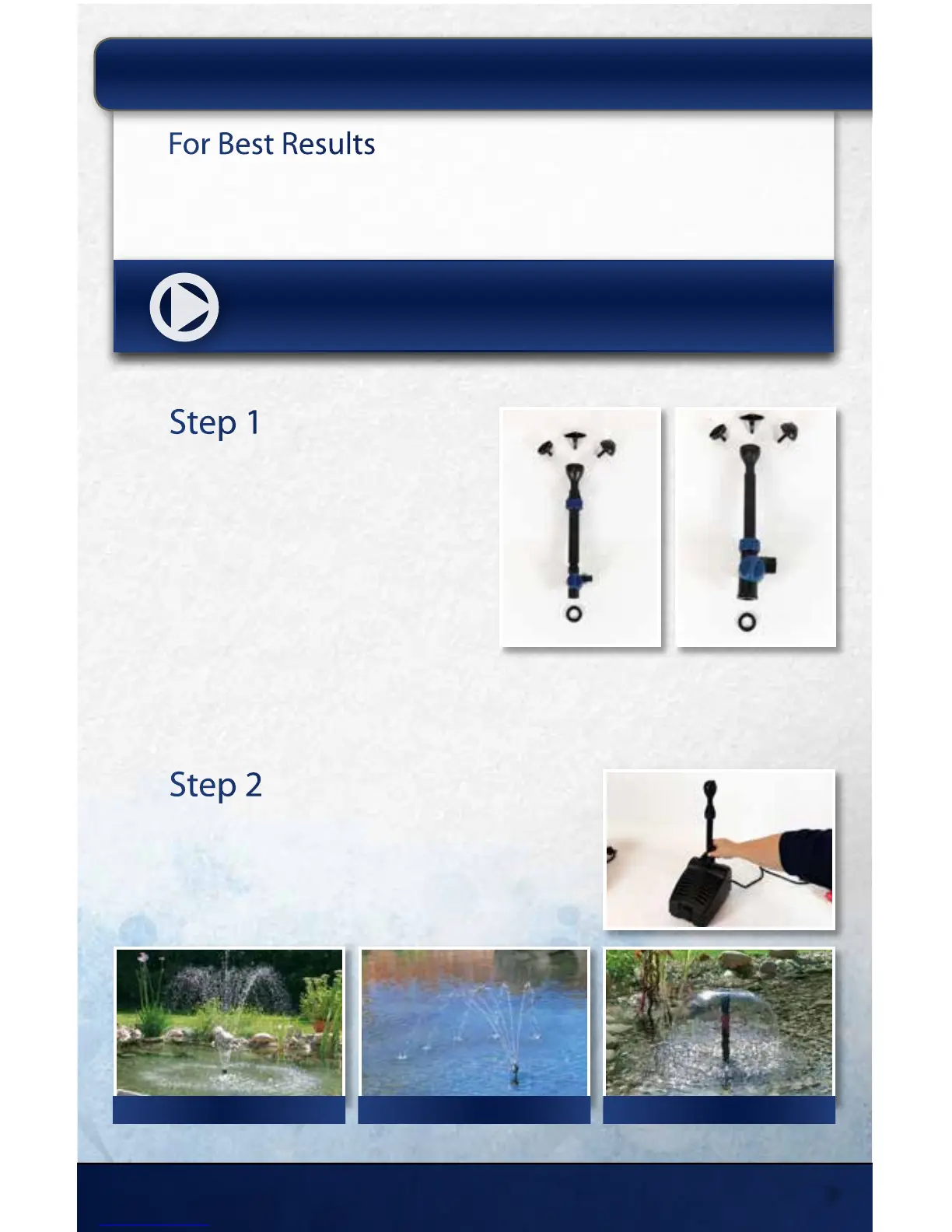
Assemble the components in order:
ClearSolution™ G2 700: O-ring, Diverter
Valve, Nozzle Tube and Compression Ring,
Nozzle Mount and Nozzle Insert.
ClearSolution™ G2 1250: O-ring, Diverter
Valve, Nozzle Tube and Compression Ring,
Nozzle Mount and Nozzle Insert.
Model 700 Model 1250
15425 Chets Way | Armada, MI 48005
5



 To Next Page