— E11 —
1
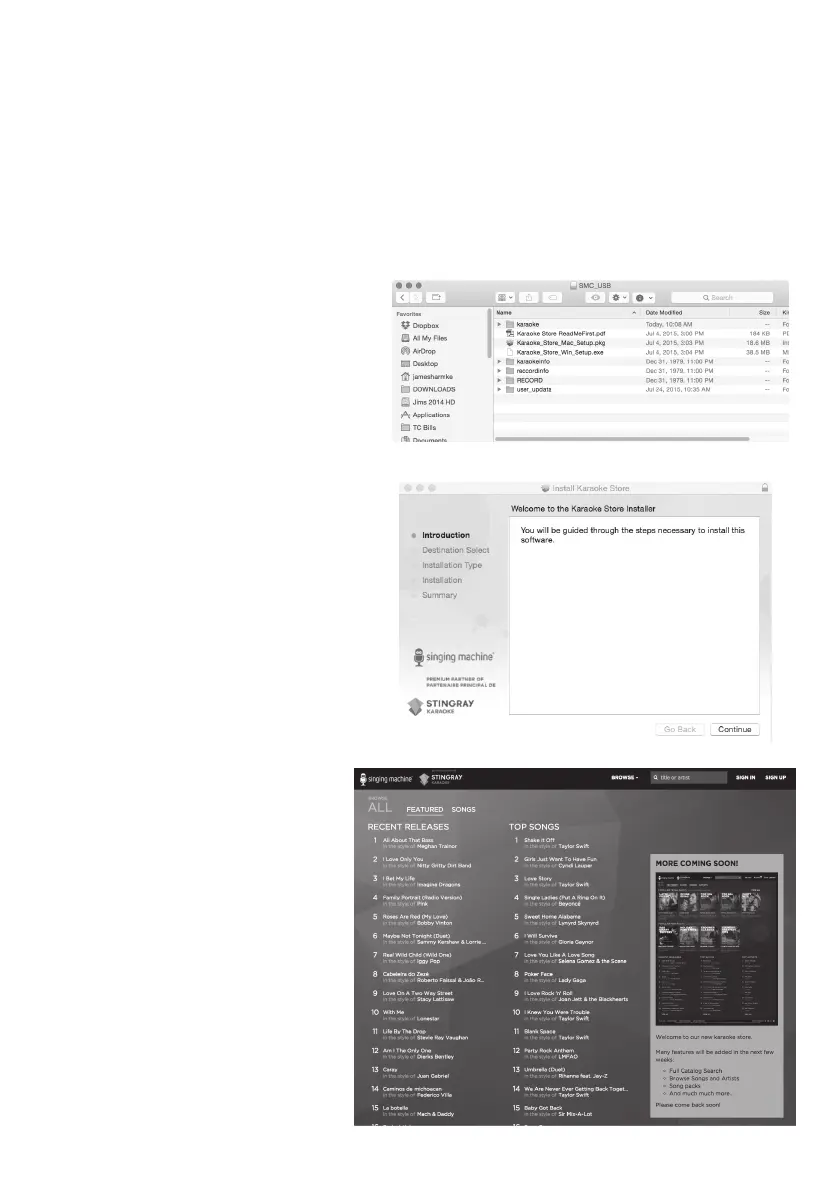
Insert the Singing Machine USB
Flash Drive into a powered USB
slot on your computer.
2
Double-click the file named,
“Karaoke_Store_Mac_Setup.pkg”.
3
Follow the online instructions
to install the software on your
computer.
4
After installing, open your
Application’s folder and open the
Stingray Karaoke Store folder.
5
Double-click Karaoke Store
App to open the software.
6
On this page you can now
sign up and enter your code
(located in your welcome kit)
for ten free downloads and
then download them to your
USB drive for playing on your
new Singing Machine!
The Karaoke Store application can be installed on Apple Macintosh computers running OS X
10.8 and higher. The Karaoke Store application requires connection to the Internet (a high-
speed connection is recommended).
Karaoke Store
Mac Installation










 To Next Page