
 Need help?
Do you have a question about the The Singing Machine STVG785 and is the answer not in the manual?
Essential safety precautions to prevent fire, shock, and damage to the unit.
Detailed instructions for safe operation, installation, and maintenance of the equipment.
Guidelines for safe and proper use of batteries in the wireless microphone.
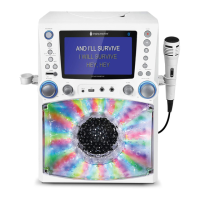
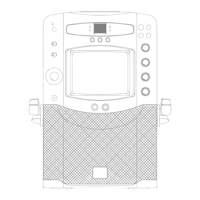
Identifies all buttons, ports, and displays on the front panel of the unit.
Identifies all input/output jacks and connectors on the rear panel of the unit.
Instructions for connecting the unit to a power source using the provided adapter.
Steps to connect the Singing Machine to a TV for displaying lyrics and audio.
How to connect external audio devices like MP3 players via the Line In jack.
Guidance on adjusting the main volume control for optimal sound output.
Procedure for powering the Singing Machine unit on and off using the power button.
Instructions for inserting CD, CD+G, or MP3+G discs and starting playback.
How to play MP3/MP3+G files from a connected USB flash drive.
How to switch between different input modes like CD, USB, and Line In.
Controls for starting, pausing, skipping tracks, and fast-searching audio.
How to set repeat functions and program custom playback sequences.
Instructions for using microphones, adjusting mic volume, key, echo, and balance.
How to illuminate and adjust the intensity of the unit's disco lighting effect.
How to record vocals and music onto a USB drive from CD or other sources.
Guide to purchasing and downloading karaoke music files from the Singing Machine store.
Tips for unzipping and transferring MP3+G files correctly to a USB drive.
Solutions for common problems like no power, no sound, or incorrect audio routing.
Troubleshooting steps for common CD playback errors such as disc not reading or dirty lens.
Resolving sound issues when audio is routed through TV or home stereo systems.
Solutions for lyrics not appearing on TV and microphone sound issues.
Addressing playback interruptions, high-speed playback, and vocal cut-out problems.
Specifications covering audio, CD player, power, dimensions, and weight.
 General
| Brand | The Singing Machine |
|---|---|
| Model | STVG785 |
| Type | Karaoke System |
| Connectivity | Bluetooth |
| Power | AC Adapter |
| Microphone Input | Yes |
| Number of Microphone Inputs | 2 |
| Echo Control | Yes |
| AVC (Auto Voice Control) | Yes |
| Built-in Speakers | Yes |
| USB Port | Yes |
| SD Card Slot | Yes |
| Video Output | Yes |
| Power Source | AC adapter |
| Battery Operated | No |
| Display | 7" Color Display |
| Audio Output | Built-in Speakers |
| Disc Compatibility | CD+G |







 To Next Page