EasyManua.ls Logo

The Singing Machine STVG785 - Troubleshooting Guide; Power and Sound Issues; CD Player Errors; TV and Stereo Connection Problems

The Singing Machine STVG785
12 pages
Print Icon
To Next Page IconTo Next Page
To Previous Page IconTo Previous Page
Loading...
I
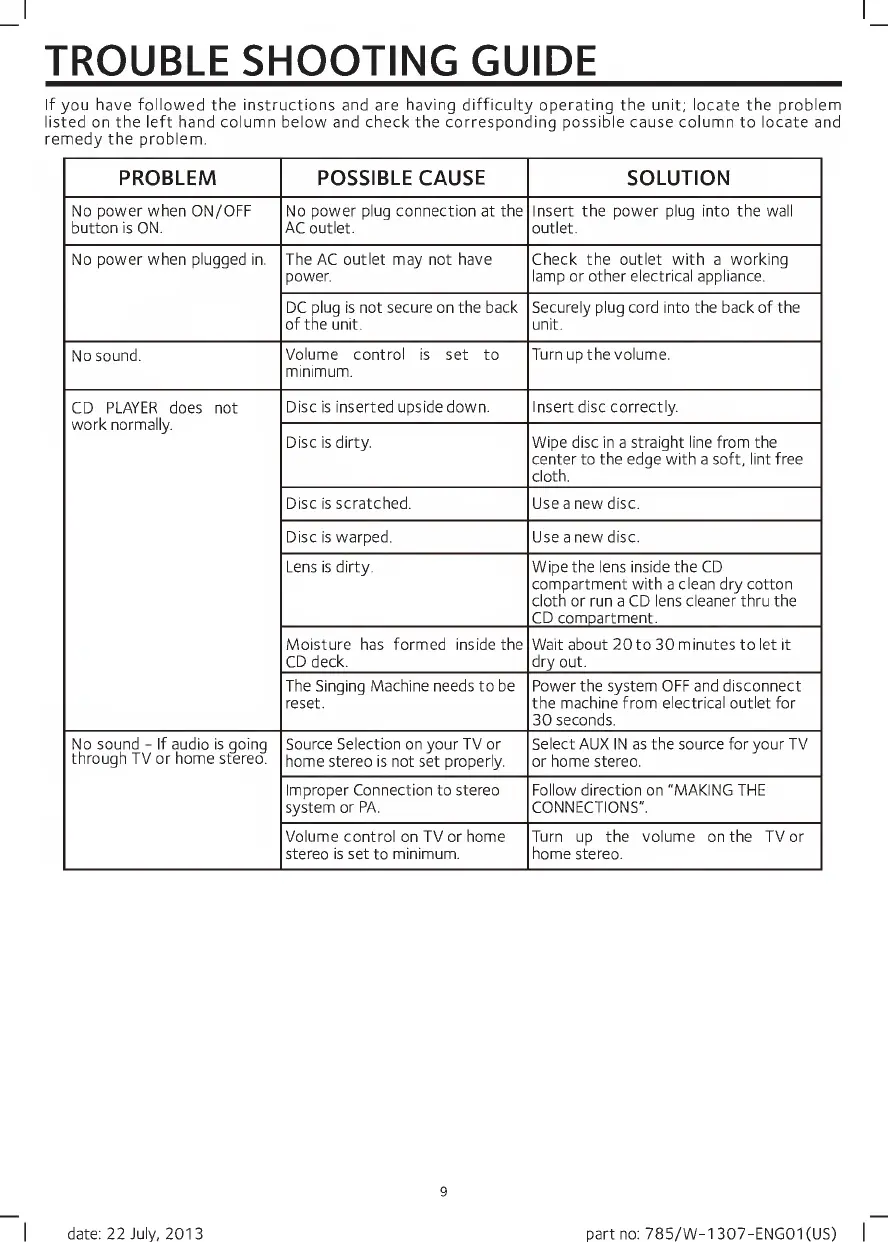
TROUBLE
SHOOTING
GUIDE
If
you
have
followed
the
Instructions
and
are
having
difficulty
operating
the
unit;
locate
the
problem
listed
on
the
left
hand
column
below
and
check
the
corresponding
possible
cause
column
to
locate
and
remedy
the
problem.
PROBLEM
POSSIBLE
CAUSE
SOLUTION
No
power
when
ON/OFF
button
is
ON.
No
power
plug
connection
at
the
AC
outlet.
Insert
the
power
plug
into
the
wall
outlet.
No
power
when
plugged
in.
The
AC
outlet
may
not
have
power.
Check
the
outlet
with
a
working
lamp
or
other
electrical
appliance.
DC
plug
is
not
secure
on
the
back
of
the
unit.
Securely
plug
cord
into
the
back
of
the
unit.
No
sound.
Volume
control
is
set
to
minimum.
Turn
up
the
volume.
CD
PLAYER
does
not
work
normally.
Disc
is
inserted
upside
down.
Insert
disc
correctly.
Disc
is
dirty.
Wipe
disc
in
a
straight
line
from
the
center
to
the
edge
with
a
soft,
lint
free
cloth.
Disc
is
scratched.
Use
a
new
disc.
Disc
is
warped.
Use
a
new
disc.
Lens
is
dirty.
Wipe
the
lens
inside
the
CD
compartment
with
a
clean
dry
cotton
cloth
or
run
a
CD
lens
cleaner
thru
the
CD
compartment.
Moisture
has
formed
inside
the
CD
deck.
Wait
about
20
to
30
minutes
to
let
it
dry
out.
The
Singing
Machine
needs
to
be
reset.
Power
the
system
OFF
and
disconnect
the
machine
from
electrical
outlet
for
30
seconds.
No
sound
-
If
audio
is
going
through
TV
or
home
stereo.
Source
Selection
on
your
TV
or
home
stereo
is
not
set
properly.
Select
AUX
IN
as
the
source
for
your
TV
or
home
stereo.
Improper
Connection
to
stereo
system
or
PA.
Follow
direction
on
"MAKING
THE
CONNECTIONS".
Volume
control
on
TV
or
home
stereo
is
set
to
minimum.
Turn
up
the
volume
on
the
TV
or
home
stereo.
9
I
date:
22
July,
2013
part
no:
785/W-1307-ENG01(US)
|

Related product manuals