EasyManua.ls Logo

The Singing Machine STVG785 - Playback Controls; Play, Pause, and Skip Functions; Repeat and Program Modes

The Singing Machine STVG785
12 pages
Print Icon
To Next Page IconTo Next Page
To Previous Page IconTo Previous Page
Loading...
I
OPERATION
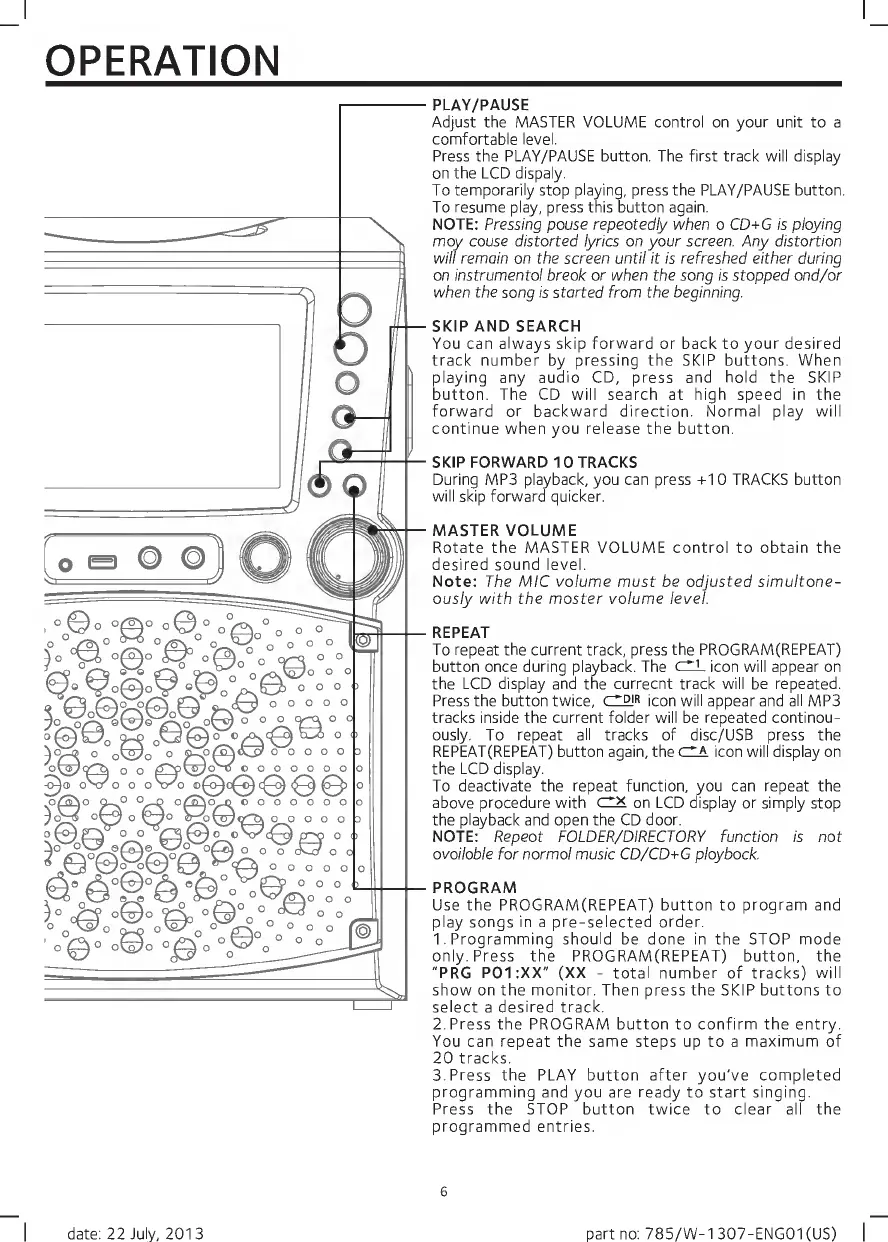
PLAY/PAUSE
Adjust
the
MASTER
VOLUME
control
on
your
unit
to
a
comfortable
level.
Press
the
PLAY/PAUSE
button.
The
first
track
will
display
on
the
LCD
dispaly.
To
temporarily
stop
playing,
press
the
PLAY/PAUSE
button.
To
resume
play,
press
this
button
again.
NOTE:
Pressing
pause
repeatedly
when
a
CD+G
is
playing
may
cause
distorted
lyrics
on
your
screen^
Any
distortion
will
remain
on
the
screen
until
It
Is
refreshed
either
during
an
instrumental
break
or
when
the
song
is
stopped
and/or
when
the
song
is
started
from
the
beginning.
SKIP
AND
SEARCH
You
can
always
skip
forward
or
back
to
your
desired
track
number
by
pressing
the
SKIP
buttons.
When
playing
any
audio
CD,
press
and
hold
the
SKIP
button.
The
CD
will
search
at
high
speed
in
the
forward
or
backward
direction.
Normal
play
will
continue
when
you
release
the
button.
SKIP
FORWARD
10
TRACKS
During
MP3
playback,
you
can
press
+10
TRACKS
button
will
skip
forward
quicker.
MASTER
VOLUME
Rotate
the
MASTER
VOLUME
control
to
obtain
the
desired
sound
level.
Note:
The
MIC
volume
must
be
adjusted
simultane¬
ously
with
the
master
volume
level.
REPEAT
To
repeat
the
current
track,
press
the
PROGRAM(REPEAT)
button
once
during
playback.
The
dL
icon
will
appear
on
the
LCD
display
and
the
currecnt
track
will
be
repeated.
Press
the
button
twice,
cIdjr
jeon
will
appear
and
all
MP3
tracks
inside
the
current
folder
will
be
repeated
continou-
ously.
To
repeat
all
tracks
of
disc/USB
press
the
REPEAT(REPEAT)
button
again,
the
r~A
jeon
will
display
on
the
LCD
display.
To
deactivate
the
repeat
function,
you
can
repeat
the
above
procedure
with
dX
on
LCD
display
or
simply
stop
the
playback
and
open
the
CD
door.
NOTE:
Repeat
FOLDER/DIRECTORY
function
Is
not
available
for
normal
music
CD/CD+G
playback.
PROGRAM
Use
the
PROGRAM(REPEAT)
button
to
program
and
play
songs
in
a
pre-selected
order.
1.
Programming
should
be
done
in
the
STOP
mode
only.
Press
the
PROGRAM(REPEAT)
button,
the
"PRG
P01:XX"
(XX
-
total
number
of
tracks)
will
show
on
the
monitor.
Then
press
the
SKIP
buttons
to
select
a
desired
track.
2.
Press
the
PROGRAM
button
to
confirm
the
entry.
You
can
repeat
the
same
steps
up
to
a
maximum
of
20
tracks.
3.
Press
the
PLAY
button
after
you've
completed
programming
and
you
are
ready
to
start
singing.
Press
the
STOP
button
twice
to
clear
all
the
programmed
entries.
6
I
date:
22
July,
2013
part
no:
785/W-1307-ENG01(US)
|

Related product manuals