
 Need help?
Do you have a question about the The Singing Machine FIESTA and is the answer not in the manual?
Covers essential safety guidelines for operating the unit safely and correctly.
Alerts users to risks of electric shock, fire, and other electrical dangers.
Details warnings regarding moisture, ventilation, heat sources, and proper placement.
Provides information on compliance with FCC, Industry Canada, and other standards.
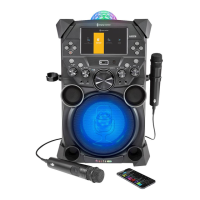
Lists all components and accessories that come with the Singing Machine unit.
Details all buttons, slots, and indicators on the front of the main unit.
Identifies the handle, DC input, wheels, and HDMI output ports on the rear.
Explains the functions of buttons and switches on both interactive and standard microphones.
Details the information shown on the unit's screen during playback, including status indicators.
Instructions on how to connect the microphones to the main unit's jacks.
Steps to connect the unit to a TV for enhanced audio-visual experience.
Procedure for plugging the unit into a standard AC power outlet.
Guide on how to replace the battery in the interactive microphone.
Important warnings and guidelines for safe battery usage and handling.
Instructions on how to charge the unit's internal rechargeable battery.
Guidelines for environmentally responsible disposal of the unit and its battery.
Specific warnings and precautions related to the lead-acid battery used in the unit.
Information about the included USB drive and its purpose for songs and recordings.
Instructions for inserting the USB flash drive or an optional SD card into the unit.
Step-by-step guide for installing the Karaoke Store application on a Windows PC.
Step-by-step guide for installing the Karaoke Store application on a Macintosh computer.
Explains how the microphone can be used to control the unit's functions remotely.
Details the four available light modes and how to activate them.
Information on the unit's power-saving features and how to turn off the TFT screen.
Instructions for extending and retracting the unit's adjustable carrying handle.
Steps to connect the unit, insert a USB drive, and select USB mode for playback.
How to navigate song lists, start playback, pause, and control volume.
Adjusting microphone volume and using the echo effect for vocal performance.
Using vocal mode and how to skip tracks forward or backward.
Steps to record your singing along with the music, including file saving notes.
Guide on how to search for songs using artist or title criteria.
How to filter the song list by genre, artist, or title to find specific tracks.
Instructions on how to create and add songs to a personalized playlist.
How to play back a created playlist and set song priorities.
Steps to remove individual songs or the entire playlist.
Guide on how to add songs to favorites and edit them.
Instructions on how to play back a favorite playlist.
Steps to connect your Bluetooth-enabled music device to the Singing Machine.
Understanding the indicators and messages related to Bluetooth connection status.
How to play, pause, and control music from a connected Bluetooth device.
Using microphones and echo effect when connected via Bluetooth.
Instructions on how to record singing and music when using a Bluetooth device.
Steps to select and enter the Recordings mode for playback.
How to play, pause, and adjust volume for recorded audio files.
Using microphones and echo effect when playing recorded files.
How to switch storage devices and manage playlists for recorded files.
Instructions for connecting external audio devices via the LINE IN jack.
Selecting Line In mode and adjusting volume from the unit or external device.
Using microphones and echo effect when audio is played via Line In.
Instructions on how to record singing and music played through the Line In jack.
Instructions for connecting external audio/video devices via the EXTERNAL INPUT jack.
How to turn the unit's built-in TFT monitor on and off.
Solutions for problems related to the unit not powering on.
Troubleshooting steps for general no sound or sound issues with TV connections.
Resolving problems with microphone sound and USB file playback.
Steps to resolve issues with pairing or connecting Bluetooth devices.
Instructions on creating a folder and downloading software for the firmware update.
Steps for plugging in the USB drive and allowing the unit to update automatically.
Details on audio output power, Bluetooth version, and working distance.
Information on USB/SD format, jack types, power, dimensions, and weight.
 General
| Model | FIESTA |
|---|---|
| Type | Karaoke System |
| Microphone Inputs | 2 |
| Built-in Speakers | Yes |
| USB Port | Yes |
| CD Player | Yes |
| FM Radio | Yes |
| Brand | The Singing Machine |
| Power Supply | AC Power |
| Disc Compatibility | CD+G |









 To Next Page