— E18 —
Operation
Playing Songs from the USB (Continued)
15
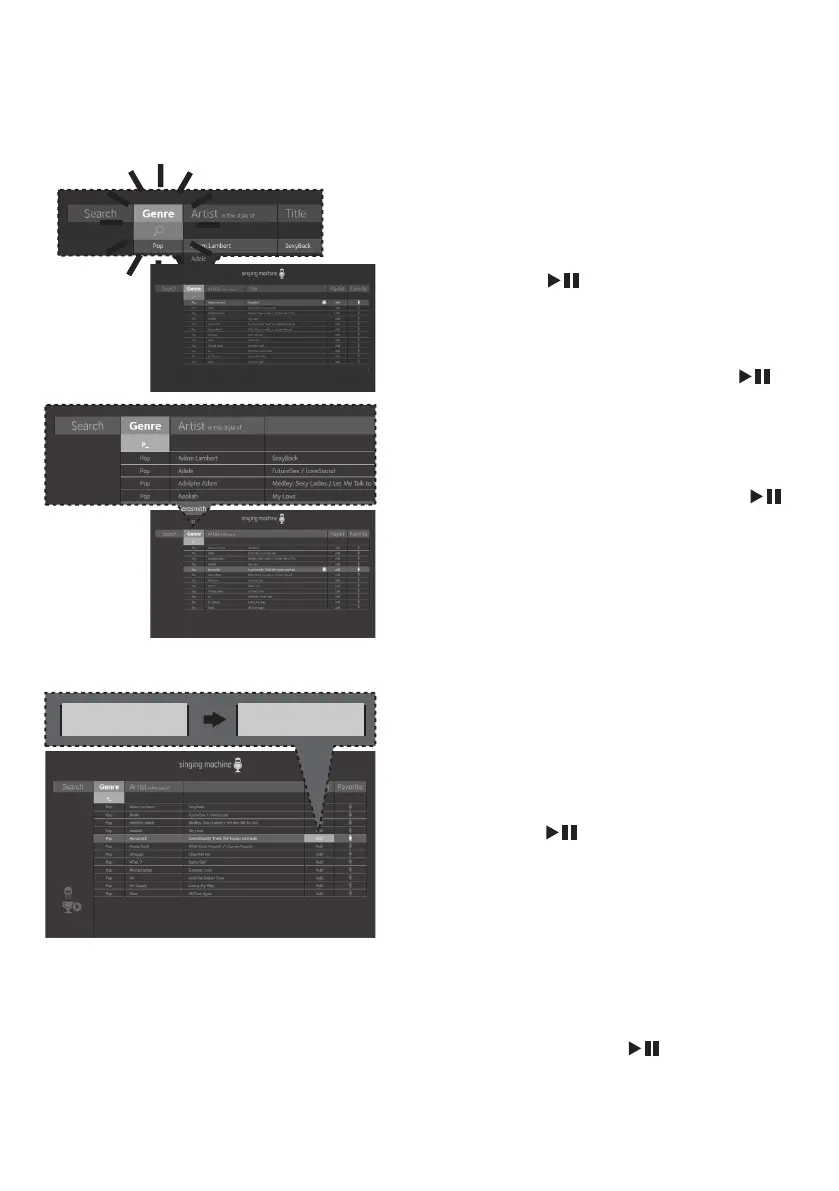
SEARCHING BY GENRE, ARTIST
or TITLE:
To filter by Genre, Artist
or Title
, select
the Genre, Artist, or
Title
using the Navigation 3 Left
and 4 Right buttons, then press the
ENTER button. The alphabet
will appear at the bottom of the
screen; select the desired starting
letter using the MASTER VOLUME
control, then press the ENTER
button to select it. A list of songs
that meet the criteria will appear. Use
the Navigation 5 Up and 6 Down
buttons to navigate through the list
of songs, then press the ENTER
button to play your selection, or
select the next letter the same way.
Note:
You can search up to six letters. After the
sixth letter the search will reset.
16
CREATING THE PLAYLIST: To create a
personalized playlist, select a song using
the Navigation 5 Up and 6 Down
buttons, then scroll to the Playlist
column (Add) using the Navigation
4 Right or 3 Left button. Press the
ENTER button
to confirm the
operation; “Added” will appear. Repeat
this step to add more songs.
Notes:
• The personalized Playlist will be kept even if
the unit is turned on or off.
• You can always edit your Playlist after you
create it by selecting a song that was added
and pressing the
ENTER button
again;
“Added” will change to “Add”.
Add Added










 To Next Page