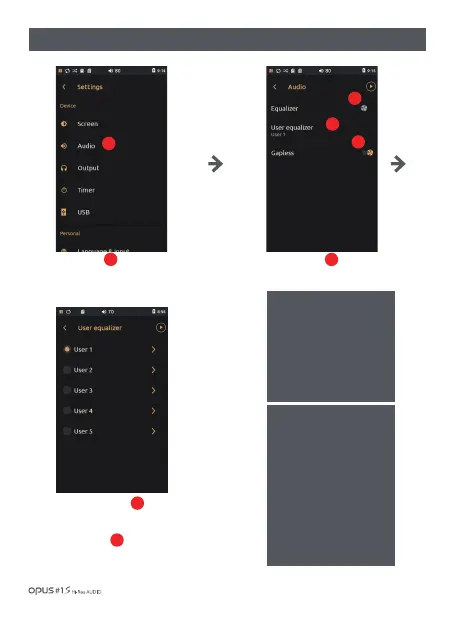
Press ‘Audio’ in Device in
settings menu to enter Audio
settings screen.
Press Equalizer button to
activate User EQ settings.
2
1
1
2
3
Attention!
There will be no difference in
EQ effect if User 1, 2, 3, 4, 5
are set identically regardless
EQ ON/ OFF status.
User EQ is set at 0db upon
factory dispatch.
Press User Equalizer to enter
User equalizer screen.
Press ‘Gapless’ playback to
activate it for a gapless playback
of the current and next files.
4
3
4
| ‘Audio’ settings screen (1)
Gapless function.
Continuous playback of
current and next music files
without abruption.
{ This function is only valid if
the current and next playback
files have the same properties
(sample rate, bit, channel). }
If properties differ there is a
short abruption between
files.
Using the device / 26



 To Next Page