Need help?
Do you have a question about the THERM PRO TP359 and is the answer not in the manual?
Specifies the operational temperature range and accuracy of the device.
Details the humidity measurement range and accuracy.
Button to toggle temperature display between Fahrenheit (°F) and Celsius (°C).
Button to initiate Bluetooth pairing mode with a mobile device.
Button to reset recorded maximum and minimum temperature/humidity values.
Download and install the 'ThermoPro Sensor' App from the App Store or Google Play.
Enable Bluetooth on smartphone and pair the thermometer via the app.
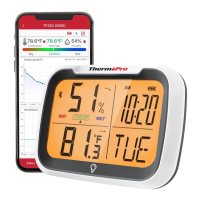
The ThermoPro TP359 is a Bluetooth-connected thermometer/hygrometer designed for remote monitoring of temperature and humidity in various indoor environments such as living rooms, bedrooms, and greenhouses. This smart device allows users to track environmental conditions from their smartphone, providing convenience and peace of mind.
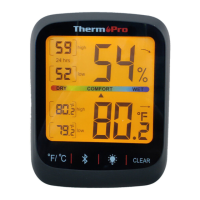
The primary function of the ThermoPro TP359 is to accurately measure and display both temperature and humidity. It connects wirelessly to a smartphone via Bluetooth, enabling remote monitoring through a dedicated mobile application called "ThermoPro Sensor." The device features an LCD screen that shows current temperature and humidity readings, along with indicators for Bluetooth connectivity, low battery, humidity history, and temperature history. It also displays humidity and temperature tendencies, as well as a comfort level indicator. The device is equipped with a magnet for easy mounting and a hanging hole for versatile placement.
To begin using the ThermoPro TP359, users must first download and install the "ThermoPro Sensor" app on their smartphone. This can be done by scanning a QR code provided in the manual or by searching for the app on the Apple App Store (for iOS 9.0 and above) or Google Play Store (for Android 4.4 and above). Android users need to grant all requested permissions for the app to function correctly.
Once the app is installed, Bluetooth must be enabled on the smartphone. The next step involves inserting two AAA batteries into the device's battery compartment, ensuring correct polarity. Upon battery insertion, the temperature and humidity readings will appear on the device's screen, and a Bluetooth icon will flash, indicating that the thermometer is ready for pairing.
Users then launch the "ThermoPro Sensor" app and tap the "add a thermometer" icon. The app will display a list of available thermometers, from which the user selects the TP359 to pair. Once pairing is successful, the Bluetooth icon on the device's display will stop flashing, and the current temperature and humidity will be shown within the app. If pairing is not completed while the Bluetooth icon is flashing, users can press and hold the pairing button on the device for 2 seconds to re-enter pairing mode.
The device includes several touch-sensitive buttons for direct control:
The remote monitoring capability allows users to check the environmental conditions of their desired location without physically being present, which is particularly useful for areas like greenhouses or basements. The app provides a comprehensive overview of the data, including historical trends, enabling users to make informed decisions about their environment.
The ThermoPro TP359 is designed for straightforward maintenance. The primary maintenance task involves replacing the two AAA batteries when the low battery indicator appears on the display. This ensures continuous operation and accurate readings.
For cleaning, the device should be wiped with a soft, dry cloth. It is important to avoid using harsh chemicals or abrasive materials that could damage the screen or casing. The device is not waterproof, so it should be kept away from water and high moisture environments to prevent damage.
In case of any issues with the device or the app, ThermoPro provides customer service support via telephone and email. This includes assistance with setup, troubleshooting, and warranty claims. The product comes with a limited one-year warranty covering defects in parts, materials, and workmanship from the date of purchase.
The device is also designed with environmental responsibility in mind. It should not be disposed of with normal household waste. Instead, users are advised to dispose of the unit at an approved facility or a local recycling center, adhering to current rules and regulations for electronic appliance disposal. This ensures proper handling and recycling of electronic components. The manufacturer also provides a declaration of conformity, ensuring the product meets relevant EU directives for radio equipment and electromagnetic compatibility.
 General
| Water Resistance | IP65 |
|---|---|
| Type | Digital Thermometer |
| Temperature Range | -58°F to 572°F (-50°C to 300°C) |
| Accuracy | ±2% or ±2°C |
| Resolution | 0.1°C/°F |
| Response Time | 500ms |
| Probe Material | Stainless steel |
| Display | LCD with backlight |
| Battery | 1 x CR2032 |
| Auto-off | Yes, after 10 minutes |

 To Next Page