EasyManua.ls Logo

Therma-Stor PHOENIX DRYMAX XL - User Manual

Therma-Stor PHOENIX DRYMAX XL
16 pages
Print Icon
To Next Page IconTo Next Page
Loading...
1
USEPHOENIX.COM | 800-533-7533
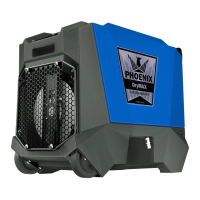
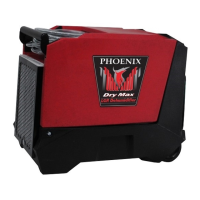
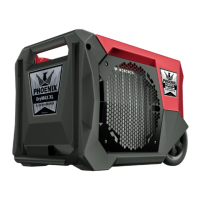
The Phoenix DryMAX XL LGR Dehumidifier
• Two in the space of one regular XL
• XL LGR Performance - 125 PPD
• Built In Bluetooth
• Free DryLINK App
• Graphical Control Panel
• Patented FiveCOIL Design
• Wheels and a Handle
• Cord Storage
• Maneuverability
• Superior Stacking
• Size = 24” x 16” x 17.5”
• Easily Serviceable
The groundbreaking DryMAX XL removes an amazing 125
ppd at AHAM while taking up only 50% of the space of the
next smallest competitive XL dehumidifier. Because of its
compact size, the DryMAX XL allows restorers to fit twice the
amount of XL dehumidifiers on their vehicle. The DryMAX XL
is also the first dehumidifier with built-in Bluetooth technology
and the first with an advanced graphical control panel
which puts all the information on homescreen in an easily
understandable format. Our free DryLINK app is included with
the unit upon purchase. This unit will automatically send the
psychrometric data by Bluetooth to the DryLINK app or an app
you may already use for your drying jobs.
Like our industry-leading DryMAX and AirMAX, the new
Phoenix DryMAX XL was also designed with superior stacking
features and easy service access. Our patented FiveCOIL
design, which includes our micro-channel condenser
, allows
the featherweight DryMAX XL to pack a knock-out punch
on drying performance every time.
TS-1141
06/23 Rev. E
Phoenix DryMAX XL
Part No. 4037000 (Red)
4037060 (Blue)
618 (Green)
Patent: thermastor.com/patents
Installation, Operation & Service Instructions
– READ AND SAVE THESE INSTRUCTIONS –
OWNER’S MANUAL
DRYMAX XL | XL LGR DEHUMIDIFIER
4201 LIEN RD. • MADISON, WI 53704
Specifications subject to change without notice.
Question and Answer IconNeed help?

Do you have a question about the Therma-Stor PHOENIX DRYMAX XL and is the answer not in the manual?

Summary

Safety Certifications

Specifications

Operation

3.1 Transporting

Describes how to properly secure and transport the unit.

3.2 Electrical Requirements

Details power source, circuit, and extension cord specifications.

3.3 Control Panel Overview

Explains control panel functions, indicators, and button operations.

3.3.4 Purge Button Operation

Instructions for manually purging condensate from the reservoir.

3.3.5 Dashboard Information

Explains the data displayed on the unit's dashboard.

3.3.6 Menu Navigation

How to navigate through the unit's menus and settings.

3.3.7 Purging System

Describes the automatic purge cycle and display indicators.

3.3.8 Condensate Removal

Details the internal condensate pump and its operation.

3.3.9 Defrosting Indicator

Explains the defrost mode and its display indication.

3.3.10 Defrost Cycle

Describes the process of the defrost cycle and its triggers.

3.3.11 Shutdown Sequence

How the unit powers down and the purpose of the shutdown time.

3.3.12 Device Name Settings

Information on changing the unit's name via the DryLINK App.

3.3.13 Job Hours Tracking

Explanation of job hours and how to reset them.

3.3.14 Quiet Mode

How to enable Quiet Mode to reduce fan speed and noise.

3.3.15 Inlet Dew Point Display

Displays the ambient dew point temperature.

3.3.16 RH Calibration

Instructions for calibrating the relative humidity sensor.

3.3.17 Bluetooth Connectivity

Information on Bluetooth functionality and connectivity.

3.3.18 Temperature Unit Selection

How to switch between Fahrenheit and Celsius temperature units.

3.3.19 Humidity Unit Settings

How to change units for humidity readings (grains, g/Kg).

3.3.20 Humidistat Mode

How to enable and disable the Humidistat mode.

3.3.21 Humidistat Set Point

How to set the desired humidity level in Humidistat mode.

3.3.22 Humidistat Fan Mode

How to set the fan mode for Humidistat operation (Auto/On).

3.3.23 About Screen

Displays system information like firmware and part numbers.

3.4 Ducting Installation

Instructions for attaching lay-flat or round ducting to the unit outlet.

Maintenance

4.1 Air Filter Care

Guidance on checking, cleaning, and replacing the air filter.

4.2 Storage and Freeze Protection

Procedures for storing the unit and preventing freeze damage.

Service and Troubleshooting

5.1 Running Diagnostics

Accessing diagnostic modes to help technical support.

5.2 Technical Description

Explanation of the unit's refrigeration system and operation.

5.3 Troubleshooting Common Issues

Guidance for resolving common error messages and operational problems.

5.3.1 Air Mover Issues

Troubleshooting steps for the air mover not running or running erratically.

5.3.2 Thermistor Probe Replacement

Instructions for replacing the thermistor probe.

5.3.3 Condensate Pump Replacement

Step-by-step guide to replace the internal condensate pump.

5.3.4 Float Switch Replacement

Instructions for replacing the float switch.

Options and Accessories

Wiring Diagram

Service Parts

Limited Warranty

Therma-Stor PHOENIX DRYMAX XL Specifications

General IconGeneral
ModelPHOENIX DRYMAX XL
Airflow300 CFM
RefrigerantR410A
TypeDehumidifier
Operating Temperature Range33°F to 100°F
Drainage OptionsGravity drain or pump
Power Supply115V

Related product manuals