
 Need help?
Do you have a question about the Thermaltake V200 TG and is the answer not in the manual?
List of included accessories and their usage.
Instructions on removing chassis screws and opening the side panel.
Instructions on placing and securing the power supply unit with screws.
Steps for laying down the chassis and installing the motherboard.
Instructions for installing 3.5" and 2.5" HDDs in the chassis.
Instructions on using PCI slots and securing the card with screws.
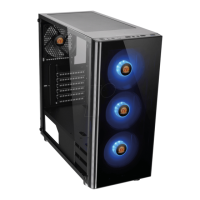
Explains how to control RGB lighting modes via the switch button.
Guide for installing various sizes of fans for air cooling.
Instructions for installing radiators of different sizes in the chassis.
Connect case LEDs and switch leads to the motherboard header.
Guide to connecting USB 2.0 ports as per motherboard manual.
Steps to ensure motherboard support and connect USB 3.0 cable.
Connecting audio connectors, ensuring compatibility with AC'97 or HD Audio.
Information about optional Thermaltake power supply product lines.
Overview of Thermaltake's RGB Plus software and voice control.
 General
| Type | Mid Tower |
|---|---|
| Motherboard Support | ATX, Micro-ATX, Mini-ITX |
| Expansion Slots | 7 |
| Cooling Support | Front: 3 x 120mm or 2 x 140mm, Top: 2 x 120mm or 2 x 140mm, Rear: 1 x 120mm |
| Pre-installed Fans | 1 x 120mm Rear Fan |
| Color | Black |
| Material | SPCC |
| Drive Bays | 2 x 2.5" |
| I/O Ports | USB 3.0 x 1, USB 2.0 x 2, HD Audio |
| Radiator Support | Rear: 1 x 120mm |
| Clearance | CPU Cooler: 160mm, PSU: 170mm |



 To Next Page