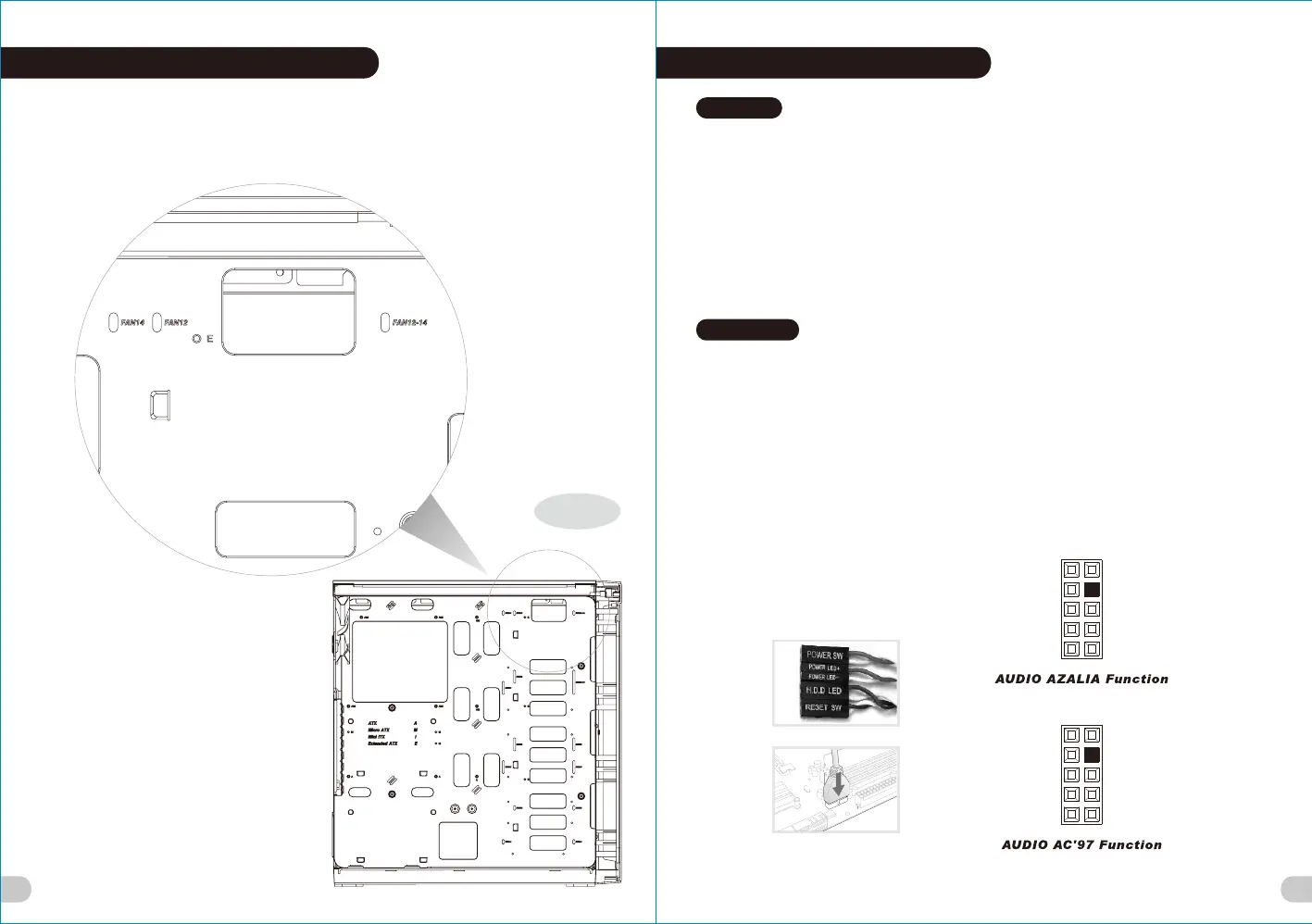
Radiator installation guide
FAN12: Radiator/Fan120mm series
FAN14: Radiator/Fan 140mm series
FAN12-14: Radiator/Fan 120 or 140mm series
12
13
FAN14
FAN12 FAN12 - 14
Right
Leads Installation Guide
Case LED Connection / On the front of the case, you can find some LEDs and switch leads. Please consult your user
manual of your motherboard manufacturer, then connect these leads to the panel header on the motherboard.
USB 2.0 Connection / Please consult your motherboard manual to find out the section of “USB connection”.
USB 3.0 connection /
1. Make sure your motherboard supports USB 3.0 connection.
2. Connect the USB 3.0 cable to the available USB 3.0 port on your computer.
Audio Connection / Please refer to the following illustration of Audio connector and your motherboard user manual.
Please select the motherboard which used AC’97 or HD Audio(Azalia),(be aware of that your audio supports AC’97 or HD
Audio (Azalia)) or it will damage your device(s).
Anschlüsse herstellen
Gehäuse-LED-Verbindungen / Auf der Gehäusevorderseite finden Sie einige LEDs und Verbindungen. Bitte nehmen
Sie die Gebrauchsanweisung Ihres Motherboard Herstellers zur Hilfe und schließen Sie diese Verbindungen an die Panel
Header Belegung des Motherboards an.
USB 2.0 Anschluss / Bitte nehmen Sie die Gebrauchsanweisung Ihres Motherboards zur Hilfe und lesen Sie unter dem
Kapitel „USB Anschlüsse“ nach.
USB 3.0 Anschluss /
1. Stellen Sie sicher, dass Ihre Hauptplatine den USB 3.0 Anschluss unterstützt.
2. Verbinden Sie das USB 3.0 Kabel mit dem USB 3.0 Port auf Ihrem Computer.
Audio Anschlüsse / Bitte beachten Sie die folgende Abbildung der Audio Anschlüsse und die Anweisung in der
Gebrauchsanweisung Ihres Motherboards. Bitte wählen Sie das Motherboard, das AC’97 oder HD Audio(Azalia)
verwendet, (achten Sie darauf, dass Ihr Audio AC’97 bzw. HD Audio (Azalia unterstützt)). Andernfalls entstehen schwere
Schäden an Ihrem(n) Gerät(en)!!!
Leads Installation
English
Deutsch
USB 3.0 Connection
L-OUT
SENSE
R-OUT
MIC-POWER
MIC-IN
SENSE2
KEY
SENSE1
PRESENSE
GND
L-OUT
R-OUT
MIC-POWER
MIC-IN
L-RET
KEY
R-RET
GND
藍色線條為尺寸標示,請勿印刷上去!
產品料號
CA-1J7-00M1WN-00
說明書
17/12/22
A
產品名稱
印刷項目
發稿日期
版本
騎馬釘24 105G
雙銅
單色 無無
其他特殊處理效果表面處理
2
厚度(g/m )
裝訂方式 材質頁數 印刷色彩
規格樣式
整本
CHECK DESIGN
Poki
(17/12/22)
Averson
(17/12/22)
刀模線
125 mm
176 mm
View 37







 To Next Page