Motherboard Installation
English /
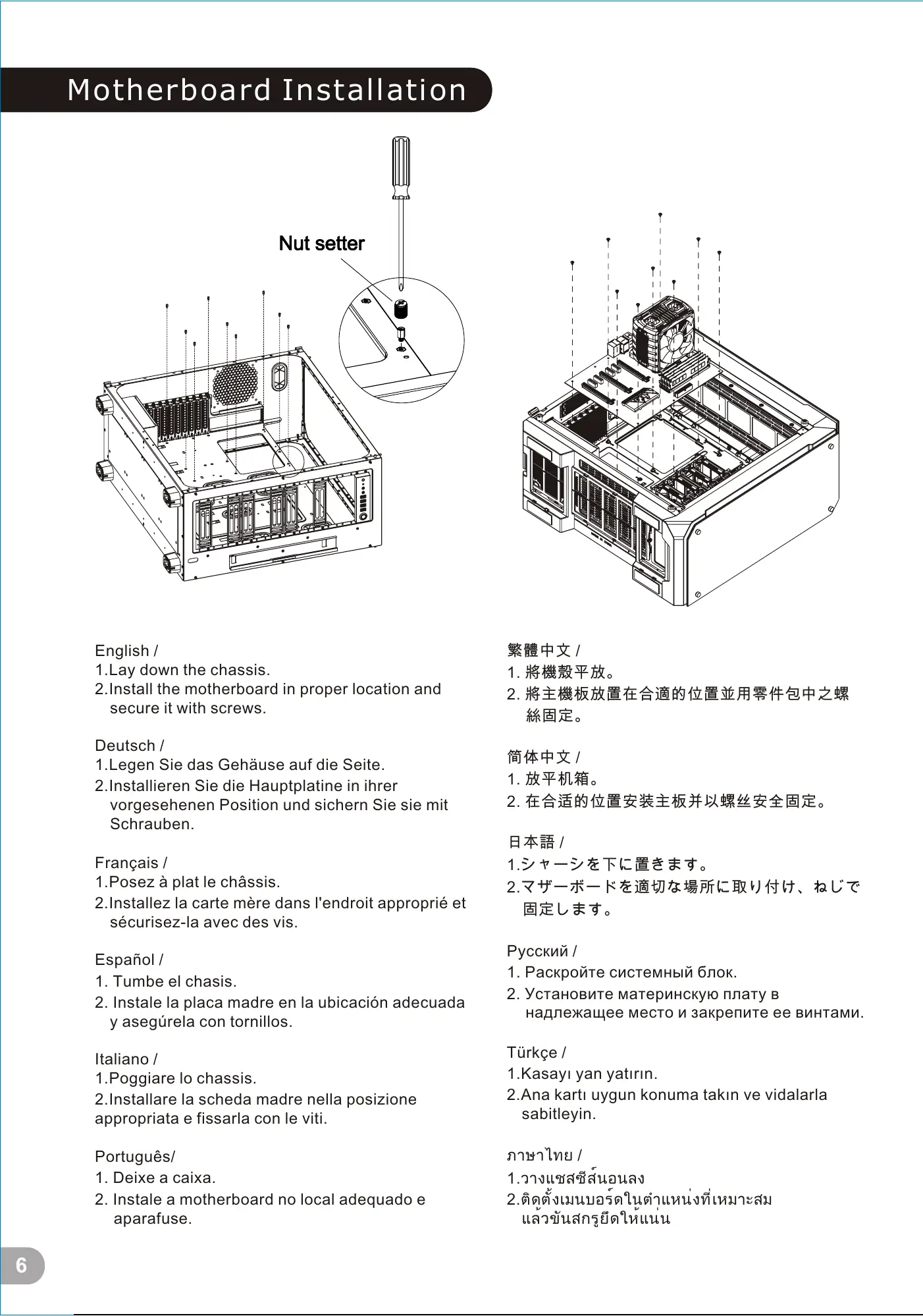
1.Lay down the chassis.
2.Install the motherboard in proper location and
secure it with screws.
Deutsch /
1.Legen Sie das Gehäuse auf die Seite.
2.Installieren Sie die Hauptplatine in ihrer
vorgesehenen Position und sichern Sie sie mit
Schrauben.
Français /
1.Posez à plat le châssis.
2.Installez la carte mère dans l'endroit approprié et
sécurisez-la avec des vis.
Español /
1. Tumbe el chasis.
2. Instale la placa madre en la ubicación adecuada
y asegúrela con tornillos.
Italiano /
1.Poggiare lo chassis.
2.Installare la scheda madre nella posizione
appropriata e fissarla con le viti.
Português/
1. Deixe a caixa.
2. Instale a motherboard no local adequado e
aparafuse.
繁體中文 /
1. 將機殼平放。
2. 將主機板放置在合適的位置並用零件包中之螺
絲固定。
日本語 /
1.シャーシを下に置きます。
2.マザーボードを適切な場所に取り付け、ねじで
固定します。
Русский /
1. Раскройте системный блок.
2. Установите материнскую плату в
надлежащее место и закрепите ее винтами.
简体中文 /
1. 放平机箱。
2. 在合适的位置安装主板并以螺丝安全固定。
Türkçe /
1.Kasayı yan yatırın.
2.Ana kartı uygun konuma takın ve vidalarla
sabitleyin.
ภาษาไทย /
1.วางแชสซีส์นอนลง
2.ติดตั้งเมนบอร์ดในตำแหน่งที่เหมาะสม
แล้วขันสกรูยึดให้แน่น
3.5" & 2.5" HDD Installation
Type A
Type B
3.5” HDD
2.5” HDD
3.5” HDD
2.5” HDD
6
7
藍色線條為尺寸標示,請勿印刷上去!
產品料號
CA-1I7-00F1WN-00 View 71 TG
說明書
17/10/25
A
產品名稱
印刷項目
發稿日期
版本
騎馬釘24 105G
雙銅
單色 無無
其他特殊處理效果表面處理
2
厚度(g/m )
裝訂方式 材質頁數 印刷色彩
規格樣式
整本
CHECK DESIGN
Poki
(17/10/25)
Averson
(17/10/25)
刀模線
125 mm
176 mm
7 / 14 6 / 12 7 / 14







 To Next Page