20 | P a g e
Part Number - 00824 Revision K, DCO 2017-0074
© 2017 Thermedx
®
, LLC
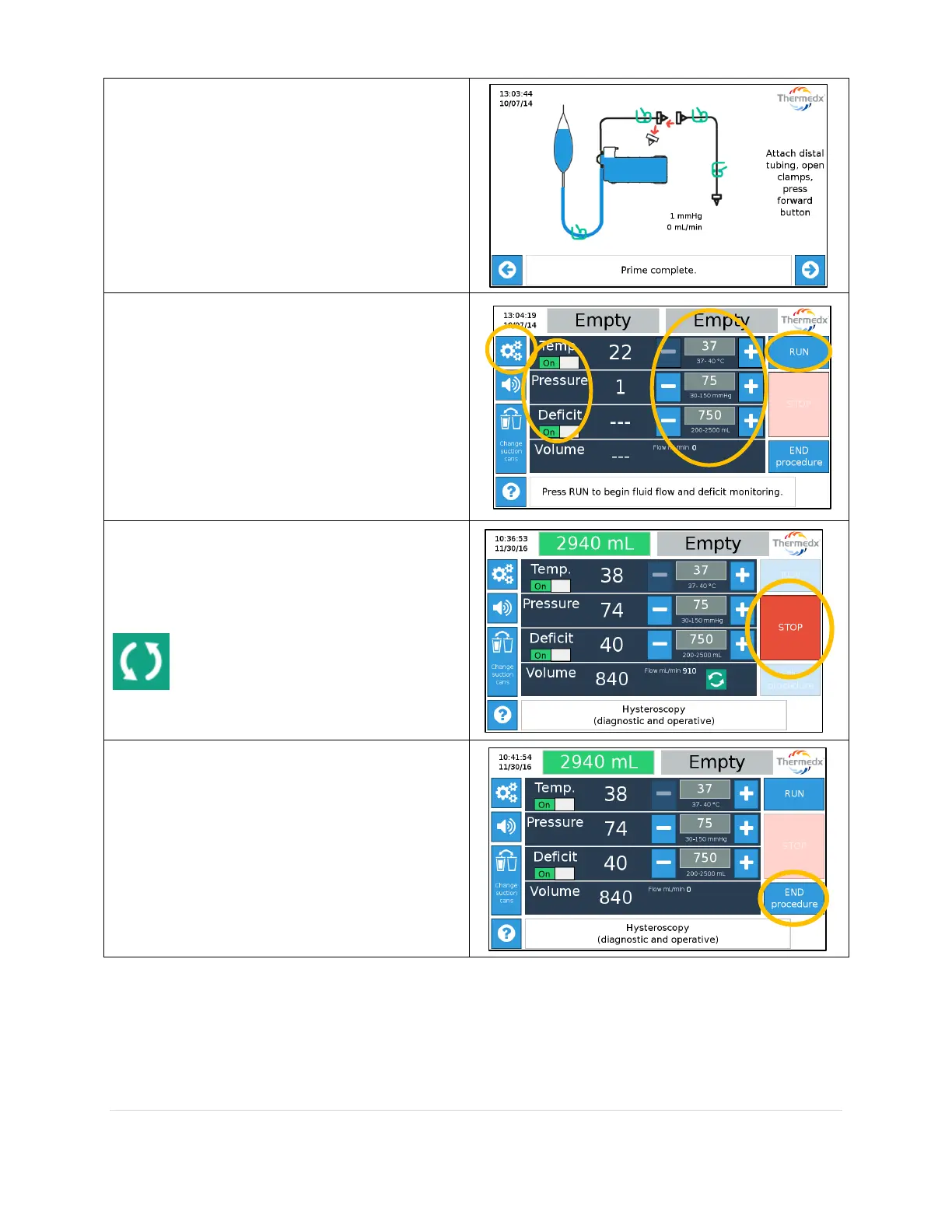
Prime is complete.
Attach distal tubing and open clamps.
Press forward button to proceed to Run
screen.
On the Run screen:
Press RUN to start fluid flow
Use the +/- buttons to adjust set-
points.
Use toggle buttons to enable or
disable features.
Press the gear icon to access
additional settings (see below).
Pump will start, stop, reverse, and change
speed as required to maintain selected
pressure.
Press STOP to stop the pump. Pressing
STOP does not stop deficit measurement.
The flow icon indicates pump is
running.
When procedure is over press END
procedure. Doing so will freeze the deficit
measurement and display a summary of the
system performance.



 To Next Page