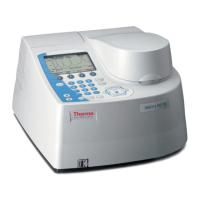
The GENESYS 10S Vis is a spectrophotometer designed for a wide range of analytical applications, integrating advanced hardware features with flexible accessory options. This user guide provides comprehensive instructions for its operation, setup, maintenance, and various measurement modes.
Function Description:
The GENESYS 10S Vis spectrophotometer measures the absorption or percent transmission spectrum of a sample, allowing for quantitative analysis experiments. It supports various measurement modes, including basic Absorbance and %Transmittance (A-%T-C), advanced A-%T-C with cell correction and delay times, basic and advanced concentration measurements, scanning, multiwavelength measurements, absorbance ratio, absorbance difference, 3-point net calculations, standard curve applications, and kinetics. The instrument is designed for ease of use, with a keypad for parameter entry and menu navigation, and the ability to store and recall test methods.
Important Technical Specifications:
The instrument operates in the visible light range. Compatible cell types and their wavelength ranges include:
- Optical Glass: 360 nm to > 1100 nm
- Borosilicate Glass: 330 nm to > 1100 nm
- Disposable Quartz: 190 nm to > 1100 nm
- Disposable Polystyrene: > 340 nm
- Disposable Methacrylate: > 300 nm
- Disposable Acrylic: > 280 nm
- Disposable UV-transparent: > 220 nm
The Z-dimension (distance from the bottom of the cuvette to the center of the light beam) is 8.5 mm. The beam dimensions are 2 mm (wide) by 7 mm (tall). The instrument includes a 6-position cell holder and a single cell holder. It supports external desktop printers compatible with HP PCL 5.0 format and later, as well as an optional internal printer. The internal printer outputs text and graphics, while the USB connection to a computer outputs only ASCII text. The tungsten lamp requires a 30-minute warm-up.
Usage Features:
- Keypad Interaction: The instrument features a keypad with function keys that change based on the software screen. It allows for numeric, alphanumeric, and menu selections, as well as on/off toggles. The
Enter key accepts values and advances to the next parameter, Esc returns to the previous screen, and Clear clears entered values or deletes the last character.
- Cell Holders: The instrument comes with a 6-position cell holder (factory-installed) and a single cell holder. Various accessory cell holders are available, including single cell recirculator temperature control, test tube holders, 50 mm rectangular long pathlength cell holders, 50 mm cylindrical long pathlength cell holders, thin film/filter holders, and adjustable filter/lens holders. These can be installed or removed without switching off the instrument.
- Cuvette Positioning: Cuvettes and test tubes must be positioned with clear sides facing the light beam. For small aperture cells, black masking is recommended, and the same cell should be used for both blank and samples. Test tubes should be oriented consistently using an alignment mark.
- Parameter Entry: Users can set various parameters such as date, time, baseline expiration time, and screen contrast through the Utility menu.
- Internal Printer: An optional internal printer can be installed, and paper loading instructions are provided. The instrument can also connect to external USB printers.
- Sample Positioner Settings: Users can select different sample positioner modes:
- Auto 6: Measures one blank and up to five samples automatically in the 6-position cell changer.
- Auto 3: Measures one blank and two samples automatically in positions 2 and 4 of the cell changer.
- Single Cell Holder: Manual measurement for one blank and one sample, ideal for accessories requiring high positioning repeatability.
- Manual 6: Allows manual selection of cell positions for blank and up to five samples in the cell changer.
- Cell Correction: This feature corrects for variances in absorption between cuvettes and is active only with the 6-position cell holder in Auto 6 or Auto 3 mode. It can be run in "Scan" mode (for a range of wavelengths) or "Discrete nms" mode (for user-specified discrete wavelengths).
- Managing Stored Tests: Test methods can be named, saved to internal memory or a USB drive, loaded, locked/unlocked with a password (4363797), and deleted.
- SmartStart: This feature allows customization of the initial menu to display frequently used tests. A single SmartStart test will load automatically on power-up, while multiple SmartStart tests will appear in a dedicated menu.
- Concentration Units: Users can specify basic concentration units (e.g., μg/L, ppm, M/L) or create custom units.
- Calculator Function: A basic calculator (addition, subtraction, multiplication, division) is available in the Utility menu.
- Measurement Modes:
- Basic A-%T-C: Instant measurement of absorbance, %transmittance, or concentration at a single wavelength.
- Advanced A-%T-C: Offers cell correction, delay times, and automated measurement of multiple samples.
- Basic Concentration Measurements: Uses a factor or a single standard to convert absorbance to concentration.
- Advanced Concentration Measurements (Standard Curve Application): Performs quantitative analysis using a multipoint calibration curve, allowing for editing of standards and curve fits.
- Scanning: Measures the absorption or %transmission spectrum of a sample, with features for viewing, manipulating, rescaling data, labeling peaks/valleys, smoothing data, and calculating peak height (3-point net) or area under a curve.
- Multiwavelength: Makes multiple fixed-wavelength measurements, offering a faster alternative to scanning when wavelengths of interest are known.
- Absorbance Ratio/Difference: Measures the ratio or difference in absorption at two wavelengths, with reference wavelength correction available.
- 3-Point Net: Determines peak height based on a sloping baseline between two wavelengths, useful for specific assays.
- Kinetics: Measures the change in sample absorbance over time, allowing for determination of linear reaction rates and recalculation of results.
Maintenance Features:
- Routine Care: Involves replacing the dust cover, avoiding corrosive environments, and gently wiping the instrument with a soft, lint-free cloth and appropriate cleaning agents (water, isopropyl alcohol, non-abrasive laboratory cleaning solution). Spills should be cleaned immediately.
- Cell Cleaning: Cuvettes and cells should be checked for damage and cleaned regularly. Cleaning methods vary based on the contaminating material (e.g., warm water with detergent, dilute nitric acid, organic solvents). Ultrasonic cleaning baths are not recommended and can void the warranty. Cells should never be stored long-term in solvent baths or dried in an oven.
- Fuse Replacement: The instrument's fuse is located in the power entry module on the back panel. Instructions are provided for safely replacing the fuse (120 VAC, 2.5 A, Slo Blo or 240 VAC, 1.25 A, Slo Blo).
- Tungsten Lamp Replacement: Detailed instructions are provided for safely replacing the tungsten lamp, including cooling time, loosening captive screws, disconnecting cables, and wiping the new lamp. After replacement, the lamp hours should be reset in the Utility menu.
- Performance Verification: A suite of tests (Wavelength Accuracy - Internal/Standard, Resolution, Photometric Accuracy, Noise, Stray Light, Internal Printer Test) is available to check instrument performance and ensure reliability. Troubleshooting guidelines are provided for failed tests.

 Need help?
 General



 To Next Page