
 To Next Page
K
kristine83Aug 2, 2025
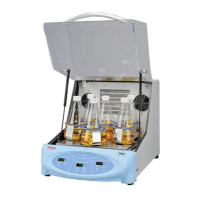
Why won’t my Thermo Scientific MaxQ SHKA4000 Laboratory Equipment shaker heat?
- YymartinezAug 2, 2025
If your Thermo Scientific Laboratory Equipment shaker won’t heat, make sure you push the “HEAT ON” button.

Why won’t my Thermo Scientific MaxQ SHKA4000 Laboratory Equipment shaker heat?
If your Thermo Scientific Laboratory Equipment shaker won’t heat, make sure you push the “HEAT ON” button.
What to do if my Thermo Scientific Laboratory Equipment shaker doesn’t operate?
If your Thermo Scientific Laboratory Equipment shaker isn’t operating, here are some things you can try: First, ensure the shaker is plugged in. If it is, check that you are using a power supply that matches the unit's requirements. You may also need to reset the circuit breaker. Try pressing any switch on the control panel or resetting the timer. Make sure the timer is set for either continuous or timed operation. Finally, the unit may be defective and require replacement.
How to fix a Thermo Scientific MaxQ SHKA4000 Laboratory Equipment platform that doesn’t rotate or has erratic speed?
If the platform of your Thermo Scientific Laboratory Equipment doesn’t rotate or has an erratic speed, the motor may be defective and require replacement. Alternatively, a part may be worn, broken, or slipped off the pulley, which would also require replacement.
General safety guidelines to prevent electrical shock and personal injury during shaker operation.
Explains the function of each control and indicator on the A-Class shaker panel.
Details the function of each control and indicator on the E-Class shaker panel.
Details power source requirements (voltage, frequency) and safety precautions.
How to use the power switch, speed control, and timer on A-Class models.
Explains controller self-test, heat indicator, and how to adjust set points.
Step-by-step guide for calibrating the temperature controller using a thermocouple.
Covers turning on, setting speed, and calibrating speed for E-Class models.
Procedures for adjusting the high-limit temperature control on the shaker.
Instructions for adjusting the low-limit temperature control on refrigerated models.
Addresses problems like the shaker not operating or not heating, with possible causes and solutions.
 General
| Model | MaxQ SHKA4000 |
|---|---|
| Speed Range | 15 to 500 rpm |
| Temperature Uniformity | ±0.5°C at 37°C |
| Capacity | 4 x 1L or 2 x 2L flasks |
| Display | LED |
| Timer | Continuous or up to 199 hours |
| Dimensions (W x D x H) | 29.5 x 26 x 18 in |
| Weight | 150 lbs |
| Type | Shaker |
| Shaking Orbit | 1.9 cm (0.75 in) |
| Controller | Microprocessor |