17
4.Use and Operation Instruction of Wire Controller
(2) Add Device
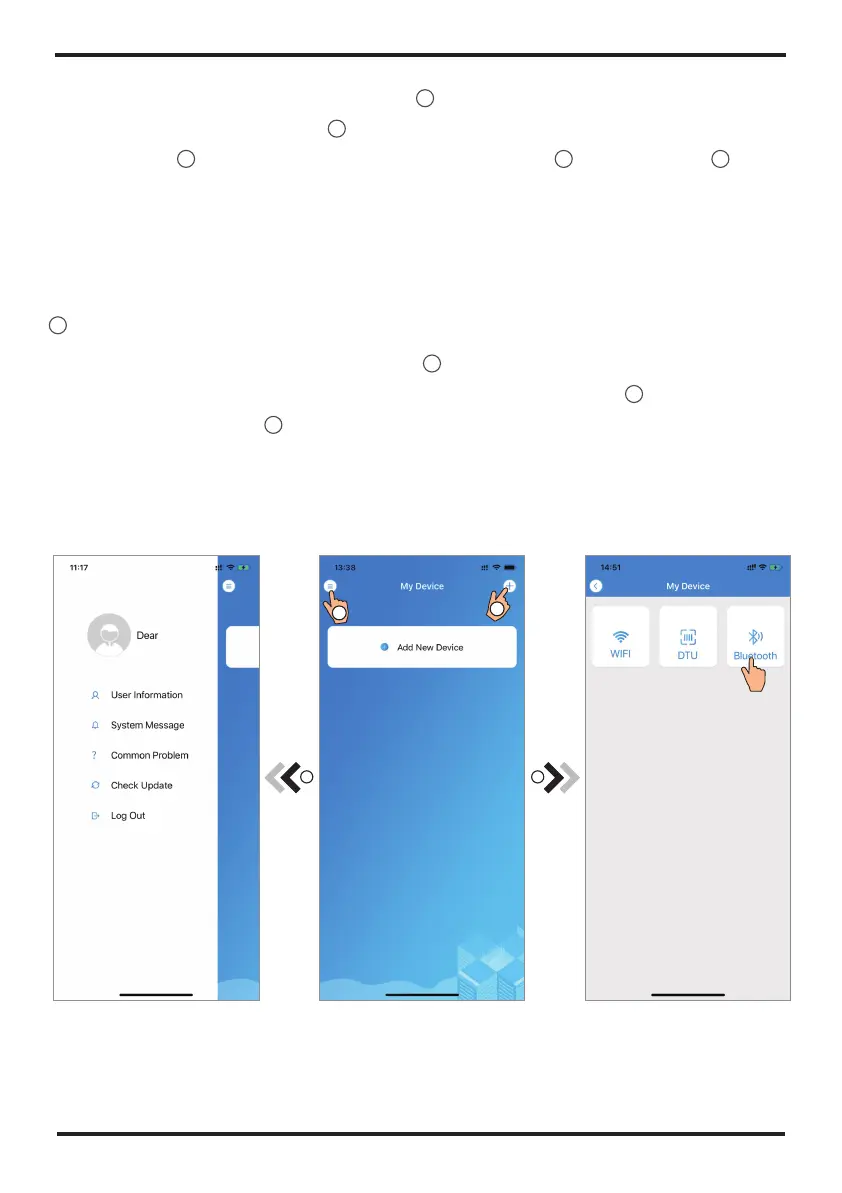
After log in, displays My Device interface (Fig. 4) , follow the instruction to add and
bond device.
Fig.5 The left-hand menu Fig.4 My Device interface Fig.6 Add Device interface
1 2
1
2
1. Account Registration: To register an account, click 1 (Fig.1) to jump to the Account Registration interface,
fill in the relevant information and click 2 to receive verification code, while completed the application
information, click 3 to read the details of the Privacy Policy, then click 4 to agree, and click 5 , registration
is done.
Please note, the valid time of one verification code is 15min, please fill in the verification code within 15min,
otherwise you need to ask for a new one.
2. Log in: Follow the instructions on the page(Fig.1 ), enter your registered email address and password, click
6 and jump to device list;
3. Forgot Password: While forget your password, click 7 (Fig.1 ), jump to the Forgot Password interface
(Fig.3 ). Follow the instructions on the page, fill in the relevant informations, click 8 to receive verification
code from your mailbox, click 9 to comfirm and password reset is done.


 To Next Page