EasyManua.ls Logo

ThermoWorks Smoke X4 - User Manual

ThermoWorks Smoke X4
2 pages
Print Icon
To Next Page IconTo Next Page
Loading...
What’s Included:
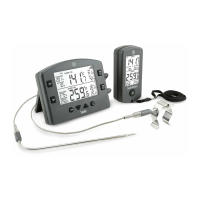
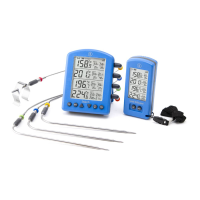
Smoke X4 Receiver, Batteries (Installed), neck lanyard, and this
instruction card.
How to Operate:
To power Smoke X4 Receiver on, press the button.
To activate backlight, press the button.
To power Smoke X4 Receiver off, press and hold for 3
seconds.
To change volume level, press VOL button.
To mute an alarm, press any button.
How to sync:
With Smoke X4 powered on, press and hold the button
for 5 seconds until “SYNC” appears on the screen.
Now that Smoke X4 is in SYNC mode, make sure Smoke X4
Receiver is powered on.
Press and hold the VOL button for 5 seconds on Smoke
X4 Receiver. The display should read “SYNC” for a short
amount of time.
Both Smoke X4 and Smoke X4 Receiver will beep and
return to normal functionality signaling a successful pairing.
NOTE: To sync multiple Smoke X4 Receivers to one base,
please follow the steps above on one Smoke X4 Receiver at
a time. Putting Smoke X4 into Sync mode will not disable or
interfere with previously synced Smoke X4 Receivers.
Go to www.thermoworks.com/smokex4 for additional product
information and more tips for use.
Smoke X4
Receiver
Operating Instructions
This device complies with part 15 of the FCC Rules. Operation is subject
to the following two conditions: (1) this device may not cause harmful
interference, and (2) this device must accept any interference received,
including interference that may cause undesired operation.
Special Notice
Changes or modifications not expressly approved by the party
responsible for compliance could void the user’s authority to operate
the equipment.
NOTE: This equipment has been tested and found to comply with
the limits for a Class B digital device, pursuant to part 15 of the FCC
Rules. These limits are designed to provide reasonable protection
against harmful interference in a residential installation. This equipment
generates, uses and can radiate radio frequency energy and, if not
installed and used in accordance with the instructions, may cause
harmful interference to radio communications. However, there is no
guarantee that interference will not occur in a particular installation.
If this equipment does cause harmful interference to radio or television
reception, which can be determined by turning the equipment off and
on, the user is encouraged to try to correct the interference by one or
more of the following measures:
• Reorient or relocate the receiving antenna.
• Increase the separation between the equipment and receiver.
• Connect the equipment into an outlet on a circuit different from that to
which the receiver is connected.
• Consult the dealer or an experienced radio/TV technician for help.
P-18-09-02-a
www.thermoworks.com
741 E. Utah Valley Dr.
American Fork, UT 84003
For service or warranty:
1-800-393-6434
1-801-756-7705
techsupport@thermoworks.com
Question and Answer IconNeed help?

Do you have a question about the ThermoWorks Smoke X4 and is the answer not in the manual?

Summary

Smoke X4 Receiver Operating Instructions

Whats Included

Lists the components included with the Smoke X4 Receiver package.

How to Operate

Details the basic functions for powering on/off, activating backlight, and adjusting volume.

How to Sync

Explains the procedure for pairing the Smoke X4 Receiver with a base unit.

Overview

The Smoke X4 Receiver is a wireless temperature monitoring device designed to work in conjunction with the Smoke X4 base unit. It provides real-time temperature updates and alarm notifications, enhancing the user's ability to monitor cooking processes remotely.

Function Description:

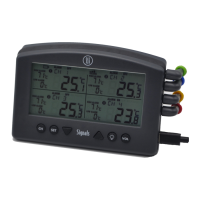
The primary function of the Smoke X4 Receiver is to wirelessly receive and display live temperature data from the Smoke X4 base unit. It can monitor up to four different temperature probes simultaneously, displaying each probe's current temperature along with its corresponding High/Low Alarm temperature settings and alarm status (on or off). The receiver updates its display every 30 seconds, ensuring the user has up-to-date information. It also features an audible alarm system to alert the user when a set temperature threshold is reached.

Important Technical Specifications:

The device operates wirelessly, receiving transmissions from the Smoke X4 base unit. It includes a battery life indicator to inform the user of the remaining power. The display shows temperatures in either Celsius or Fahrenheit, depending on the settings of the Smoke X4 base unit. The receiver is designed for portability, featuring a neck lanyard for convenient carrying.

Usage Features:

  • Power On/Off: To power the Smoke X4 Receiver on, the user presses the dedicated power button. To power it off, the user presses and holds the power button for 3 seconds.
  • Backlight Activation: The backlight can be activated for 20 seconds by pressing the power button, improving visibility in low-light conditions.
  • Volume Control: The receiver includes a VOL button to change the alarm volume level.
  • Alarm Mute: If an alarm sounds, pressing any button on the receiver will mute it.
  • Wireless Synchronization (Syncing):
    • To initiate synchronization, the user first ensures the Smoke X4 base unit is powered on.
    • On the Smoke X4 base unit, the user presses and holds the (()) button for 5 seconds until "SYNC" appears on its screen.
    • Next, on the Smoke X4 Receiver, the user ensures it is powered on.
    • The user then presses and holds the VOL button on the Smoke X4 Receiver for 5 seconds. The receiver's display will briefly show "SYNC".
    • Upon successful pairing, both the Smoke X4 base unit and the Smoke X4 Receiver will beep and return to normal operation.
    • Multiple Receiver Syncing: If syncing multiple Smoke X4 Receivers to a single Smoke X4 base unit, the process should be repeated for each receiver individually. Importantly, putting the Smoke X4 base unit into Sync mode will not disable or interfere with any previously synced Smoke X4 Receivers.
  • Display Information: The display clearly shows the current temperature for each of the four probes, the High/Low Alarm settings for each probe, and an indicator for whether the alarm is active for a given probe. A wireless transmission icon indicates when the device is actively transmitting data, flashing during active transmission.

Maintenance Features:

  • Battery Life Indicator: The receiver includes a battery life indicator on its display, allowing the user to monitor battery status and anticipate when a battery replacement or recharge (if applicable) might be needed.
  • FCC Compliance: The device complies with part 15 of the FCC Rules, ensuring it meets standards for radio frequency emissions and is unlikely to cause harmful interference. Users are advised to take corrective measures (reorienting antenna, increasing separation, connecting to different outlet) if interference occurs.
  • Firmware Updates/Support: While not explicitly detailed as a user-accessible feature, the manual directs users to the manufacturer's website for additional product information and tips for use, implying ongoing support and potential for updates or troubleshooting guidance.
  • Warranty and Service: Contact information for service and warranty claims is provided, including phone numbers and an email address, ensuring users can access support for any issues or repairs.

The Smoke X4 Receiver is designed for ease of use and reliable performance, making it a valuable tool for anyone needing precise temperature monitoring in cooking or other applications. Its wireless capabilities and clear display enhance convenience, while its alarm system provides critical alerts.

ThermoWorks Smoke X4 Specifications

General IconGeneral
BrandThermoWorks
ModelSmoke X4
CategoryThermometer
LanguageEnglish

Related product manuals