☆ Viewing Videos and Photos on Your i60+
1. Turn on camera.
2. Press Power / Mode Button repeatedly until you get to Playback
Mode “ ”.
3. Press Up / Down Button to check the videos or photos files.
4. Press Shutter / Select Button to Play / Stop the Video.
00001/00000
Setup Mode
* Press the Power / Mode Button repeatedly until you get to Setup
Mode “ ”.
* Press the Shutter / Select Button to enter the setting menus.
☆ Delete Photos or Videos on Your i60+
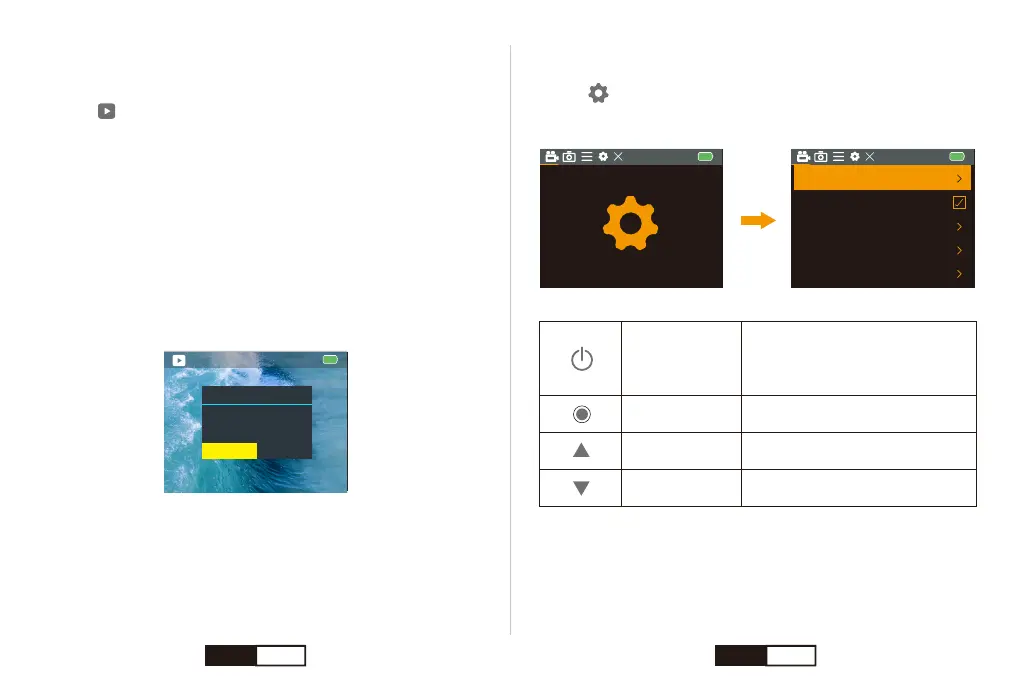
1. Enter into playback mode.
2. Press Up / Down Button to check the videos or photos files.
3. Press & Hold Shutter / Select Button for 3s to enter the delete dialog.
The Screen shows “Delete this file?”
4. Press Up or Down Button to select “Confirmation”.
5. Short press Shutter / Select Button to confirm.
Notice:
* You can play back your content on the camera’s touch display, your
computer, TV, or smartphone / tablet.
* You can also play back content by inserting the micro SD card directly
into a device, such as a computer or compatible TV. With this method,
playback resolution depends on the resolution of the device and its
ability to play back that resolution.
Delete
Delete this file?
CencelConfirmation
Video Recording
Timelapse Video Close
Close
720P 120FPS
Looping Record
Slow Motion
Video Resolution 1080P 60FPS
Power /
Mode Button
Switch to a Different Menu:
Video Settings, Photo Settings and
System Settings.
Confirm Your Select
Turn to Previous Item
Turn to Next Item
Shutter /
Select Button
Up / WiFi Button
Down Button
EN 10 EN 11


 To Next Page