WiPro III + safe.lock Installation Manual – Fiat Ducato X250, Euro 4
3
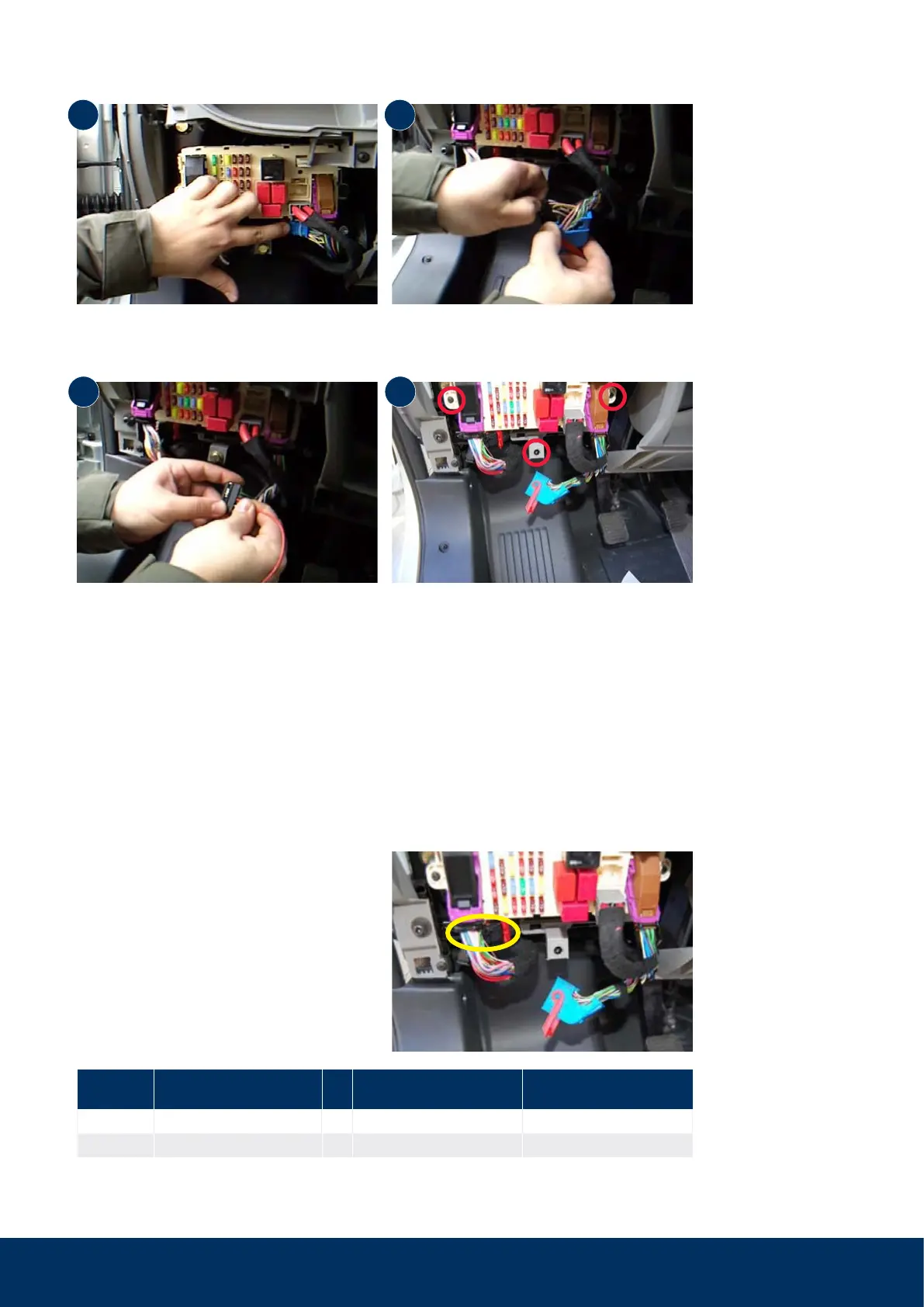
Step 2: Make preparations for connection of power supply and remove on-board computer
Step 3: Connect safe.lock wire
Connect the control lines for the central lock-
ing system as follows:
Remove the blue connector on the front side
of the on-board computer (fold the red bracket
forwards to release).
Pin 46 (connector is numbered at the bottom)
is protected via fuse 39 with 10 A (lower row,
3rd fuse from the left).
Only insert the power supply wire into pin 46
after all assembly/connection work has been
completed.
If pin 46 is already occupied (e.g. red/yellow or
red/black), the connection can be made with a
branch connector.
Remove the black plug insert (side plastic lugs
serve towards locking).
Remove three screws and pull the on-board
computer forwards to get to the connectors on
the rear side.
1
3
2
4
Pin Cable colour on vehicle
Cable colour on WiPro III
safe.lock
Function
28 blue/yellow → blue/black front doors
50 pink/violet → blue rear doors



 To Next Page