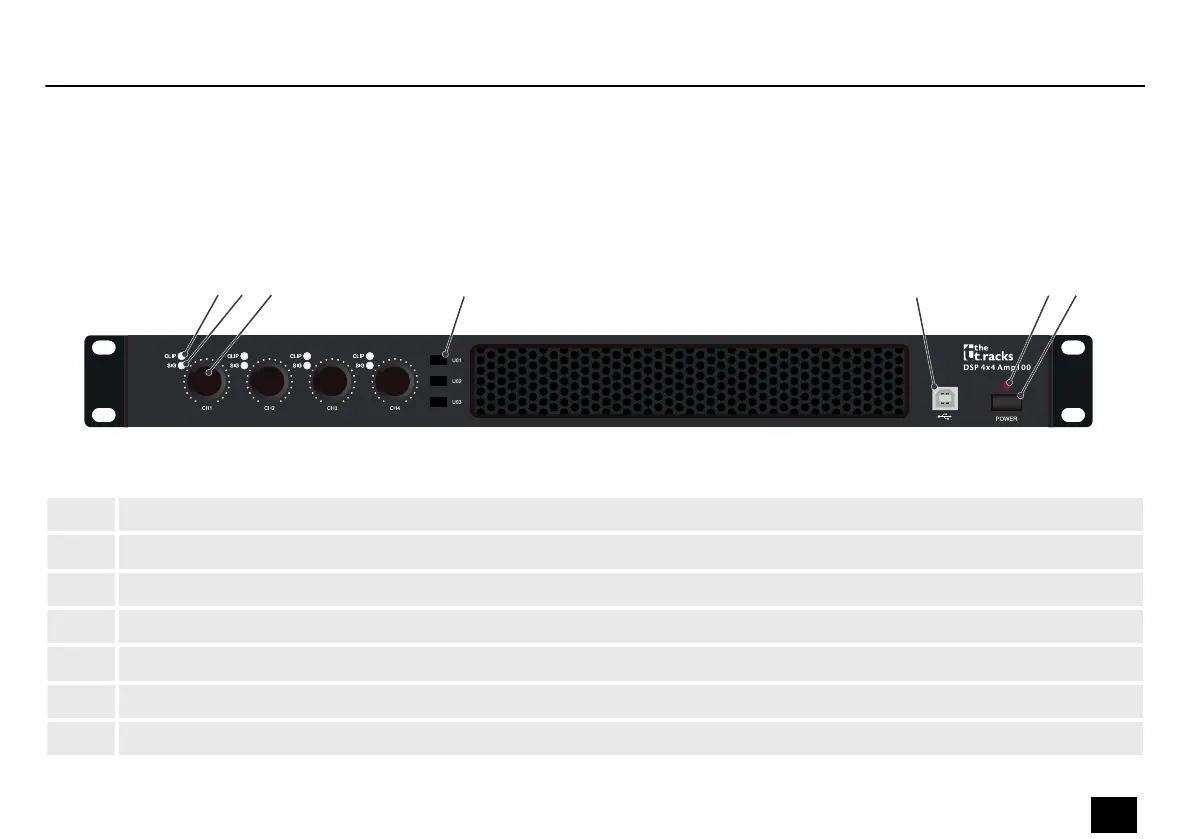
5 Connections and controls
1 [CLIP] LED for each channel | The LED lights up when the signal on the respective input is overloading.
2 [SIG] LEDs for each channel | The LED lights up when a signal is present at the respective input.
3 Rotary control [CH 1]…[CH 4] | Controls the output level of the corresponding channel.
4 Buttons [U01], [U02], [U03] | Buttons for calling up the presets. Press and hold the button for 2 seconds to call them up.
5 [USB] | USB interface for connecting to a PC
6 [POWER] | The LED lights when the device is on.
7 [POWER] button | Button for switching on and o
Front
Connections and controls
DSP 4x4 Amp 4.250, DSP 4x4 Amp100V
13
Controller



 To Next Page
 Loading...