D
I
S
C
t
a
p
e
R
D
S
p
t
y
m
e
m
o
2
3
654
78
9
1
P
L
A
Y
F
W
D
S
T
O
P
R
E
V
PAU
S
E
h
i
f
i
0
v
c
r
/
s
a
t
t
v
d
i
g
i
t
a
l
c
d
s
a
t
/
c
a
b
dv
d
t
h
e
a
t
e
r
m
o
d
e
s
d
e
l
a
y
t
u
n
e
r
v
i
d
e
o
/
v
c
r
s
te
r
e
o
l
e
v
e
l
u
p
p
r
p
r
d
o
w
n
R
E
C
v
c
r
d
t
s
d
v
d
/c
d
r
e
p
.
m
i
x
M
U
L
T
I
P
R
O
D
U
C
T
rc
1
0
0
0
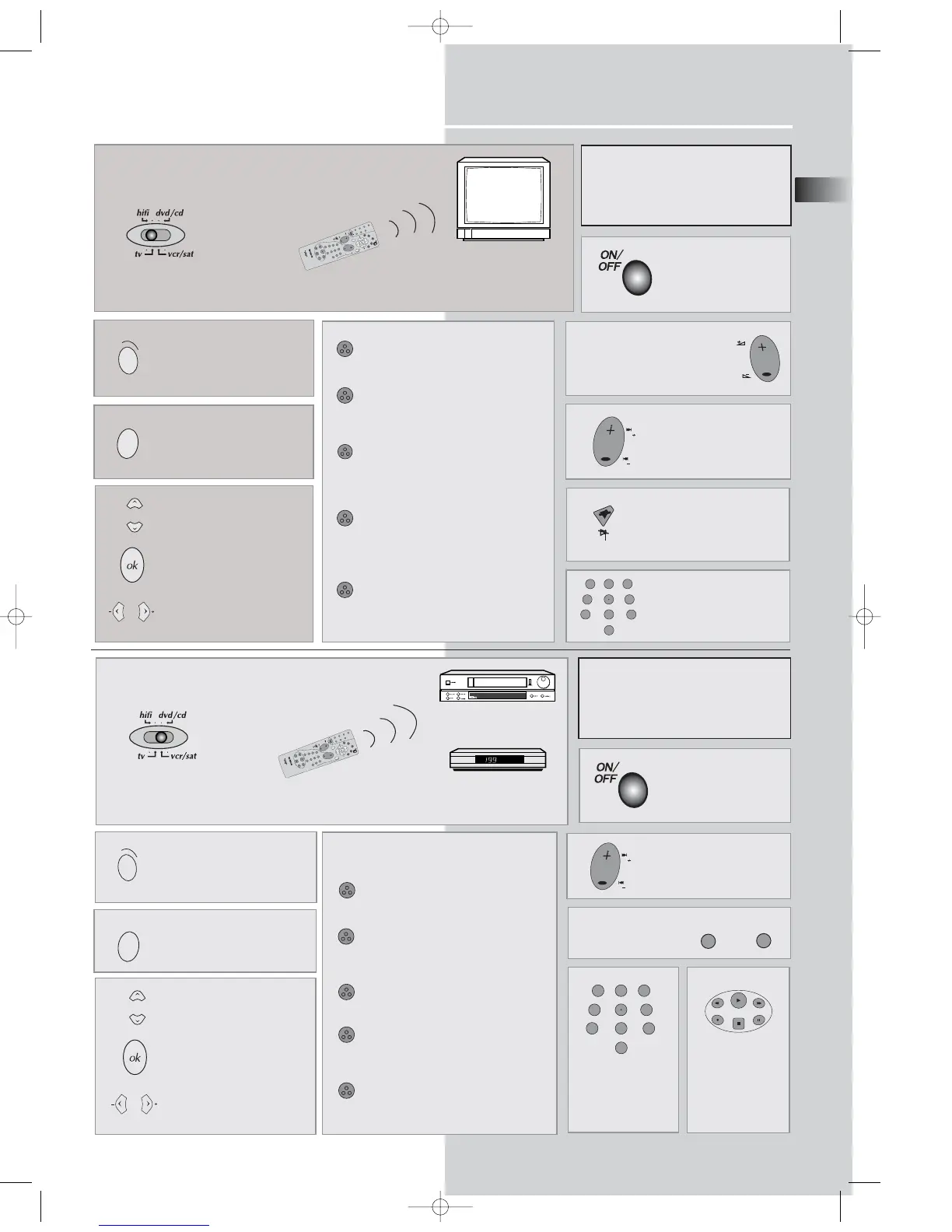
Switch the key to tv position to control the TV.
According to the devices and when they
were put on the market, all the functions
represented on this page will not
inevitably be available.
According to the devices and when they
were put on the market, all the functions
represented on this page will not inevitably
be available.
Standby/on
Standby/on
Access to the menu with the
setting functions
To change channels
Volume level adjustment
Sound mute
Call up the sound and picture
settings (red button)
Call up a programme list
(green button)
Display of channel name, time,
sound, type (yellow button) and
zoom for models with this function.
Call up NEXTVIEW Electronic
Program Guide (for models with this
function) or Teletext (Fasttext)
headings (blue button)
Call up the Teletext/Toptext/Fastext
function (purple key)
D
I
S
C
t
a
p
e
R
D
S
p
t
y
m
e
m
o
2
3
654
78
9
1
P
L
A
Y
F
W
D
S
T
O
P
R
E
V
PAU
S
E
h
i
f
i
0
v
c
r
/
s
a
t
t
v
d
i
g
i
t
a
l
c
d
s
a
t
/
c
a
b
dv
d
t
h
e
a
t
e
r
m
o
d
e
s
d
e
l
a
y
t
u
n
e
r
v
i
d
e
o
/
v
c
r
s
t
e
r
e
o
l
e
v
e
l
u
p
p
r
p
r
d
o
w
n
R
E
C
v
c
r
d
t
s
d
v
d
/c
d
r
e
p
.
m
i
x
M
U
L
T
I
P
R
O
D
U
C
T
rc
1
0
0
0
Switch the key to vcr/sat position to control the THOMSON VCR or a SAT
Satellite Receiver
VCR
Direct access to the
channels and input
of the digital values
AV input selection
(VCR only)
DISC
PLAY
FWD
STOP
REV
PAUSE
REC vcr
Playing of the
tape (VCR only)
VCR only
Access to the Menu
Access to the tape functions
SHOW VIEW function
VPS-PDC function
Information displayed on the screen
and setting of the menus
Access to the menu with the
setting functions
Direct access to the chan-
nels and input of the dig-
ital values
Up/Down selection in the
menus
Confirm
Left/Right selection in the
menus
Up/Down selection in the
menus
Confirm
Left/Right selection in the
menus
DPL950-EN last new 5/7/03 10:06 AM Page 5


 To Next Page