EasyManua.ls Logo

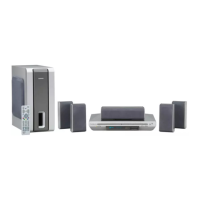
THOMSON Scenium DTH4500 - User Manual

THOMSON Scenium DTH4500
51 pages
Print Icon
To Next Page IconTo Next Page
Loading...
GB
GB
1
Precautions
Ensure that the mains supply in your house complies with that indicated on the identification sticker
located at the back of your player. Install your player horizontally, on a suitable base (furniture), with
enough space around it for ventilation (7-10 cm). Make sure the ventilation slots are not covered. Do
not stack other, or heavy devices on top of the player. Do not place the player on amplifiers or other
equipment which may become hot. Before moving the player, ensure the disc tray is empty.
This player is designed for continuous use. Switching off the DVD player to the stand-by mode does
not disconnect the electricity supply. In order to separate the player completely from the mains, it has
to be disconnected by unplugging the mains plug, especially when left unused for a long period of time.
Condensation
If your player or a disc have been stored in a cold atmosphere, as for example during transportation
in the winter, wait for approximately 2 hours until they have reached room temperature.
Protect the player from moisture and excess heat (e.g. fireplace) or equipment creating strong magnetic
or electric fields (i. e. speakers ...). Disconnect the power cable from the mains electricity supply if the
player malfunctions. Your player is not intended for industrial use but for domestic purposes only.
Use of this product is for personal use only. Copying CDs or downloading music files for sale or other
business purposes is or may be a violation of copyright law.
DISCLAIMER OF WARRANTY: TO THE EXTENT ALLOWED BY APPLICABLE LAW.
REPRESENTATIONS AND WARRANTIES OF NON-INFRINGEMENT OF COPYRIGHTS OR OTHER
INTELLECTUAL PROPERTY RIGHTS RESULTING FROM THE USE OF THE PRODUCT UNDER
CONDITIONS OTHER THAN AS HEREABOVE SPECIFIED ARE HEREBY EXCLUDED.
2 - Caution
1 - Setting up
Never open the player or any of its components. It can be dangerous for you or for certain fragile
components. You could receive an electric shock or touch the laser beam.
Do not place your eyes close to the opening of the disc tray or any other opening to look inside the
player.
3 - For your safety
Always handle your discs with care. Hold a disc with fingers on the border or hole.
Always place disc with the label facing upward (in case of a single-sided disc).
Always place the disc properly into the tray using the proper guide area.
Always use a soft cloth to clean discs if necessary, wipe from the centre to the border.
Always put discs back into their cases after playing and store in a vertical position.
Never
try to play a Photo CD.
Never
use record cleaning sprays, benzine, static electricity liquids or any other solvent, if the disc
surface is dirty. Wipe gently with a soft damp (water only) cloth, never wipe the disc in a circular
motion, since circular scratches are likely to occur and could cause noise during playback.
4 - Discs
5 - Batteries
Please respect the environment and prevailing regulations. Before you dispose of batteries or
accumulators, ask your dealer whether they are subject to special recycling and if he accepts to take
them back.
THOMSON multimedia shall not be responsible if the player is not used according to this manual.
DTH4500-GB 7/09/00 13:33 Page 1

Question and Answer IconNeed help?

Do you have a question about the THOMSON Scenium DTH4500 and is the answer not in the manual?

Summary

About Discs

Disc Types, Compatibility, and Regional Codes

Information on playable discs, regional codes, and incompatible formats.

Before You Start

Basic Connections and Initial Setup Procedures

Connecting the player and performing the first-time setup.

Video and Audio Connections

Connecting to TV and Audio Systems Diagrams

Diagrams for connecting player to TVs and audio equipment.

Digital Audio Output Configuration Settings

Setting up digital audio output formats.

Picture Settings

TV Screen Aspect Ratio Adjustment Guide

Adjusting picture format for 4:3 or 16:9 TVs.

SCART and NTSC Output Configuration Options

Selecting SCART signal type and NTSC disc output.

Basic Playback Operations

Playback, Resume Memory, and Volume Control

Starting playback, resume function, and master volume.

Display Options

Screen Format and Still State Settings Guide

Adjusting aspect ratio and still image modes.

Speaker Setup and Quality

System Audio Quality Configuration Steps

Setting up speakers for optimal sound.

Speaker Setting Principles and Icon Interpretation

Guidelines for speaker setup and icon interpretation.

Rating Limit and Parental Control

Setting and Managing Rating Levels and Passwords

Establishing parental control limits and managing passwords.

Universal Remote Control

Remote Control Setup and Basic Operation Guide

Configuring the remote for other devices.

Appendix: Troubleshooting

Power and Connectivity Issue Resolution

Solutions for power and video/audio connection problems.

Remote Control and Playback Error Solutions

Troubleshooting remote control and playback issues.

Summary

About Discs

Disc Types, Compatibility, and Regional Codes

Information on playable discs, regional codes, and incompatible formats.

Before You Start

Basic Connections and Initial Setup Procedures

Connecting the player and performing the first-time setup.

Video and Audio Connections

Connecting to TV and Audio Systems Diagrams

Diagrams for connecting player to TVs and audio equipment.

Digital Audio Output Configuration Settings

Setting up digital audio output formats.

Picture Settings

TV Screen Aspect Ratio Adjustment Guide

Adjusting picture format for 4:3 or 16:9 TVs.

SCART and NTSC Output Configuration Options

Selecting SCART signal type and NTSC disc output.

Basic Playback Operations

Playback, Resume Memory, and Volume Control

Starting playback, resume function, and master volume.

Display Options

Screen Format and Still State Settings Guide

Adjusting aspect ratio and still image modes.

Speaker Setup and Quality

System Audio Quality Configuration Steps

Setting up speakers for optimal sound.

Speaker Setting Principles and Icon Interpretation

Guidelines for speaker setup and icon interpretation.

Rating Limit and Parental Control

Setting and Managing Rating Levels and Passwords

Establishing parental control limits and managing passwords.

Universal Remote Control

Remote Control Setup and Basic Operation Guide

Configuring the remote for other devices.

Appendix: Troubleshooting

Power and Connectivity Issue Resolution

Solutions for power and video/audio connection problems.

Remote Control and Playback Error Solutions

Troubleshooting remote control and playback issues.

THOMSON Scenium DTH4500 Specifications

General IconGeneral
Progressive ScanYes
Remote controlYes
Power Consumption15 W
DVD player typeDVD player
Playable formatsCD, DVD
ConnectorsComposite video, Component video, S-Video
Disc CompatibilityDVD-R, DVD-RW, DVD+R, DVD+RW, CD-R, CD-RW
Audio OutputDolby Digital

Related product manuals