6
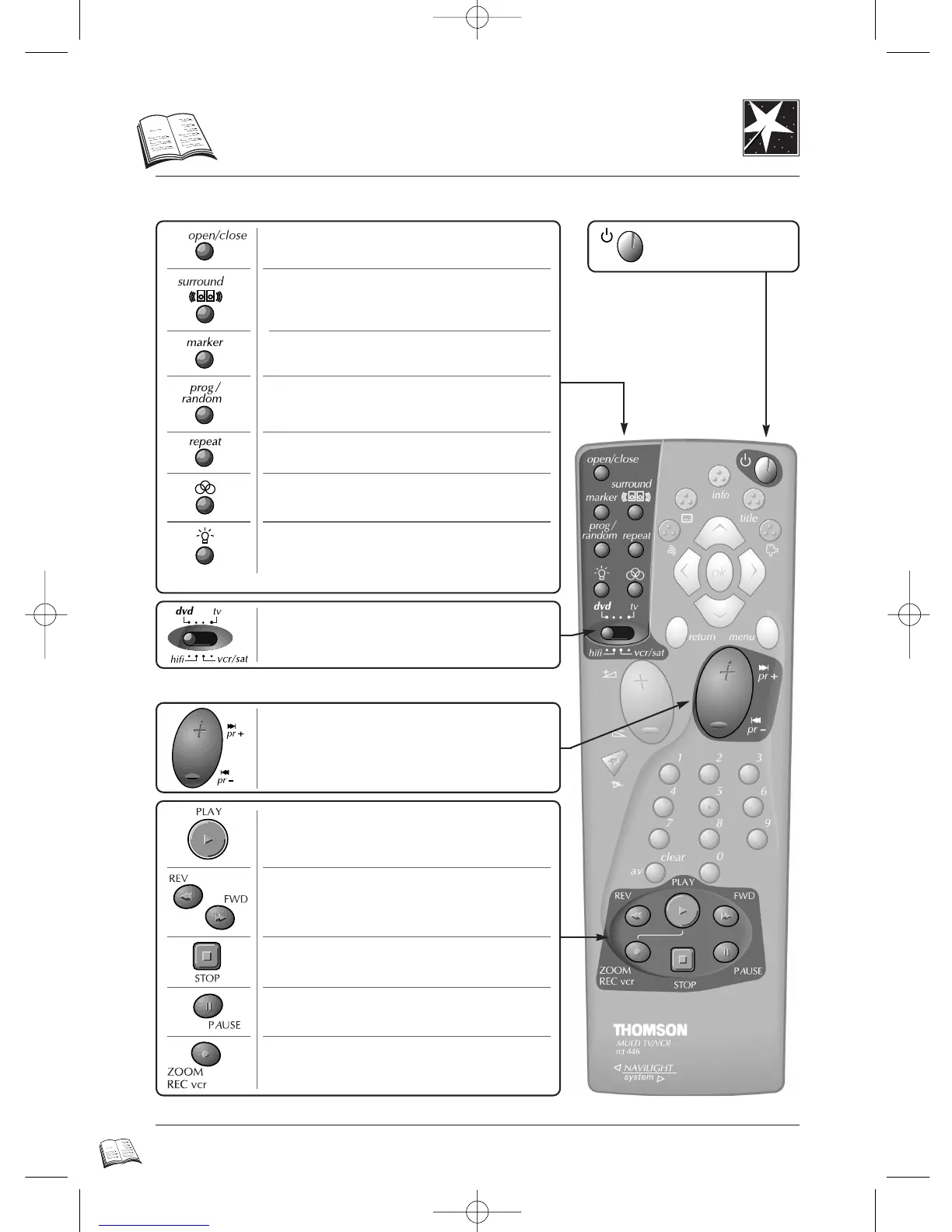
DVD remote control
Comfort functions Power / Stand-by
Playback
To switch your
player on and off.
* Press key again to remove display.
To enjoy virtual surround sound, if you only
use a stereo TV or 2 speakers
(page 26).*
To open or close the disc tray (page 22).
To memorize scenes for replay (page 25).
For random play and programme play (pages
30-31).*
To repeat titles, chapters, tracks,
or the whole disc (page 29).*
Not available.
To light the remote control buttons.
For fast reverse or forward and visual
search (while playing) in both directions
(page 22).
To start playback (page 24).
To stop a disc (to stop completely
press twice).
For pause / still picture, frame advance, and
slow motion (page 23).
To zoom-in during playback, slow motion or
pause mode on the selected area of a scene
(page 28).
To also use the remote control with your
video-recorder, TV set, satellite receiver or
amplifier
(pages 42-43)
.
To skip chapters or tracks (pages 25-33).
DTH4500-GB 7/09/00 13:33 Page 6



 To Next Page