GB
GB
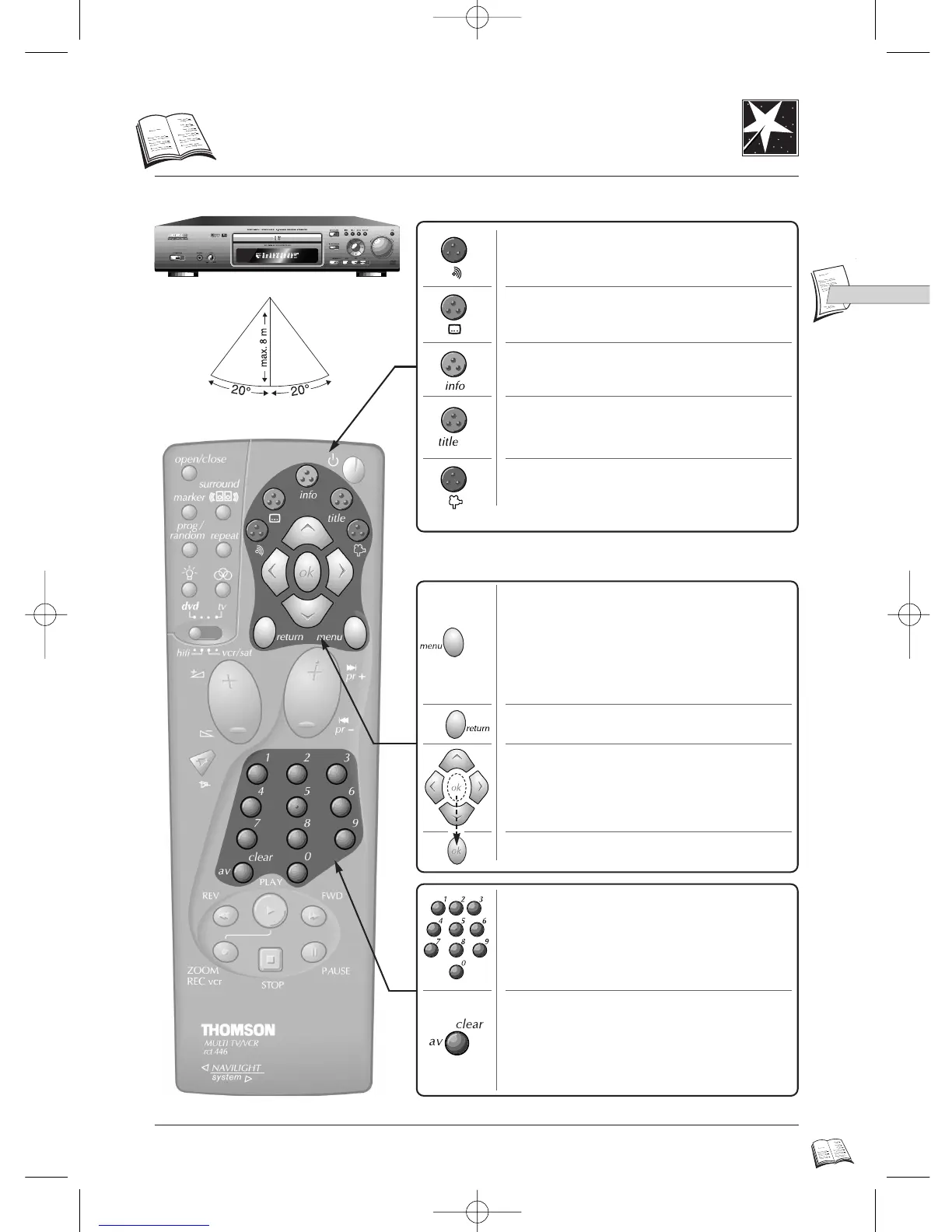
To go back in menu levels (p. 17).
Displays (on and off):
- the disc's menu (if available) during
playback (page 26),
- the player's set-up menu after having
stopped a disc with the STOP key (page 8,
pages 17-18).
7
DVD remote control
Selections via menu
Menu operation
Displays (on and off) the subtitle language
name abbreviation on-screen (page 27).*
Displays (on and off) the dialogue language
name abbreviation and the audio format on-
screen (page 26).*
Displays (on and off) the disc's special
features on-screen (pages 8-9-25).*
Displays (on and off) the disc's contents on-
screen (page 8-24).*
Introscan for CD Audio/CD Video (page 24).
Displays (on and off) the camera point of
view number on-screen (page 28).*
Confirms a selection.
Arrows move to items.
Clears on-screen displays
Clears markers in the marker on-screen
display (p. 25).
Clears program, repeat and random play.
(p. 29-30).
Use the number keys to input chapter or
track numbers or to select menu items.
Read pages 42-43 on the UNIVERSAL remote control to operate your video-recorder, TV set, satellite
receiver or amplifier.
* If available
DTH4500-GB 7/09/00 13:33 Page 7



 To Next Page