- EN 20 -
Description of parts
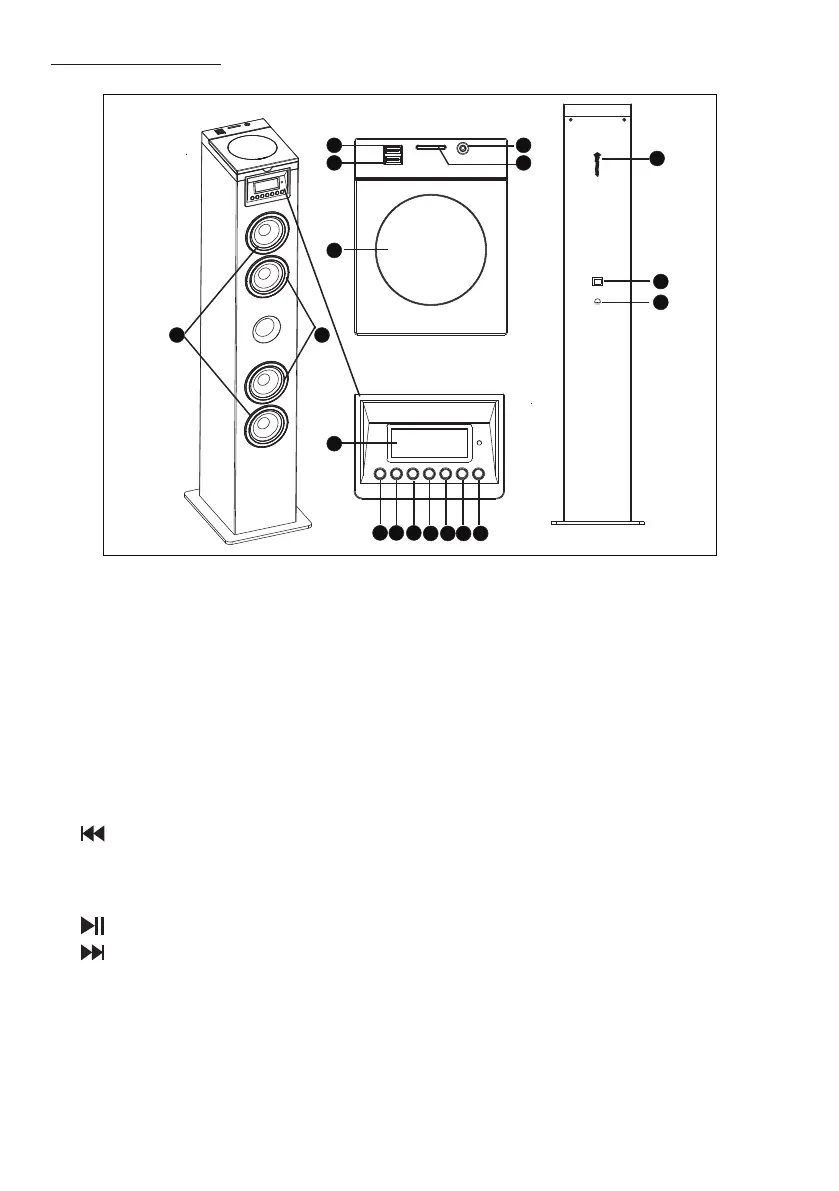
1.USB Charge
2.USB socket
3. Audio in
4. SD slot
5. CD door
6. Tweeter speaker
7. Speakers
8. FM antenna
9. Display panel :Show the current atus
10. Standby : Turn on the unit, switch to Standby mode
11.Source : Select a source: CD, Bluetooth, USB, FM or AUDIO IN
12.
Skip to the previous track
Tune to a radio ation
Press and hold the key to search within atrack CD/ USB
13. Start or pause play
14.
Skip to the next track
Tune to a radio ation
Press and hold the key to search within atrack CD/ USB
15. VOL - :Adju the Volume-
16. VOL + :Adju the Volume+
17. Power switch :Switch on or o your tower
1
2
5
9
10 11 12 13 14 15 16
17
18
8
6 7
3
4



 To Next Page