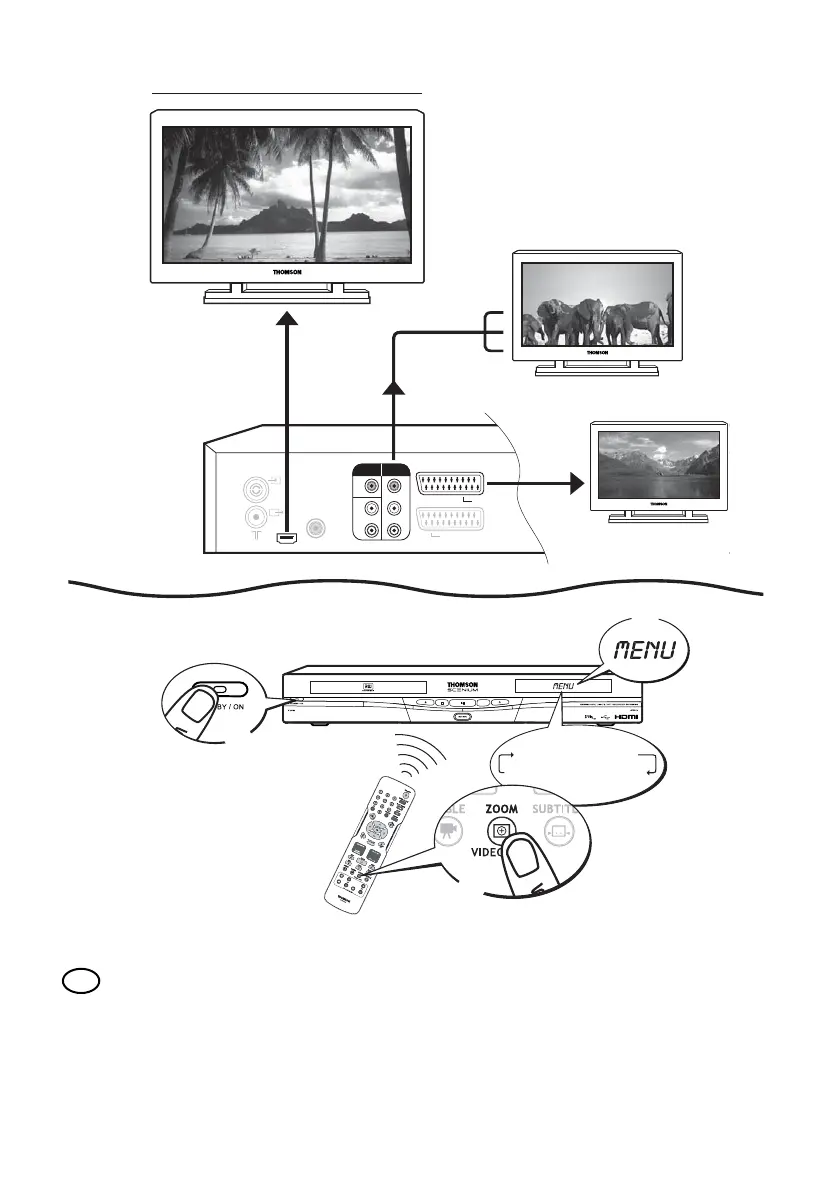
Connection via HDMI or Y-Pr-PB (also see page 5 of the manual)
Your DVD recorder is preset to provide RGB and CVBS output video signal. If you connect a television
set or monitor fitted with HDMI or Y-Pr-PB (YUV) sockets you must modify the presets or else you
will not get a picture on these sockets.The following instructions are used to change the signal settings
for the sockets used.
In menu mode, select the socket by pressing the
ZOOM/VIDEO OUT key on the remote control one
or more times until a menu appears.Your recorder's menu displays the following one after the other:
AUTO, 576P, 720P, 1080I, 1H YUV, RGB, Auto, 576P,…
EN
AV 2 (SAT-CABLE-DECODER)
AV 1 (TV)
HDMI OUT
COAXIAL
DIGITAL
AUDIO OUT
ANTENNA
/CABLE
IN
OUT
OUTPUT
COMPONENT
VIDEO OUT
VIDEO
AUDIO
L
R
Y
Pb/Cb
Pr/Cr
auto
576p
720p
1080i
1h yuv
rgb
rgb " auto " 576p
1h yuv ! 1080i ! 720p
1
2
3


 To Next Page