44 - EN
User’s Manual - Hero - 10.1’’
mythomson.com
- Using the keyboard -
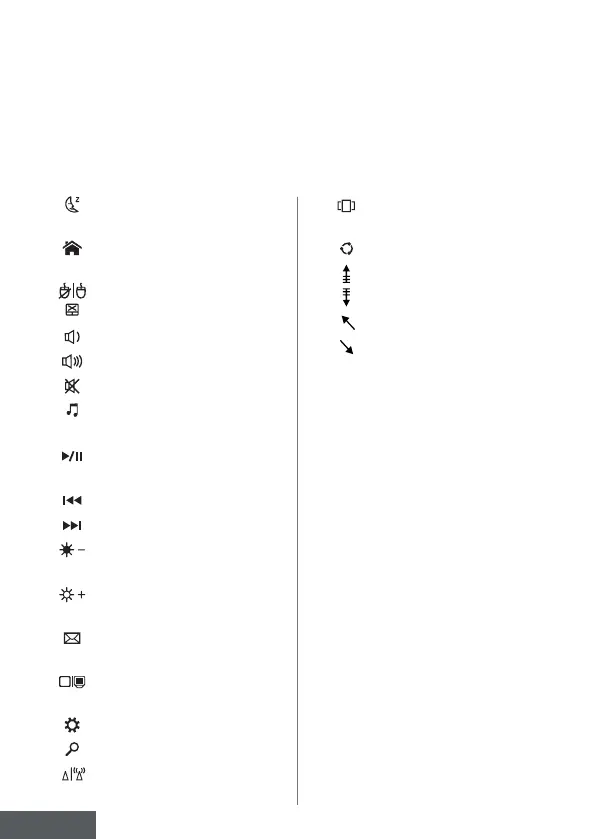
Function keys
The keypad on your device is equipped with function keys for performing
actions or settings.
Note
: The key icons displayed and the functions offered may vary depending on the
model.
Put the computer into standby
mode
Opens the default web
browser
Enables or disables the
touchpad
Lower the volume level
Increases the volume level
Enables or disables sound
Opens the default media
player
Media player playback or
pause function
Previous music or video
Next music or video
Decreases the brightness of
the screen
Increases the brightness of the
screen
Opens the default email
software
Enables the use of an external
display
Opens the settings menu
Opens the search pane
Enables / Disables the wireless
network
fn +
fn +
fn +
fn +
fn +
fn +
fn +
fn +
fn +
fn +
fn +
fn +
fn +
fn +
fn +
fn +
fn +
Displays applications running
at runtime
Opens the sharing pane
Vertical scrolling upwards
Vertical scrolling down
Start function
Fine function
Cancels the current program
(example: a game)
Saves a screenshot of your
screen
Enables/disables the numeric
keypad
Enables/disables scrolling
Enables/disables the Refresh
mode
fn +
fn +
fn +
fn +
fn +
fn +
Pause
PrtScr/
Impécr
Numlck/
VerrNum
ScrLk
Ins



 To Next Page