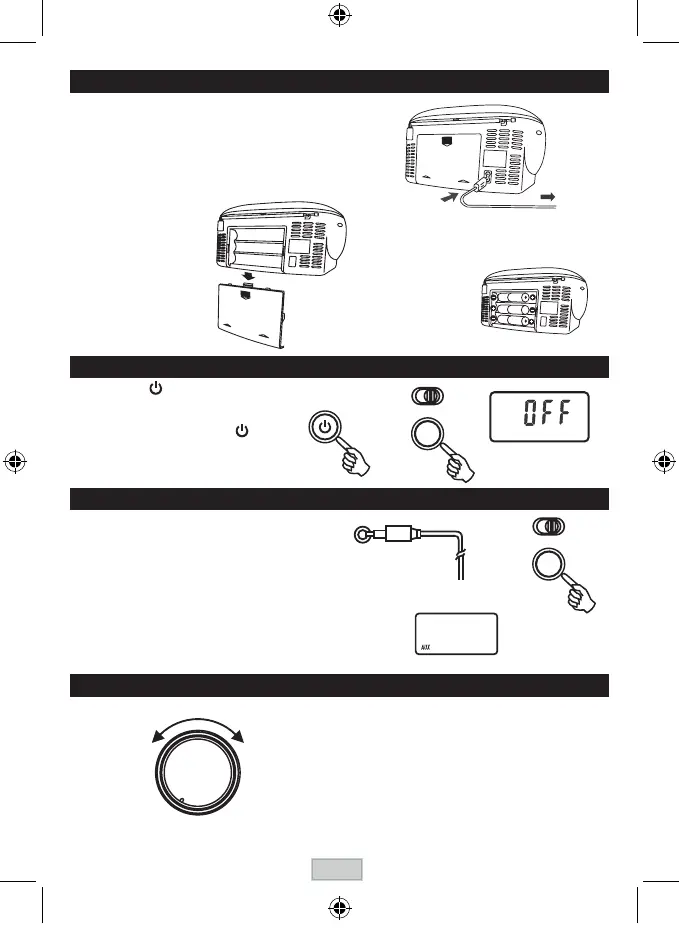
Press the POWER button to turn the audio on.
TochangetheaudiomodebetweenRADIO,AUX,TAPEandCD,
press the FUNCTION button while the power is on.
The audio mode is displayed.
TurnofftheunitbypressingthePOWERbutton.
" OFF " word will be shown on the display
and then resume the current time.
TURN ON / OFF THE SYSTEM
POWER SUPPLY
USING HOUSE CURRENT
Beforeuse,checkthattheratedvoltageofyourunit
matchesyourlocalvoltage.
Note:Plugisusedasthedisconnectdevice.
The disconnect device shall remain readily
operable.
USING BATTERIES
Disconnect the AC power cord
from the AC inlet of the unit.
Battery power is cut
automatically by the cord
while it is connected.
Insert six UM-2
(sizeC)batteries.
battery door
When the volume decrease, or the sound distorts,
replace all of the batteries with new ones.
To AC socket
To
AC outlet
AUX. IN
AUX. IN
Anexternal(auxiliary)audiosource(i.e.,personalCDplayer
orMP3player)canbeconnectedtothisunitandheardthrough
the speakers.
1)
Plug
oneendofcableintotheAUXINsocketontheunit.
2)
Plug
theotherendofthecableintotheHeadphoneor
Line Out socket of the external source.
3)
Press
theFUNCTIONbuttontoselectAUX.
Continue to operate CD or MP3 player as usual.
Selectionswillbeheardthroughtheunit'sspeakers.
(Plugotherendintoexternal
sourcesuchasanMP3player.)
Unit will be automatically off after 4.5 hours without further operation.
ADJUSTING THE SOUND
T
O ADJUST THE VOLUME
LCD display
LCD display
POWER
FUNCTION
FUNCTION
VOLUME
MAX.MIN.
GB-4



 To Next Page